Block 1 - AI Agent
- Type / Role
- @n8n/n8n-nodes-langchain.agent - agent
- Config choices
- Version 1.9
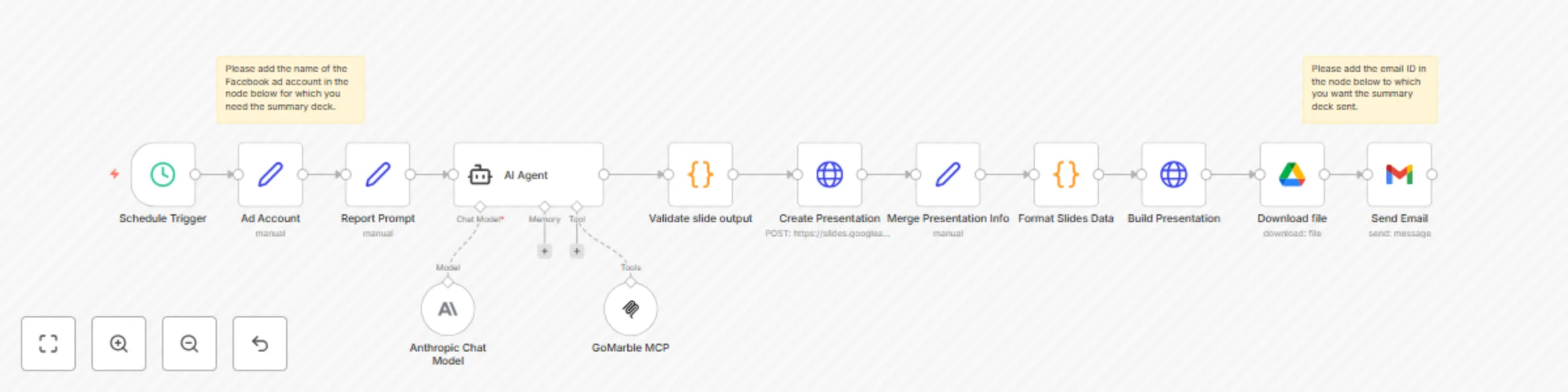


 Early Deal
This workflow is provided as-is. Please review and test before using in production.
This automation workflow transforms Meta advertising data into executive ready presentation decks, eliminating manual report creation while ensuring stakeholders receive consistent performance insi...
@n8n/n8n-nodes-langchain.agent, n8n-nodes-base.scheduletrigger, @n8n/n8n-nodes-langchain.mcpclienttool, n8n-nodes-base.googledrive, @n8n/n8n-nodes-langchain.lmchatanthropic, n8n-nodes-base.gmail, n8n-nodes-base.set, n8n-nodes-base.httprequest
This workflow is cataloged by N8N Workflows and links back to its original n8n.io source page by Sankalp Dev.
Original n8n.io sourceThis automation workflow transforms Meta advertising data into executive ready presentation decks, eliminating manual report creation while ensuring stakeholders receive consistent performance insights. It generates professional Google Slides presentations from your ad campaigns and delivers them automatically via email to designated recipients. By combining scheduled data extraction with AI-powered analysis and automated presentation building, you'll receive polished, actionable reports that facilitate strategic advertising decisions and client communication
Key Features: Scheduled automated summary deck generation (daily, weekly, or monthly) AI powered data analysis using advanced language models Intelligent presentation generation with actionable recommendations Direct email delivery of formatted summary decks
Prerequisites: GoMarble MCP account and API access Anthropic account Google Slides, Google Drive & Gmail accounts n8n instance (cloud or self-hosted)
Configuration Time: ~15-20 minutes
Step By Step Setup:
1. Connect GoMarble MCP to n8n
Follow the integration guide: GoMarble MCP Setup
Configure your Meta Ads account credentials in GoMarble platform
2. Configure the Schedule Trigger
3.Customize the Ad Account Settings. Update the account name to match your ad account name.
4. Customise the Report Prompt (Although the workflow includes a pre configured template report prompt)
Define specific metrics and KPIs to track Set analysis parameters and report format preferences
5. Set up AI Agent Configuration Configure Anthropic Claude model with your API credentials Connect the GoMarble MCP tools for Meta advertising data
6. Configure Google Services Integration Set up Google Slides OAuth2 API for presentation creation Configure Google Drive OAuth2 API for file management Link Gmail OAuth2 for automated email delivery
7. Customize Email Delivery Set recipient email addresses for stakeholders Customize email subject line and message content Advanced Configuration Modify report prompt to include specific metrics and KPIs Adjust slide content structure (5-slide format: Executive Snapshot, Channel KPIs, Top Campaigns, Under-performers, Action Recommendations)
What You'll Get
Automated Presentation Creation: Weekly Google Slides decks generated without manual intervention Professional Ads Analysis: Executive-ready performance summaries with key metrics and insights Structured Intelligence: Consistent 5-slide format covering spend, ROAS, campaign performance, and strategic recommendations Direct Stakeholder Delivery: Presentations automatically emailed as attachments to specified recipients Data-Driven Insights: AI-powered analysis of campaign performance with actionable next steps Scalable Reporting: Easy to modify timing, recipients, or content structure as business needs evolve Perfect for marketing teams, agencies, and business owners who need regular Meta advertising performance updates delivered professionally without manual report creation.
This catalog entry is organized from the workflow JSON. The node-level section below shows the executable blocks available for review before importing the template.
| Workflow | Automate weekly Meta Ad reports with Claude AI, GoMarble MCP & Google Slides |
|---|---|
| Complexity | advanced |
| Nodes | 15 |
| Categories | Document Extraction, Multimodal AI |
| Author | Sankalp Dev |
| Published | 21 Aug 2025 |
Use the JSON export at /data/workflows/7695/7695.json as the source template for this automation.
Open n8n, import the downloaded JSON, and review each node before activating the workflow.
Replace placeholder credentials, API keys, webhook URLs, account IDs, and environment-specific values with your own settings.
Run the workflow manually or in a staging workspace, inspect node output, and confirm downstream systems receive the expected data.
Enable the workflow only after testing, then monitor executions, errors, and rate limits during the first production runs.
Review imported nodes carefully before activation. This catalog entry is intended to help you inspect the workflow structure, understand required services, and find related templates faster.
Node names, credentials, schedules, webhook paths, and external service limits may need adjustment for your workspace.
This automation workflow transforms Meta advertising data into executive ready presentation decks, eliminating manual report creation while ensuring stakeholders receive consistent performance insi...
Review the workflow JSON, configure any required credentials in n8n, and test the automation in a safe workspace before using it in production.
Yes. Use the block-by-block analysis and the downloadable JSON to inspect each node, then adjust credentials, prompts, schedules, filters, or destinations for your Document Extraction, Multimodal AI use case.