Sankalp Dev
Workflows by Sankalp Dev
Automate weekly Meta Ad reports with Claude AI, GoMarble MCP & Google Slides
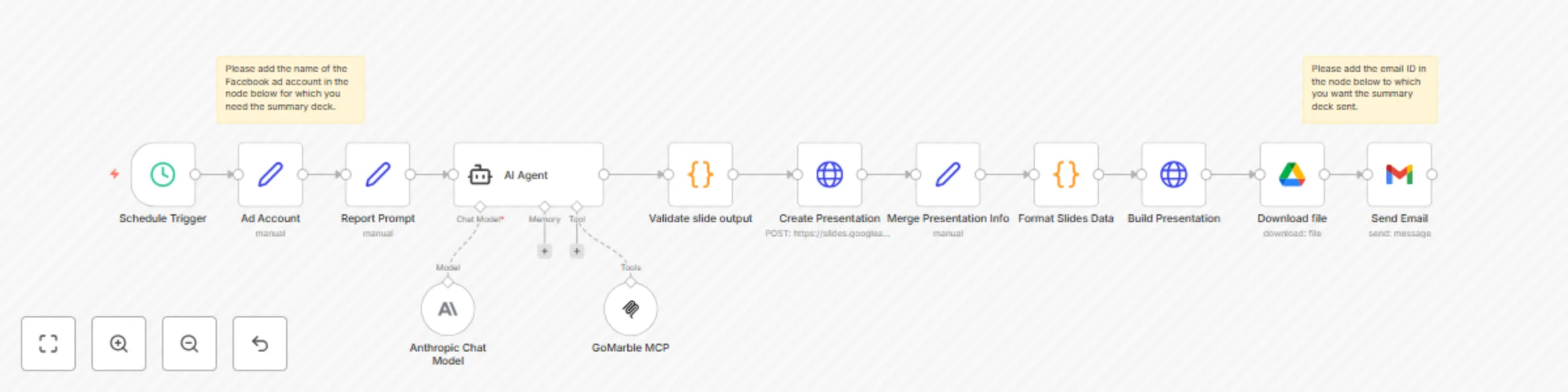
This automation workflow transforms Meta advertising data into executive ready presentation decks, eliminating manual report creation while ensuring stakeholders receive consistent performance insights. It generates professional Google Slides presentations from your ad campaigns and delivers them automatically via email to designated recipients. By combining scheduled data extraction with AI-powered analysis and automated presentation building, you'll receive polished, actionable reports that facilitate strategic advertising decisions and client communication **Key Features:** Scheduled automated summary deck generation (daily, weekly, or monthly) AI powered data analysis using advanced language models Intelligent presentation generation with actionable recommendations Direct email delivery of formatted summary decks **Prerequisites:** GoMarble MCP account and API access Anthropic account Google Slides, Google Drive & Gmail accounts n8n instance (cloud or self-hosted) **Configuration Time:** ~15-20 minutes **Step By Step Setup:** **1. Connect GoMarble MCP to n8n** Follow the integration guide: [GoMarble MCP Setup](https://docs.google.com/presentation/d/1uBu4Bky-8WiPxLCcoQHzLU6itk5UE752HPbCUhPDmVA/edit?slide=id.g37064fd59c7_0_31#slide=id.g37064fd59c7_0_31) Configure your Meta Ads account credentials in GoMarble platform **2. Configure the Schedule Trigger** **3.Customize the Ad Account Settings.** Update the account name to match your ad account name. **4. Customise the Report Prompt** (Although the workflow includes a pre configured template report prompt) Define specific metrics and KPIs to track Set analysis parameters and report format preferences **5. Set up AI Agent Configuration** Configure Anthropic Claude model with your API credentials Connect the GoMarble MCP tools for Meta advertising data **6. Configure Google Services Integration** Set up Google Slides OAuth2 API for presentation creation Configure Google Drive OAuth2 API for file management Link Gmail OAuth2 for automated email delivery **7. Customize Email Delivery** Set recipient email addresses for stakeholders Customize email subject line and message content Advanced Configuration Modify report prompt to include specific metrics and KPIs Adjust slide content structure (5-slide format: Executive Snapshot, Channel KPIs, Top Campaigns, Under-performers, Action Recommendations) **What You'll Get** Automated Presentation Creation: Weekly Google Slides decks generated without manual intervention Professional Ads Analysis: Executive-ready performance summaries with key metrics and insights Structured Intelligence: Consistent 5-slide format covering spend, ROAS, campaign performance, and strategic recommendations Direct Stakeholder Delivery: Presentations automatically emailed as attachments to specified recipients Data-Driven Insights: AI-powered analysis of campaign performance with actionable next steps Scalable Reporting: Easy to modify timing, recipients, or content structure as business needs evolve Perfect for marketing teams, agencies, and business owners who need regular Meta advertising performance updates delivered professionally without manual report creation.
Automate weekly marketing reports with GoMarble MCP, Claude AI & Gmail
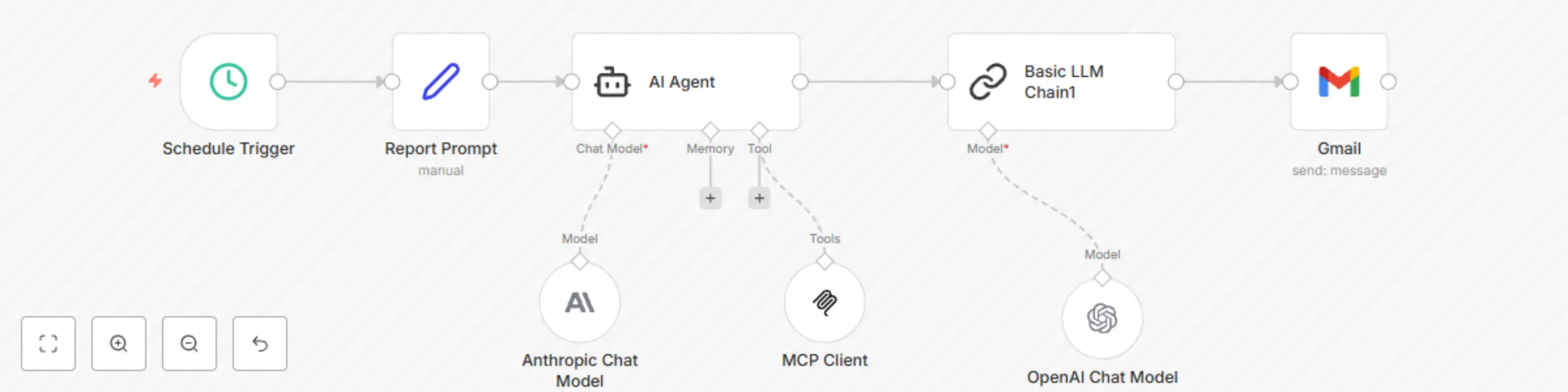
# Automated Marketing Analytics Report with AI Agent ## How it works Transform your marketing data into actionable insights with this intelligent automation workflow. The system combines scheduled triggers with AI-powered analysis to deliver comprehensive marketing reports directly to your inbox. **Key Features:** - Scheduled automated reporting (daily, weekly, or monthly) - AI-powered data analysis using advanced language models - Multi-platform marketing data integration via GoMarble MCP - Intelligent report generation with actionable recommendations - Direct email delivery of formatted reports ## Set up steps **Prerequisites:** - GoMarble MCP account and API access - Gmail account for report delivery - n8n instance (cloud or self-hosted) **Configuration Time:** ~15-20 minutes **Step-by-step setup:** 1. **Connect GoMarble MCP to n8n** - Follow the integration guide: [GoMarble n8n Setup](https://www.gomarble.ai/docs/connect-to-n8n) - Configure your marketing platform credentials (Google Ads, Facebook Ads, Analytics) 2. **Configure the Schedule Trigger** - Set your preferred reporting frequency - Choose optimal timing for data availability 3. **Customize the Report Prompt** - Define specific metrics and KPIs to track - Set analysis parameters and report format preferences 4. **Set up AI Agent Configuration** - Choose between Anthropic Claude or OpenAI models - Configure the GoMarble MCP tools for your marketing platforms 5. **Configure Gmail Integration** - Set recipient email addresses - Customize email template and subject line **Advanced Configuration:** - Add conditional logic for performance thresholds - Include custom data visualization requests - Set up alert triggers for significant metric changes ## What you'll get - **Automated Intelligence:** Regular marketing performance analysis without manual effort - **Cross-Platform Insights:** Unified view of Google Ads, Facebook Ads, and Analytics data - **AI-Powered Recommendations:** Strategic insights and optimization suggestions - **Professional Reports:** Well-formatted, executive-ready marketing summaries - **Scalable Solution:** Easy to extend with additional marketing platforms or custom metrics Perfect for marketing teams, agencies, and business owners who want to stay on top of their marketing performance with minimal manual work.