Block 1 - RAG Web Browser
- Type / Role
- n8n-nodes-base.httpRequest - httpRequest
- Config choices
- Version 4.2


 Early Deal
This workflow is provided as-is. Please review and test before using in production.
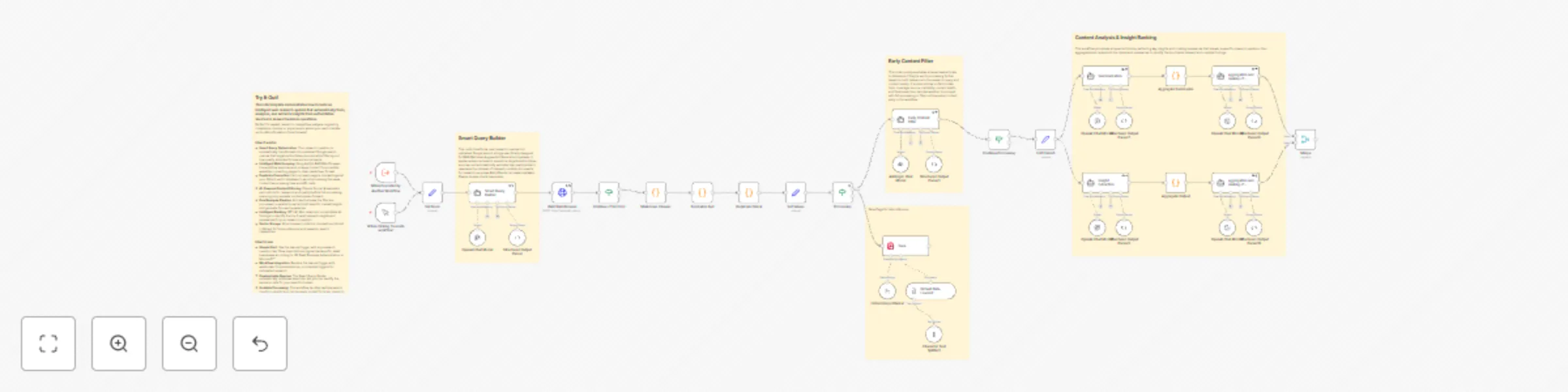
This n8n template demonstrates how to automate comprehensive web research using multiple AI models to find, analyze, and extract insights from authoritative sources. Use cases are many: Try automat...
n8n-nodes-base.httprequest, n8n-nodes-base.manualtrigger, n8n-nodes-base.executeworkflowtrigger, n8n-nodes-base.set, @n8n/n8n-nodes-langchain.outputparserstructured, @n8n/n8n-nodes-langchain.agent, n8n-nodes-base.code, @n8n/n8n-nodes-langchain.vectorstoreqdrant
This workflow is cataloged by N8N Workflows and links back to its original n8n.io source page by Peter Zendzian.
Original n8n.io sourceThis n8n template demonstrates how to automate comprehensive web research using multiple AI models to find, analyze, and extract insights from authoritative sources.
Use cases are many: Try automating competitive analysis research, finding latest regulatory guidance from official sources, gathering authoritative content for reports, or conducting market research on industry developments!
Each research query typically costs $0.08-$0.34 depending on the number of sources found and processed. The workflow includes smart filtering to minimize unnecessary API calls.
The workflow requires multiple AI services and may need additional setup time compared to simpler templates.
Qdrant storage is optional and can be removed without affecting performance.
Your research question gets transformed into optimized Google search queries that target authoritative sources while filtering out low-quality sites.
Apify's RAG Web Browser scrapes the content and converts pages to clean markdown format.
Claude Sonnet 4 evaluates each article for relevance and quality before full processing.
Articles that pass the filter get analyzed in parallel - one pipeline creates focused summaries while another extracts specific claims and evidence.
GPT-4.1 Mini ranks all findings and presents the top 3 most valuable insights and summaries.
All processed content gets stored in your Qdrant vector database to prevent duplicate processing and enable future reference.
The manual trigger node is used as an example but feel free to replace this with other triggers such as webhook, form submissions, or scheduled research.
You can modify the configuration variables in the Set Node to customize Qdrant URLs, collection names, and quality thresholds for your specific needs.
OpenAI API account for GPT-4.1 Mini (query optimization, summarization, ranking) Anthropic API account for Claude Sonnet 4 (content filtering) Apify account for web scraping capabilities Qdrant vector database instance (local or cloud) Ollama with nomic-embed-text model for embeddings
Web research automation can be adapted for many specialized use cases. Try focusing on specific domains like legal research (targeting .gov and .edu sites), medical research (PubMed and health authorities), or financial analysis (SEC filings and analyst reports).
This catalog entry is organized from the workflow JSON. The node-level section below shows the executable blocks available for review before importing the template.
Showing the first 24 of 42 workflow blocks. Download the JSON for the full node graph.
| Workflow | Automate web research with GPT-4, Claude & Apify for content analysis and insights |
|---|---|
| Complexity | advanced |
| Nodes | 42 |
| Categories | Market Research, AI RAG |
| Author | Peter Zendzian |
| Published | 01 Aug 2025 |
Use the JSON export at /data/workflows/6822/6822.json as the source template for this automation.
Open n8n, import the downloaded JSON, and review each node before activating the workflow.
Replace placeholder credentials, API keys, webhook URLs, account IDs, and environment-specific values with your own settings.
Run the workflow manually or in a staging workspace, inspect node output, and confirm downstream systems receive the expected data.
Enable the workflow only after testing, then monitor executions, errors, and rate limits during the first production runs.
Review imported nodes carefully before activation. This catalog entry is intended to help you inspect the workflow structure, understand required services, and find related templates faster.
Node names, credentials, schedules, webhook paths, and external service limits may need adjustment for your workspace.
This n8n template demonstrates how to automate comprehensive web research using multiple AI models to find, analyze, and extract insights from authoritative sources. Use cases are many: Try automat...
Review the workflow JSON, configure any required credentials in n8n, and test the automation in a safe workspace before using it in production.
Yes. Use the block-by-block analysis and the downloadable JSON to inspect each node, then adjust credentials, prompts, schedules, filters, or destinations for your Market Research, AI RAG use case.