Block 1 - If
- Type / Role
- n8n-nodes-base.if - if
- Config choices
- Version 2.2


 Early Deal
This workflow is provided as-is. Please review and test before using in production.
Are alert storms overwhelming your Security Operations workflows? This n8n workflow supercharges your SOC by fully automating triage, analysis, and notification for Wazuh alerts—blending event dr...
n8n-nodes-base.if, n8n-nodes-base.webhook, n8n-nodes-base.noop, @n8n/n8n-nodes-langchain.chainsummarization, n8n-nodes-base.telegram, @n8n/n8n-nodes-langchain.lmchatopenai
This workflow is cataloged by N8N Workflows and links back to its original n8n.io source page by mariskarthick.
Original n8n.io sourceThis n8n workflow supercharges your SOC by fully automating triage, analysis, and notification for Wazuh alerts—blending event-driven automation, OpenAI-powered contextual analysis, and real-time collaboration for incident response.
Instantly filters Wazuh alerts by severity to focus analyst effort on the signals that matter.
Uses OpenAI's GPT-4o-mini to auto-generate context-rich incident reports, including:
Delivers clean, actionable reports directly to your SOC team via Telegram. Easily extendable to Slack, Outlook, Gmail, Discord, or any other preferred channel.
Eliminates alert fatigue using smart filters and custom AI prompts that suppress false positives and highlight real threats.
Tweak severity thresholds, update prompt logic, or integrate additional data sources and channels — all with minimal effort
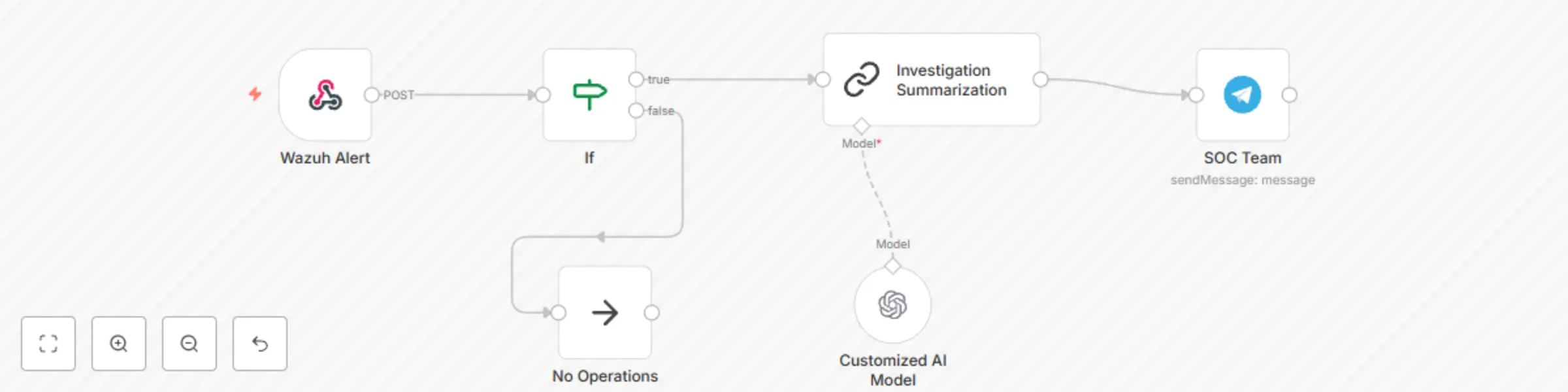
Webhook
Listens for incoming Wazuh alerts in real time.
If Condition
Filters based on severity (1 low, 2 medium, etc.) or other logic you define.
AI Investigation (LangChain + OpenAI)
Summarizes full alert logs and context using custom prompts to generate:
Notification Delivery
The report is parsed, cleaned, and sent to your SOC team in real-time, enabling rapid response — even during high-alert volumes.
No-Op Path
Efficiently discards irrelevant alerts without breaking the flow.
Traditional alert triage is manual, slow, and error-prone — leading to analyst burnout and missed critical threats.
This workflow shows how combining workflow automation with a tailored AI model enables your SOC to shift from reactive to proactive. Analysts can now:
> ⚠️ Note: We learned that generic AI isn’t enough. Context-rich prompts and alignment with your actual SOC processes are key to meaningful, scalable automation.
Clone this workflow, adapt it to your processes, and never miss a critical alert again.
📬 Contributions welcome!
Feel free to raise PRs, suggest new enhancements, or fork for your own use cases.
Created by Mariskarthick M
Senior Security Analyst | Detection Engineer | Threat Hunter | Open-Source Enthusiast
This catalog entry is organized from the workflow JSON. The node-level section below shows the executable blocks available for review before importing the template.
| Workflow | Automate Wazuh alert triage and reporting with GPT-4o-mini and Telegram |
|---|---|
| Complexity | intermediate |
| Nodes | 6 |
| Categories | SecOps, AI Summarization |
| Author | mariskarthick |
| Published | 04 Aug 2025 |
Use the JSON export at /data/workflows/6978/6978.json as the source template for this automation.
Open n8n, import the downloaded JSON, and review each node before activating the workflow.
Replace placeholder credentials, API keys, webhook URLs, account IDs, and environment-specific values with your own settings.
Run the workflow manually or in a staging workspace, inspect node output, and confirm downstream systems receive the expected data.
Enable the workflow only after testing, then monitor executions, errors, and rate limits during the first production runs.
Review imported nodes carefully before activation. This catalog entry is intended to help you inspect the workflow structure, understand required services, and find related templates faster.
Node names, credentials, schedules, webhook paths, and external service limits may need adjustment for your workspace.
Are alert storms overwhelming your Security Operations workflows? This n8n workflow supercharges your SOC by fully automating triage, analysis, and notification for Wazuh alerts—blending event dr...
Review the workflow JSON, configure any required credentials in n8n, and test the automation in a safe workspace before using it in production.
Yes. Use the block-by-block analysis and the downloadable JSON to inspect each node, then adjust credentials, prompts, schedules, filters, or destinations for your SecOps, AI Summarization use case.