Block 1 - When clicking ‘Execute workflow’
- Type / Role
- n8n-nodes-base.manualTrigger - manualTrigger
- Config choices
- Version 1


 Early Deal
This workflow is provided as-is. Please review and test before using in production.
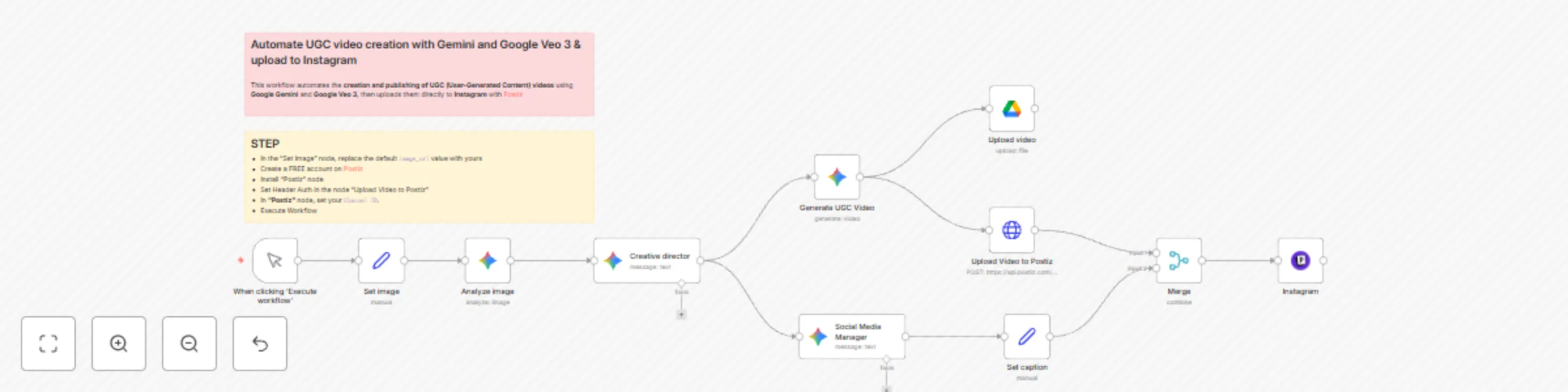
This workflow automates the creation and publishing of UGC (User Generated Content) videos using Google Gemini and Google Veo 3 , then uploads them directly to Instagram with [Postiz](https://...
n8n-nodes-base.manualtrigger, @n8n/n8n-nodes-langchain.googlegemini, n8n-nodes-base.merge, n8n-nodes-base.httprequest, n8n-nodes-postiz.postiz, n8n-nodes-base.set, n8n-nodes-base.googledrive, n8n-nodes-base.stickynote
This workflow is cataloged by N8N Workflows and links back to its original n8n.io source page by Davide.
Original n8n.io source🎥🤖 This workflow automates the creation and publishing of UGC (User-Generated Content) videos using Google Gemini and Google Veo 3, then uploads them directly to Instagram with Postiz.
Image Analysis & Creative Briefing: The workflow starts with a predefined product image. This image is analyzed by Google Gemini, which acts as a "Creative Director" to generate a detailed, cinematic prompt describing an 8-second commercial scene based on the image's content.
Parallel AI Task Execution: The creative director's prompt is then sent to two different AI agents simultaneously:
Asset Distribution & Publishing: The generated video is uploaded to two destinations: Google Drive for storage and the Postiz API for social media management. The AI-generated caption is prepared. Finally, all data (video information from Postiz and the caption) is merged and sent to the Postiz node, which schedules and publishes the video as a post to the connected Instagram account.
To use this workflow, you need to configure the following credentials and node settings in n8n:
Image Source: In the "Set image" node, replace the default image_url value with the URL of your own product image.
Google Gemini Credentials: The workflow uses three Gemini nodes. Ensure your Google Gemini API credentials (named "Google Gemini(PaLM) (Eure)" in this example) are correctly set up and have access to the specified models (gemini-2.5-pro and veo-3.0-generate-preview).
Google Drive Credentials: Configure the "Upload video" node with valid Google Drive OAuth credentials. Update the folderId parameter if you wish to save the generated videos to a different folder in your Drive.
Postiz Credentials: The "Upload Video to Postiz" and "Instagram" nodes require valid credentials for the Postiz API. You must have an active Postiz account and have connected your Instagram business account to it within the Postiz platform.
Postiz Integration ID: In the "Instagram" node, the integrationId field is specific to a connected social account within a Postiz account. You must replace this value with your own Instagram integration ID from Postiz.
(Optional) Video Parameters: You can adjust the video generation aspect ratio (e.g., 9:16 for Stories/Reels) in the options of the "Generate UGC Video" node.
Contact me for consulting and support or add me on Linkedin.
This catalog entry is organized from the workflow JSON. The node-level section below shows the executable blocks available for review before importing the template.
| Workflow | Automate UGC video creation with Gemini and Google Veo 3 & upload to Instagram via Postiz |
|---|---|
| Complexity | intermediate |
| Nodes | 13 |
| Categories | Content Creation, Multimodal AI |
| Author | Davide |
| Published | 01 Sept 2025 |
Use the JSON export at /data/workflows/8115/8115.json as the source template for this automation.
Open n8n, import the downloaded JSON, and review each node before activating the workflow.
Replace placeholder credentials, API keys, webhook URLs, account IDs, and environment-specific values with your own settings.
Run the workflow manually or in a staging workspace, inspect node output, and confirm downstream systems receive the expected data.
Enable the workflow only after testing, then monitor executions, errors, and rate limits during the first production runs.
Review imported nodes carefully before activation. This catalog entry is intended to help you inspect the workflow structure, understand required services, and find related templates faster.
Node names, credentials, schedules, webhook paths, and external service limits may need adjustment for your workspace.
This workflow automates the creation and publishing of UGC (User Generated Content) videos using Google Gemini and Google Veo 3 , then uploads them directly to Instagram with [Postiz](https://...
Review the workflow JSON, configure any required credentials in n8n, and test the automation in a safe workspace before using it in production.
Yes. Use the block-by-block analysis and the downloadable JSON to inspect each node, then adjust credentials, prompts, schedules, filters, or destinations for your Content Creation, Multimodal AI use case.