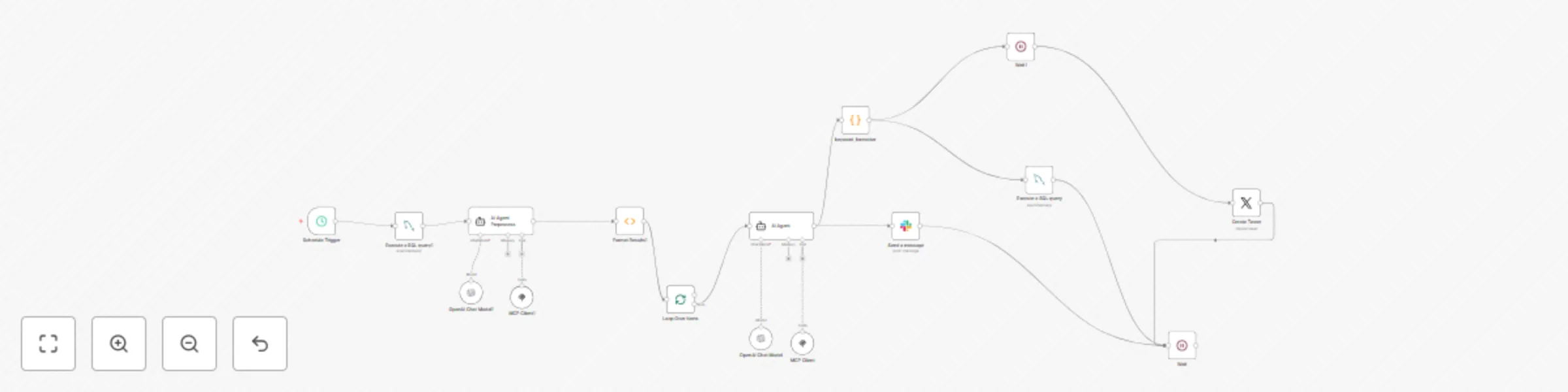
Automate Twitter content with trend analysis using OpenAI GPT & MCP

Workflow preview

Workflow preview
100%
Automate Twitter content with trend analysis using OpenAI GPT & MCP preview
Open on n8n.io

Important notice

This workflow is provided as-is. Please review and test before using in production.

1. Workflow Overview

How it works This template creates a fully automated Twitter content system that discovers trending topics, analyzes why they're trending using AI, and posts intelligent commentary about them. The ...

Best for

  • Social Media automation workflows
  • AI RAG automation workflows
  • advanced n8n builders looking for reusable templates

Tools used

n8n-nodes-base.function, n8n-nodes-base.splitinbatches, @n8n/n8n-nodes-langchain.agent, @n8n/n8n-nodes-langchain.mcpclienttool, n8n-nodes-base.slack, n8n-nodes-base.wait, @n8n/n8n-nodes-langchain.lmchatopenai, n8n-nodes-base.mysql

Source and attribution

This workflow is cataloged by N8N Workflows and links back to its original n8n.io source page by Dayong Huang.

Original n8n.io source

1.1 Workflow description

Title
Automate Twitter content with trend analysis using OpenAI GPT & MCP
Workflow name
Automate Twitter content with trend analysis using OpenAI GPT & MCP

How it works

This template creates a fully automated Twitter content system that discovers trending topics, analyzes why they're trending using AI, and posts intelligent commentary about them.

The workflow uses MCP (Model Context Protocol) with the twitter154 MCP server from MCPHub to connect with Twitter APIs and leverages OpenAI GPT models to generate brand-safe, engaging content about current trends.

Key Features:

  • 🔍 Smart Trend Discovery: Automatically finds US trending topics with engagement scoring
  • 🤖 AI-Powered Analysis: Uses GPT to explain "why it's trending" in 30-60 words
  • 📊 Duplicate Prevention: MySQL database tracks posted trends with 3-day cooldowns
  • 🛡️ Brand Safety: Filters out NSFW content and low-quality hashtags
  • Rate Limiting: Built-in delays to respect API limits
  • 🐦 Powered by twitter154: Uses the robust "Old Bird" MCP server for comprehensive Twitter data access

Set up steps

Setup time: ~10 minutes

Prerequisites:

  • OpenAI API key for GPT models
  • Twitter API access for posting
  • MySQL database for trend tracking
  • MCP server access: twitter154 from aigeon-ai via MCPHub

Configuration:

  1. Set up MCP integration with twitter154 server endpoint: https://api.mcphub.com/mcp/aigeon-ai-twitter154
  2. Configure credentials for OpenAI, Twitter, and MySQL connections
  3. Set up authentication for the twitter154 MCP server (Header Auth required)
  4. Create MySQL table for keyword registry (schema provided in workflow)
  5. Test the workflow with manual execution before enabling automation
  6. Set schedule for automatic trend discovery (recommended: every 2-4 hours)

MCP Server Features Used:

  • Search Tweets: Core functionality for trend analysis
  • Get Trends Near Location: Discovers trending topics by geographic region
  • AI Tools: Leverages sentiment analysis and topic classification capabilities

Customization Options:

  • Modify trend scoring criteria in the AI agent prompts
  • Adjust cooldown periods in database queries
  • Change target locale from US to other regions (WOEID configuration)
  • Customize tweet formatting and content style
  • Configure different MCP server endpoints if needed

Perfect for: Social media managers, content creators, and businesses wanting to stay current with trending topics while maintaining consistent, intelligent posting schedules.

Powered by: The twitter154 MCP server ("The Old Bird") provides robust access to Twitter data including tweets, user information, trends, and AI-powered text analysis tools.

1.2 Logical Blocks

This catalog entry is organized from the workflow JSON. The node-level section below shows the executable blocks available for review before importing the template.

2. Block-by-Block Analysis

Block 1 - Format Results1

Type / Role
n8n-nodes-base.function - function
Config choices
Version 1

Block 2 - Loop Over Items

Type / Role
n8n-nodes-base.splitInBatches - splitInBatches
Config choices
Version 3

Block 3 - AI Agent

Type / Role
@n8n/n8n-nodes-langchain.agent - agent
Config choices
Version 2.2

Block 4 - MCP Client

Type / Role
@n8n/n8n-nodes-langchain.mcpClientTool - mcpClientTool
Config choices
Version 1.1

Block 5 - Send a message

Type / Role
n8n-nodes-base.slack - slack
Config choices
Version 2.3

Block 6 - Wait

Type / Role
n8n-nodes-base.wait - wait
Config choices
Version 1.1

Block 7 - OpenAI Chat Model

Type / Role
@n8n/n8n-nodes-langchain.lmChatOpenAi - lmChatOpenAi
Config choices
Version 1.2

Block 8 - AI Agent Preprocess

Type / Role
@n8n/n8n-nodes-langchain.agent - agent
Config choices
Version 2.2

Block 9 - OpenAI Chat Model1

Type / Role
@n8n/n8n-nodes-langchain.lmChatOpenAi - lmChatOpenAi
Config choices
Version 1.2

Block 10 - MCP Client1

Type / Role
@n8n/n8n-nodes-langchain.mcpClientTool - mcpClientTool
Config choices
Version 1.1

Block 11 - Execute a SQL query

Type / Role
n8n-nodes-base.mySql - mySql
Config choices
Version 2.5

Block 12 - Execute a SQL query1

Type / Role
n8n-nodes-base.mySql - mySql
Config choices
Version 2.5

Block 13 - Schedule Trigger

Type / Role
n8n-nodes-base.scheduleTrigger - scheduleTrigger
Config choices
Version 1.2

Block 14 - Wait1

Type / Role
n8n-nodes-base.wait - wait
Config choices
Version 1.1

Block 15 - Create Tweet

Type / Role
n8n-nodes-base.twitter - twitter
Config choices
Version 2

Block 16 - keyword_formatter

Type / Role
n8n-nodes-base.code - code
Config choices
Version 2

3. Summary Table

Workflow Automate Twitter content with trend analysis using OpenAI GPT & MCP
Complexity advanced
Nodes 16
Categories Social Media, AI RAG
Author Dayong Huang
Published 04 Sept 2025

4. Reproducing the Workflow from Scratch

  1. 1. Download the workflow JSON

    Use the JSON export at /data/workflows/8267/8267.json as the source template for this automation.

  2. 2. Import the template into n8n

    Open n8n, import the downloaded JSON, and review each node before activating the workflow.

  3. 3. Configure credentials and variables

    Replace placeholder credentials, API keys, webhook URLs, account IDs, and environment-specific values with your own settings.

  4. 4. Test with sample data

    Run the workflow manually or in a staging workspace, inspect node output, and confirm downstream systems receive the expected data.

  5. 5. Activate and monitor

    Enable the workflow only after testing, then monitor executions, errors, and rate limits during the first production runs.

5. General Notes & Resources

Review imported nodes carefully before activation. This catalog entry is intended to help you inspect the workflow structure, understand required services, and find related templates faster.

Node names, credentials, schedules, webhook paths, and external service limits may need adjustment for your workspace.

Frequently asked questions

What does Automate Twitter content with trend analysis using OpenAI GPT & MCP do?

How it works This template creates a fully automated Twitter content system that discovers trending topics, analyzes why they're trending using AI, and posts intelligent commentary about them. The ...

What do I need before importing this workflow?

Review the workflow JSON, configure any required credentials in n8n, and test the automation in a safe workspace before using it in production.

Can I customize this workflow?

Yes. Use the block-by-block analysis and the downloadable JSON to inspect each node, then adjust credentials, prompts, schedules, filters, or destinations for your Social Media, AI RAG use case.