Block 1 - Weekly Monday 9AM Trigger
- Type / Role
- n8n-nodes-base.scheduleTrigger - scheduleTrigger
- Config choices
- Version 1.2


 Early Deal
This workflow is provided as-is. Please review and test before using in production.
AI Editor in Chief: Trend Research to 3 Notion Blog Drafts This workflow acts as your personal "AI Editor in Chief," fully automating the process from trend research to content creation. It scrapes...
n8n-nodes-base.scheduletrigger, n8n-nodes-base.set, @n8n/n8n-nodes-langchain.openai, n8n-nodes-base.code, n8n-nodes-base.notion, n8n-nodes-base.aggregate, n8n-nodes-base.slack, @apify/n8n-nodes-apify.apify
This workflow is cataloged by N8N Workflows and links back to its original n8n.io source page by MAMI YAMANE.
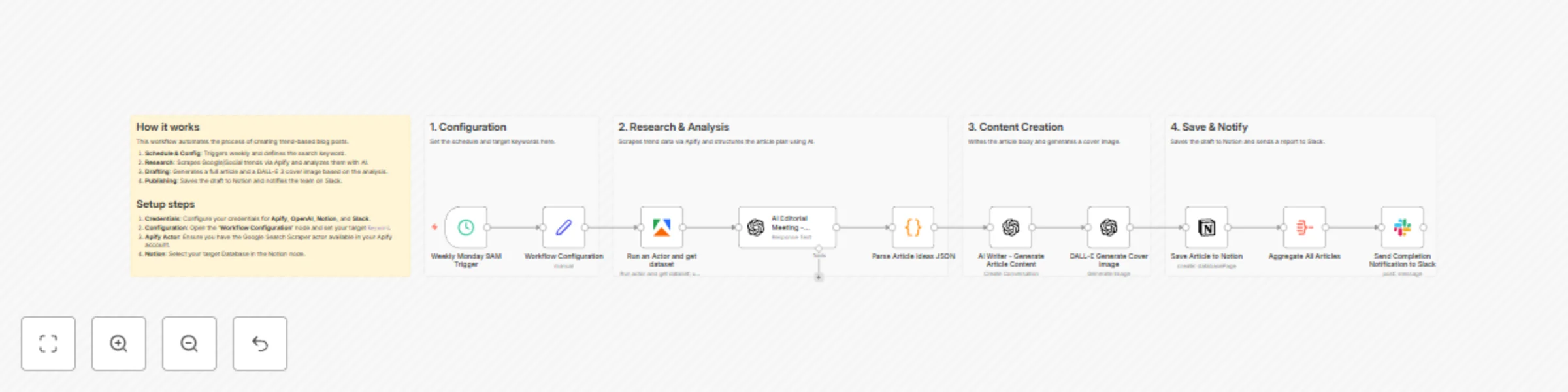
Original n8n.io sourceAI Editor-in-Chief: Trend Research to 3 Notion Blog Drafts This workflow acts as your personal "AI Editor-in-Chief," fully automating the process from trend research to content creation. It scrapes Google Search results and generates three distinct article drafts (with different angles) complete with AI-generated cover images, saving everything directly to Notion. 🎯 Target Audience Bloggers & Affiliate Marketers: Individuals who struggle with writer's block and want to maintain a consistent posting schedule. Content Marketers & Editors: Teams running owned media who need to efficiently generate high-volume article ideas and drafts based on trends. SEO Specialists: Professionals who need to quickly create content based on the latest search keywords. ⚙️ How it Works & Features This workflow automates the entire editorial process: Automated Research: Scrapes top Google Search results for a specific keyword (e.g., "2025 AI Tools") using Apify. Multi-Angle Planning: GPT-4o analyzes the research and brainstorms article concepts from 3 different perspectives (e.g., "Beginner's Guide," "Critical Review," "Business Use Case"). Writing & Visualizing: For each concept, the AI writes a full article body in Markdown and DALL-E 3 generates a matching cover image. CMS Entry: Automatically saves the Title, Body Text, and Cover Image URL into a Notion database as a draft. Notification: Sends a completion report with links to the created Notion pages via Slack. 🛠 Setup Instructions Import: Copy the workflow JSON and paste it into your n8n editor. Credentials: Set up credentials for the following nodes: Apify: Required for the Google Search Scraper actor. OpenAI: Required for GPT-4o and DALL-E 3. Notion: Connect your account to access your database. Slack: Connect your account for notifications. Configuration: Open the Workflow Configuration node and set your desired Search Keyword. Notion Setup: Create a database in Notion (with properties for Title, Content, etc.). Crucial Step: Go to the Notion database page menu ... > Connect to and select your n8n integration to grant permission. Select this database in the Save Article to Notion node. Slack Setup: In the Send Completion Notification to Slack node, specify the target channel name (e.g., general). 📦 Requirements n8n Version: v1.0 or higher (recommended). Apify Account: Access to the apify/google-search-scraper actor. OpenAI Account: API access to GPT-4o and DALL-E 3. Notion Account: A workspace with a database. Slack Account: A workspace for receiving notifications. 🔧 Customization Change Keywords: Simply update the searchKeyword value in the Workflow Configuration node to target any topic (e.g., "Keto Diet," "Tech Gadgets," "Investment Trends"). Adjust Angles: Modify the System Prompt in the AI Editorial Meeting node to change the persona or angles (e.g., "Pros & Cons," "Global Reaction," "Tutorial"). Change Destination: You can replace the Notion node with a WordPress node to draft articles directly into your CMS. Scheduling: Update the Schedule Trigger node to run daily, weekly, or on specific days as needed.
This catalog entry is organized from the workflow JSON. The node-level section below shows the executable blocks available for review before importing the template.
| Workflow | Automate trend research to blog content with GPT-4o, DALL-E & Apify to Notion |
|---|---|
| Complexity | advanced |
| Nodes | 15 |
| Categories | Content Creation, Multimodal AI |
| Author | MAMI YAMANE |
| Published | 21 Nov 2025 |
Use the JSON export at /data/workflows/11094/11094.json as the source template for this automation.
Open n8n, import the downloaded JSON, and review each node before activating the workflow.
Replace placeholder credentials, API keys, webhook URLs, account IDs, and environment-specific values with your own settings.
Run the workflow manually or in a staging workspace, inspect node output, and confirm downstream systems receive the expected data.
Enable the workflow only after testing, then monitor executions, errors, and rate limits during the first production runs.
Review imported nodes carefully before activation. This catalog entry is intended to help you inspect the workflow structure, understand required services, and find related templates faster.
Node names, credentials, schedules, webhook paths, and external service limits may need adjustment for your workspace.
AI Editor in Chief: Trend Research to 3 Notion Blog Drafts This workflow acts as your personal "AI Editor in Chief," fully automating the process from trend research to content creation. It scrapes...
Review the workflow JSON, configure any required credentials in n8n, and test the automation in a safe workspace before using it in production.
Yes. Use the block-by-block analysis and the downloadable JSON to inspect each node, then adjust credentials, prompts, schedules, filters, or destinations for your Content Creation, Multimodal AI use case.