Automate student admission process with Excel, validation & email notifications
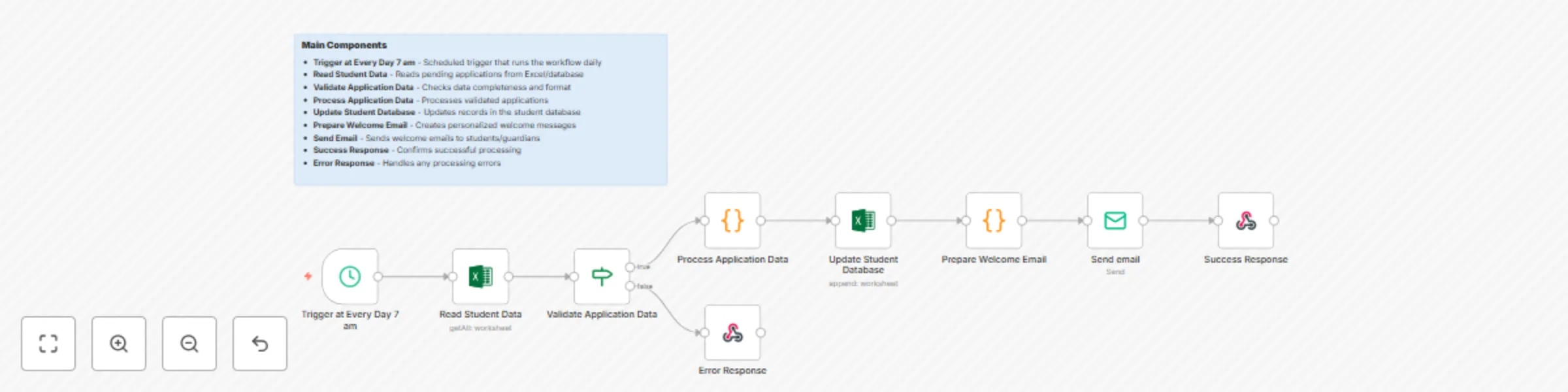
Workflow preview

$20/month : Unlimited workflows
2500 executions/month

THE #1 IN WEB SCRAPING
Scrape any website without limits
HOSTINGER  Early Deal
DISCOUNT 20% Try free
Early DealDISCOUNT 20%
Self-hosted n8n
Unlimited workflows - from $4.99/mo

#1 hub for scraping, AI & automation
6000+ actors - $5 credits/mo
Important notice
This workflow is provided as-is. Please review and test before using in production.
Overview
This automated n8n workflow processes student applications on a scheduled basis, validates data, updates databases, and sends welcome communications to students and guardians.
Main Components
- Trigger at Every Day 7 am - Scheduled trigger that runs the workflow daily
- Read Student Data - Reads pending applications from Excel/database
- Validate Application Data - Checks data completeness and format
- Process Application Data - Processes validated applications
- Update Student Database - Updates records in the student database
- Prepare Welcome Email - Creates personalized welcome messages
- Send Email - Sends welcome emails to students/guardians
- Success Response - Confirms successful processing
- Error Response - Handles any processing errors
Essential Prerequisites
- Excel file with student applications (student_applications.xlsx)
- Database access for student records
- SMTP server credentials for sending emails
- File storage access for reading application data
Required Excel File Structure (student_applications.xlsx):
- Application ID | First Name | Last Name | Email | Phone
- Program Interest | Grade Level | School | Guardian Name | Guardian Phone
- Application Date | Status | Notes
Expected Input Data Format:
{
  "firstName": "John",
  "lastName": "Doe",
  "email": "[email protected]",
  "phone": "+1234567890",
  "program": "Computer Science",
  "gradeLevel": "10th Grade",
  "school": "City High School",
  "guardianName": "Jane Doe",
  "guardianPhone": "+1234567891"
}
Key Features
- ⏰ Scheduled Processing: Runs daily at 7 AM automatically
- 📊 Data Validation: Ensures application completeness
- 💾 Database Updates: Maintains student records
- 📧 Auto Emails: Sends welcome messages
- ❌ Error Handling: Manages processing failures
Quick Setup
- Import workflow JSON into n8n
- Configure schedule trigger (default: 7 AM daily)
- Set Excel file path in "Read Student Data" node
- Configure database connection in "Update Student Database" node
- Add SMTP settings in "Send Email" node
- Test with sample data
- Activate workflow
Parameters to Configure
excel_file_path: Path to student applications filedatabase_connection: Student database credentialssmtp_host: Email server addresssmtp_user: Email usernamesmtp_password: Email passwordadmin_email: Administrator notification email