Block 1 - DeepSeek Chat Model
- Type / Role
- @n8n/n8n-nodes-langchain.lmChatDeepSeek - lmChatDeepSeek
- Config choices
- Version 1
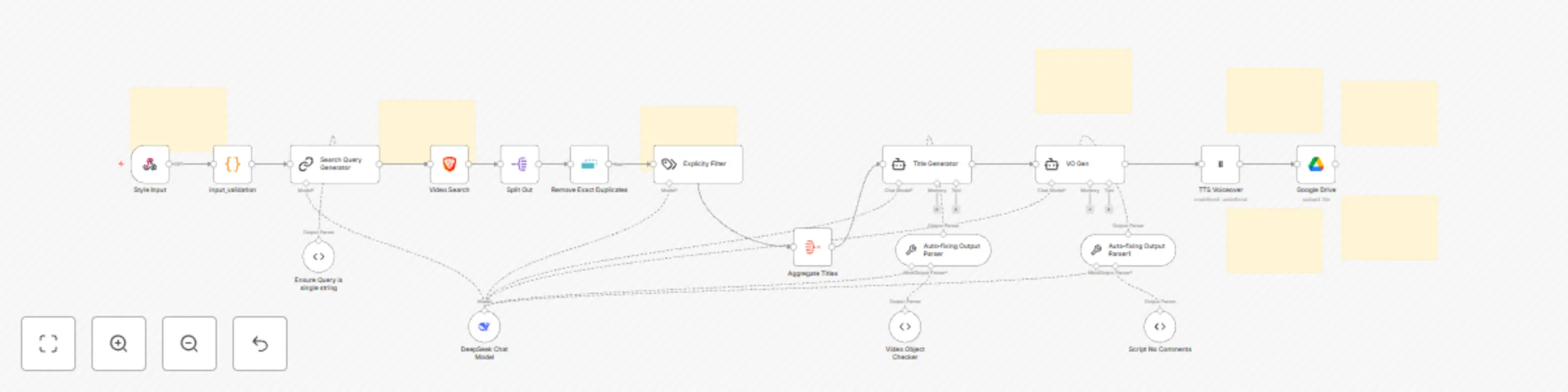


 Early Deal
This workflow is provided as-is. Please review and test before using in production.
Need help? Want access to this workflow + many more paid workflows + live Q&A sessions with a top verified n8n creator? [Join the community](https://www.skool.com/beyond nodes automation lab 2006/a...
@n8n/n8n-nodes-langchain.lmchatdeepseek, n8n-nodes-base.splitout, n8n-nodes-base.aggregate, n8n-nodes-base.removeduplicates, @n8n/n8n-nodes-langchain.outputparserautofixing, @n8n/n8n-nodes-langchain.outputparserstructured, @n8n/n8n-nodes-langchain.agent, @n8n/n8n-nodes-langchain.textclassifier
This workflow is cataloged by N8N Workflows and links back to its original n8n.io source page by David Ashby.
Original n8n.io sourceNeed help? Want access to this workflow + many more paid workflows + live Q&A sessions with a top verified n8n creator?
Automate the production of ad-friendly meditation content—from trend research to AI voiceover generation. 🌟 Key Features
Style-Specific Content Generation

    Input a meditation style (e.g., "calming," "motivational") and generate tailored scripts.

    Customize voice profiles using ElevenLabs.

Trend-Based Title Research

    Scrape YouTube/Brave Search for popular video titles in your niche.

    Remove duplicates, filter explicit content, and aggregate results.

AI-Powered Content Creation

    Generate fresh video titles using aggregated trends.

    Create 2500-character voiceover scripts with pacing cues (e.g., [sighs], ... pauses).

Structured Output Validation

    Auto-fix malformed AI outputs with recursive parsing.

    Enforce script constraints (no line breaks/comments).

Audio Production & Storage

    Convert scripts to lifelike speech via ElevenLabs.

    Auto-save audio to Google Drive with timestamps.
🛠️ Nodes Used
Data Prep: Brave Search → SplitOut → Remove Duplicates → Text Classifier (explicit filter)

AI Models: DeepSeek (title/script generation), Output Parsers (schema validation)

TTS: ElevenLabs (voice synthesis) → Google Drive (storage)

Utilities: Webhook trigger, Code node (input validation), Sticky Notes (instructions)
💡 Use Cases
Create ASMR/sleep meditation content at scale.

Repurpose trending topics into new videos.

Generate voiceovers for faceless YouTube channels.
🔗 Setup Notes
Required APIs:

    ElevenLabs (voice synthesis)

    Brave Search (video trends)

    Google Drive (storage)

Input: Send style (e.g., "sleep meditation") and voice_id to the webhook.

Output: MP3 audio + metadata saved to Google Drive.
📌 Pro Tips
Use output parsers to enforce JSON schemas and avoid malformed AI responses.

Attach royalty-free visuals using the included background video.
Extend with video composition orthumbnail generation workflows.
✅ Ad-Friendly: Filters explicit titles and enforces YouTube-safe content guidelines.
This catalog entry is organized from the workflow JSON. The node-level section below shows the executable blocks available for review before importing the template.
Showing the first 24 of 26 workflow blocks. Download the JSON for the full node graph.
| Workflow | Automate sleep meditation content creation with ElevenLabs V3 & DeepSeek AI |
|---|---|
| Complexity | advanced |
| Nodes | 26 |
| Categories | Multimodal AI |
| Author | David Ashby |
| Published | 07 Jun 2025 |
Use the JSON export at /data/workflows/4762/4762.json as the source template for this automation.
Open n8n, import the downloaded JSON, and review each node before activating the workflow.
Replace placeholder credentials, API keys, webhook URLs, account IDs, and environment-specific values with your own settings.
Run the workflow manually or in a staging workspace, inspect node output, and confirm downstream systems receive the expected data.
Enable the workflow only after testing, then monitor executions, errors, and rate limits during the first production runs.
Review imported nodes carefully before activation. This catalog entry is intended to help you inspect the workflow structure, understand required services, and find related templates faster.
Node names, credentials, schedules, webhook paths, and external service limits may need adjustment for your workspace.
Need help? Want access to this workflow + many more paid workflows + live Q&A sessions with a top verified n8n creator? [Join the community](https://www.skool.com/beyond nodes automation lab 2006/a...
Review the workflow JSON, configure any required credentials in n8n, and test the automation in a safe workspace before using it in production.
Yes. Use the block-by-block analysis and the downloadable JSON to inspect each node, then adjust credentials, prompts, schedules, filters, or destinations for your Multimodal AI use case.