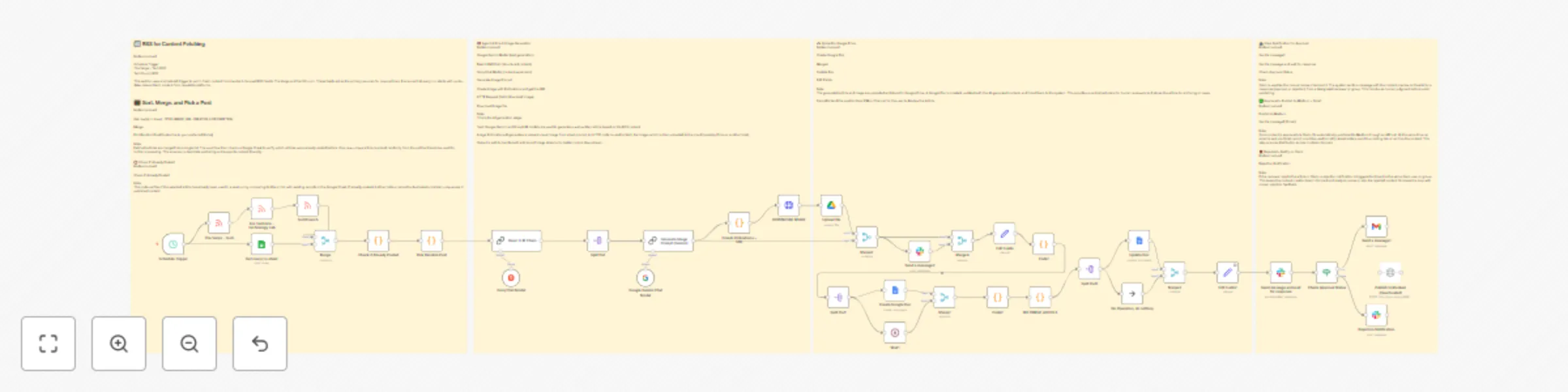
Automate RSS to Medium publishing with Groq, Gemini & Slack approval system

Workflow preview

Workflow preview
100%
Automate RSS to Medium publishing with Groq, Gemini & Slack approval system preview
Open on n8n.io

Important notice

This workflow is provided as-is. Please review and test before using in production.

1. Workflow Overview

This n8n template demonstrates how to build a complete AI powered content pipeline that pulls fresh news from RSS feeds, transforms it into engaging Medium articles. Categories Content Creation AI ...

Best for

  • Content Creation automation workflows
  • Multimodal AI automation workflows
  • advanced n8n builders looking for reusable templates

Tools used

n8n-nodes-base.googledocs, n8n-nodes-base.if, n8n-nodes-base.httprequest, n8n-nodes-base.slack, n8n-nodes-base.scheduletrigger, n8n-nodes-base.rssfeedread, @n8n/n8n-nodes-langchain.chainllm, @n8n/n8n-nodes-langchain.lmchatgroq

Source and attribution

This workflow is cataloged by N8N Workflows and links back to its original n8n.io source page by ObisDev.

Original n8n.io source

1.1 Workflow description

Title
Automate RSS to Medium publishing with Groq, Gemini & Slack approval system
Workflow name
Automate RSS to Medium publishing with Groq, Gemini & Slack approval system

This n8n template demonstrates how to build a complete AI-powered content pipeline that pulls fresh news from RSS feeds, transforms it into engaging Medium articles.

Categories

  • Content Creation
  • AI Automation
  • Publishing
  • Social Media

Share

Yes, this n8n workflow is straight FIRE for content creators who want to automate their entire publishing game! 🔥

This template creates a complete content pipeline that pulls fresh tech news from RSS feeds, transforms it into engaging Medium articles using AI, generates matching cover images, and handles the entire approval-to-publishing process through Slack integration.

Good to know

  • Uses multiple AI models (Groq, Google Gemini) for content generation
  • Integrates with Medium publishing API for automated posting
  • Includes smart duplicate checking via Google Sheets
  • Generates professional cover images using Pollinations AI
  • Full Slack approval workflow with human oversight
  • Automatic storage and organization in Google Drive

How it works

RSS Content Fetching

  • Pulls fresh content from The Verge, TechCrunch, and Ars Technica RSS feeds on a 6-hour schedule
  • Smart filtering ensures only new, unposted articles are processed

AI Content Generation

  • Groq and Google Gemini models transform RSS content into engaging Medium-style articles
  • Automatic image prompt generation creates relevant cover visuals
  • Pollinations AI generates professional marketing-style images

Smart Review & Approval

  • Creates Google Doc with formatted article for easy review
  • Sends preview to Slack channel/DM for human approval
  • Waits for explicit approval before publishing

Multi-Platform Publishing

  • Auto-publishes to Medium upon approval
  • Sends formatted content via Gmail
  • Stores everything in Google Drive for archiving
  • Updates Google Sheets to prevent duplicates

Rejection Handling

  • Clean rejection notifications via Slack
  • No publishing if content doesn't meet standards

Key Features That'll Blow Your Mind

  • Zero-Duplicate Publishing: Smart Google Sheets integration tracks all published content
  • Human-in-the-Loop: Slack approval system keeps quality control tight
  • Full AI Pipeline: From RSS parsing to image generation, everything's automated
  • Multi-Source Content: Aggregates from top tech news sources
  • Professional Formatting: Articles come out Medium-ready with proper structure
  • Cloud Storage: Everything gets archived in Google Drive automatically
  • Email Distribution: Auto-sends content to your mailing list

How to use

  • Clone this workflow and connect your credentials
  • Set up your Google Sheets tracking document
  • Configure Slack notifications for your approval channel
  • Add your Medium API credentials for publishing
  • The schedule trigger runs every 6 hours, but you can adjust timing
  • Manual trigger available for testing and one-off runs

Requirements

  • Google Workspace: Sheets, Docs, Drive, Gmail access
  • Slack Workspace: For approval notifications and review
  • Groq API: For AI content generation
  • Google Gemini API: For image prompt creation
  • Medium API: For automated publishing
  • Pollinations: Free AI image generation (no API key needed)

Customizing this workflow

This isn't just another automation—it's your new content creation superpower. Here's how to make it yours:

  • Switch RSS Sources: Replace tech feeds with your niche (finance, health, etc.)
  • Modify AI Prompts: Adjust the content generation style to match your brand voice
  • Change Publishing Destinations: Swap Medium for WordPress, Ghost, or other platforms
  • Add More Approval Steps: Include multiple reviewers or different approval criteria
  • Customize Image Generation: Modify prompts for different visual styles
  • Schedule Flexibility: Adjust timing from 6 hours to daily, weekly, whatever fits

Pro Tips:

  • The workflow includes comprehensive error handling and logging
  • Sticky notes provide detailed documentation for each section
  • Modular design makes it easy to swap components
  • Built-in duplicate prevention saves you from embarrassing reposts

This template is perfect for content creators, digital marketers, tech bloggers, and anyone who wants to scale their content game without losing quality control. It's like having a full content team working 24/7, but smarter and way more consistent.

Use cases that work incredibly well:

  • Tech blog automation for agencies
  • News aggregation and commentary sites
  • Personal brand content scaling
  • Client content creation workflows
  • Multi-platform publishing systems

1.2 Logical Blocks

This catalog entry is organized from the workflow JSON. The node-level section below shows the executable blocks available for review before importing the template.

2. Block-by-Block Analysis

Block 1 - Create Google Doc

Type / Role
n8n-nodes-base.googleDocs - googleDocs
Config choices
Version 2

Block 2 - Check Approval Status

Type / Role
n8n-nodes-base.if - if
Config choices
Version 2

Block 3 - Publish to Medium

Type / Role
n8n-nodes-base.httpRequest - httpRequest
Config choices
Version 4.1

Block 4 - Rejection Notification

Type / Role
n8n-nodes-base.slack - slack
Config choices
Version 2.1

Block 5 - Schedule Trigger

Type / Role
n8n-nodes-base.scheduleTrigger - scheduleTrigger
Config choices
Version 1.2

Block 6 - TechCrunch

Type / Role
n8n-nodes-base.rssFeedRead - rssFeedRead
Config choices
Version 1

Block 7 - The Verge – Tech

Type / Role
n8n-nodes-base.rssFeedRead - rssFeedRead
Config choices
Version 1

Block 8 - Ars Technica – Technology Lab

Type / Role
n8n-nodes-base.rssFeedRead - rssFeedRead
Config choices
Version 1

Block 9 - Basic LLM Chain

Type / Role
@n8n/n8n-nodes-langchain.chainLlm - chainLlm
Config choices
Version 1.7

Block 10 - Groq Chat Model

Type / Role
@n8n/n8n-nodes-langchain.lmChatGroq - lmChatGroq
Config choices
Version 1

Block 11 - Google Gemini Chat Model

Type / Role
@n8n/n8n-nodes-langchain.lmChatGoogleGemini - lmChatGoogleGemini
Config choices
Version 1

Block 12 - Generate Image Prompt (Gemini)

Type / Role
@n8n/n8n-nodes-langchain.chainLlm - chainLlm
Config choices
Version 1.6

Block 13 - Split Out

Type / Role
n8n-nodes-base.splitOut - splitOut
Config choices
Version 1

Block 14 - Get row(s) in sheet

Type / Role
n8n-nodes-base.googleSheets - googleSheets
Config choices
Version 4.6

Block 15 - Merge

Type / Role
n8n-nodes-base.merge - merge
Config choices
Version 3.2

Block 16 - Pick Random Post

Type / Role
n8n-nodes-base.code - code
Config choices
Version 2

Block 17 - Check if Already Posted

Type / Role
n8n-nodes-base.code - code
Config choices
Version 2

Block 18 - Edit Fields

Type / Role
n8n-nodes-base.set - set
Config choices
Version 3.4

Block 19 - Code1

Type / Role
n8n-nodes-base.code - code
Config choices
Version 2

Block 20 - Split Out1

Type / Role
n8n-nodes-base.splitOut - splitOut
Config choices
Version 1

Block 21 - Merge1

Type / Role
n8n-nodes-base.merge - merge
Config choices
Version 3.2

Block 22 - Wait1

Type / Role
n8n-nodes-base.wait - wait
Config choices
Version 1.1

Block 23 - Code2

Type / Role
n8n-nodes-base.code - code
Config choices
Version 2

Block 24 - REFORMAT ARTICLE

Type / Role
n8n-nodes-base.code - code
Config choices
Version 2

Showing the first 24 of 41 workflow blocks. Download the JSON for the full node graph.

3. Summary Table

Workflow Automate RSS to Medium publishing with Groq, Gemini & Slack approval system
Complexity advanced
Nodes 41
Categories Content Creation, Multimodal AI
Author ObisDev
Published 30 Jul 2025

4. Reproducing the Workflow from Scratch

  1. 1. Download the workflow JSON

    Use the JSON export at /data/workflows/6713/6713.json as the source template for this automation.

  2. 2. Import the template into n8n

    Open n8n, import the downloaded JSON, and review each node before activating the workflow.

  3. 3. Configure credentials and variables

    Replace placeholder credentials, API keys, webhook URLs, account IDs, and environment-specific values with your own settings.

  4. 4. Test with sample data

    Run the workflow manually or in a staging workspace, inspect node output, and confirm downstream systems receive the expected data.

  5. 5. Activate and monitor

    Enable the workflow only after testing, then monitor executions, errors, and rate limits during the first production runs.

5. General Notes & Resources

Review imported nodes carefully before activation. This catalog entry is intended to help you inspect the workflow structure, understand required services, and find related templates faster.

Node names, credentials, schedules, webhook paths, and external service limits may need adjustment for your workspace.

Frequently asked questions

What does Automate RSS to Medium publishing with Groq, Gemini & Slack approval system do?

This n8n template demonstrates how to build a complete AI powered content pipeline that pulls fresh news from RSS feeds, transforms it into engaging Medium articles. Categories Content Creation AI ...

What do I need before importing this workflow?

Review the workflow JSON, configure any required credentials in n8n, and test the automation in a safe workspace before using it in production.

Can I customize this workflow?

Yes. Use the block-by-block analysis and the downloadable JSON to inspect each node, then adjust credentials, prompts, schedules, filters, or destinations for your Content Creation, Multimodal AI use case.