Block 1 - Webhook
- Type / Role
- n8n-nodes-base.webhook - webhook
- Config choices
- Version 2.1


 Early Deal
This workflow is provided as-is. Please review and test before using in production.
Complete Video Documentation: https://youtu.be/O bKlX3G7 4 Explanation WITH clean Video timestamps: Prerequisites : You need a rental agreement document, a BoldSign account (which has a free t...
n8n-nodes-base.webhook, n8n-nodes-base.if, n8n-nodes-base.set, n8n-nodes-base.googlesheets, n8n-nodes-base.httprequest, n8n-nodes-base.formtrigger, n8n-nodes-base.telegramtrigger, @n8n/n8n-nodes-langchain.agent
This workflow is cataloged by N8N Workflows and links back to its original n8n.io source page by iamvaar.
Original n8n.io sourceComplete Video Documentation: https://youtu.be/O-bKlX3G7_4
Before you build this, you'll need a few things:
Tenant Name, Tenant Email, Property, Estimated Rent per month, contract expiry, and agreement status.In BoldSign, you would replace the {{...}} and [Date] parts with draggable form fields.
The key to sending the agreement is the Send aggrement to Tenant's Email node. This is a standard HTTP Request node, not a special BoldSign node.
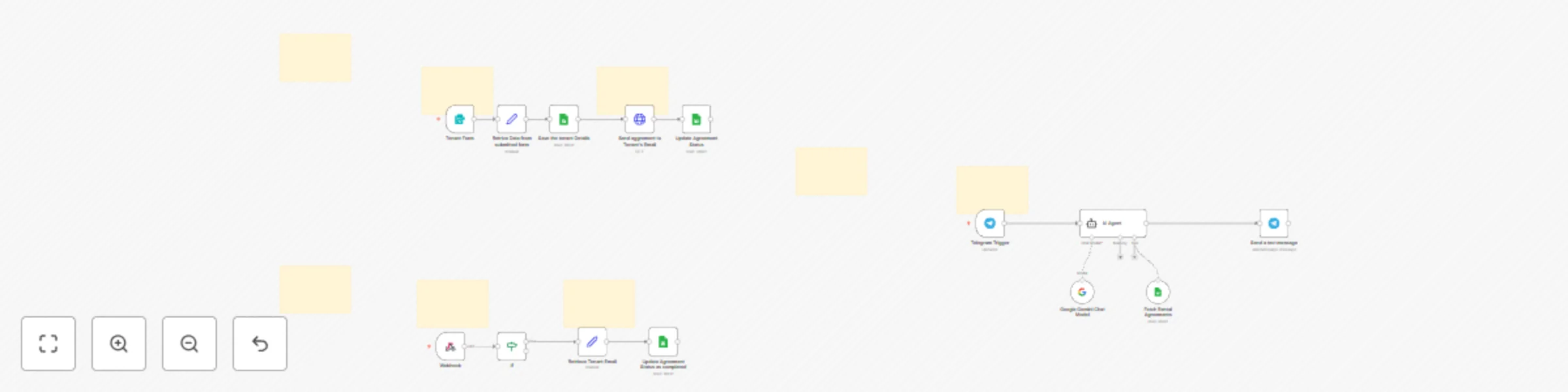
Method: POSTURL: https://api.boldsign.com/v1/template/send?templateId=enter-your-template-identer-your-template-id with the actual ID of the template you created in BoldSign [07:04].Authentication: Header AuthName is X-API-KEY and the Value is the secret API key you got from your BoldSign account [07:16].Body: The jsonBody is the most important part [08:02]. It's a JSON object that tells BoldSign who to send the agreement to and what data to pre-fill.title: Sets the document title, like "Rental Agreement - 123 Main St".roles: This array defines the signers.existingFormFields & mergeFields: This is where you dynamically insert data into the document. You map the data from your n8n form (like {{ $('Retrive Data from submitted form').item.json.address }}) to the id of the fields you created in your BoldSign template [08:16].This workflow is actually three separate flows that work together.
This is the main flow that kicks everything off when a new tenant is interested.
Node: Tenant Form (Form Trigger)
Form Trigger node. You add fields for "Your Name" (tenant's name) and "Your Email" (tenant's email).Node: Retrive Data from submitted form (Set)
tenant_name, address, estimated_rent) [05:25].expiry_date as one year from today.Node: Save the tenant Details (Google Sheets)
tenant_name, tenant_email, etc.) to the correct columns in your sheet.Node: Send aggrement to Tenant's Email (HTTP Request)
Node: Update Agreement Status (Google Sheets)
agreement status column to "Pending Signing" [08:55]. This is great for tracking.This flow listens for activity. It doesn't run on a schedule; it waits for BoldSign to tell it something happened.
Node: Webhook (Webhook Trigger)
Node: If (If)
x-boldsign-event and only continues if the value equals "Completed" [11:02]. This means it will ignore the "Signed" event (when just one person signs) and only proceed when both parties have signed.Node: Retrieve Tenant Email (Set)
.find() function to look through the signerDetails and pull the email for the person whose role was "Tenent" (Tenant). This gives us the unique key to update our spreadsheet.Node: Update Agreement Status as completed (Google Sheets)
agreement status column to "Completed" [11:32].This is a bonus flow that lets the owner "chat" with the Google Sheet.
Node: Telegram Trigger
Node: AI Agent (Langchain Agent)
message.text from the Telegram user [12:30].Node: Google Gemini Chat Model (Google Gemini)
Node: Fetch Rental Agreements (Google Sheets Tool)
Node: Send a text message (Telegram)
output from the AI Agent and sends it as a reply to the user in Telegram.This catalog entry is organized from the workflow JSON. The node-level section below shows the executable blocks available for review before importing the template.
| Workflow | Automate rental agreements with BoldSign, Google Sheets & Gemini AI |
|---|---|
| Complexity | advanced |
| Nodes | 22 |
| Categories | Document Extraction, AI Chatbot |
| Author | iamvaar |
| Published | 12 Nov 2025 |
Use the JSON export at /data/workflows/10772/10772.json as the source template for this automation.
Open n8n, import the downloaded JSON, and review each node before activating the workflow.
Replace placeholder credentials, API keys, webhook URLs, account IDs, and environment-specific values with your own settings.
Run the workflow manually or in a staging workspace, inspect node output, and confirm downstream systems receive the expected data.
Enable the workflow only after testing, then monitor executions, errors, and rate limits during the first production runs.
Review imported nodes carefully before activation. This catalog entry is intended to help you inspect the workflow structure, understand required services, and find related templates faster.
Node names, credentials, schedules, webhook paths, and external service limits may need adjustment for your workspace.
Complete Video Documentation: https://youtu.be/O bKlX3G7 4 Explanation WITH clean Video timestamps: Prerequisites : You need a rental agreement document, a BoldSign account (which has a free t...
Review the workflow JSON, configure any required credentials in n8n, and test the automation in a safe workspace before using it in production.
Yes. Use the block-by-block analysis and the downloadable JSON to inspect each node, then adjust credentials, prompts, schedules, filters, or destinations for your Document Extraction, AI Chatbot use case.