Automate real estate construction site discovery with 99acres email scraper

Workflow preview

Workflow preview
100%
Automate real estate construction site discovery with 99acres email scraper preview
Open on n8n.io

Important notice

This workflow is provided as-is. Please review and test before using in production.

1. Workflow Overview

This n8n workflow helps users easily discover nearby residential construction projects by automatically scraping and analyzing property listings from 99acres and other real estate platforms. Users ...

Best for

  • Market Research automation workflows
  • intermediate n8n builders looking for reusable templates

Tools used

n8n-nodes-base.emailreadimap, n8n-nodes-base.code, n8n-nodes-base.httprequest, n8n-nodes-base.emailsend, n8n-nodes-base.stickynote

Source and attribution

This workflow is cataloged by N8N Workflows and links back to its original n8n.io source page by Oneclick AI Squad.

Original n8n.io source

1.1 Workflow description

Title
Automate real estate construction site discovery with 99acres email scraper
Workflow name
Automate real estate construction site discovery with 99acres email scraper

This n8n workflow helps users easily discover nearby residential construction projects by automatically scraping and analyzing property listings from 99acres and other real estate platforms. Users can send an email with their location preferences and receive a curated list of available properties with detailed information, including pricing, area, possession dates, and construction status.

Good to know

  • The workflow focuses specifically on residential construction projects and active developments
  • Property data is scraped in real-time to ensure the most current information
  • Results are automatically formatted and structured for easy reading
  • The system handles multiple property formats and data variations from different sources
  • Fallback mechanisms ensure reliable data extraction even when website structures change

How it works

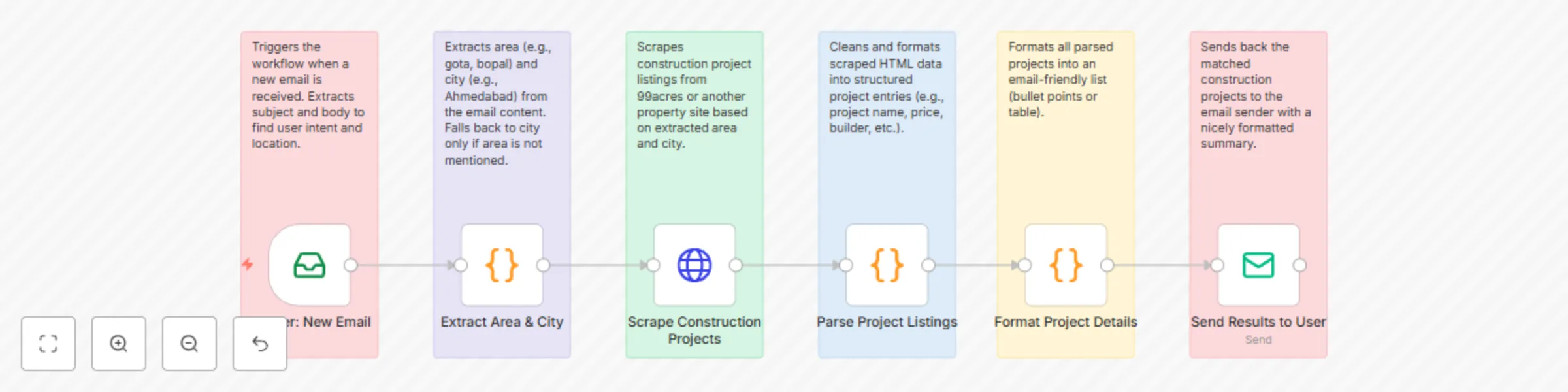
  • Trigger: New Email - Detects incoming emails with property search requests and extracts location preferences from email content
  • Extract Area & City - Parses the email body to identify target areas (e.g., Gota, Ahmedabad) and falls back to city-level search if specific area is not mentioned
  • Scrape Construction Projects - Performs web scraping on 99acres and other property websites based on the extracted area and city information
  • Parse Project Listings - Cleans and formats the scraped HTML data into structured project entries with standardized fields
  • Format Project Details - Transforms all parsed projects into a consistent email-ready list format with bullet points and organized information
  • Send Results to User - Delivers a professionally formatted email with the complete list of matching construction projects to the original requester

Email Format Examples

Input Email Format

To: [email protected]
Subject: Property Search Request

Hi, I am interested in buying a flat. Can you please send me the list of available properties in Gota, Ahmedabad?

Output Email Example

Subject: šŸ˜ļø Property Search Results: 4 Projects Found in Gota, Ahmedabad

šŸ˜ļø Available Construction Projects in Gota, Ahmedabad

Search Area: Gota, Ahmedabad
Total Projects: 4
Search Date: August 4, 2025

šŸ“‹ PROJECT LISTINGS:

šŸ”· Project 1
šŸ  Name: Vivaan Oliver offers
šŸ¢ BHK: 3 BHK
šŸ’° Price: N/A
šŸ“ Area: 851.0 Sq.Ft
šŸ—“ļø Possession: August 2025
šŸ“Š Status: under construction
šŸ“ Location: Thaltej, Ahmedabad West
šŸ•’ Scraped Date: 2025-08-04

-------------------------------------------

šŸ”· Project 2
šŸ  Name: Vivaan Oliver offers
šŸ¢ BHK: 3 BHK
šŸ’° Price: Price on Request
šŸ“ Area: 891 Sq Ft
šŸ—“ļø Possession: N/A
šŸ“Š Status: Under Construction
šŸ“ Location: Thaltej, Ahmedabad West
šŸ•’ Scraped Date: 2025-08-04

-------------------------------------------

šŸ”· Project 3
šŸ  Name: It offers an exclusive range of
šŸ¢ BHK: 3 BHK
šŸ’° Price: N/A
šŸ“ Area: 250 Sq.Ft
šŸ—“ļø Possession: 0 2250
šŸ“Š Status: Under Construction
šŸ“ Location: Thaltej, Ahmedabad West
šŸ•’ Scraped Date: 2025-08-04

-------------------------------------------

šŸ”· Project 4
šŸ  Name: N/A
šŸ¢ BHK: 2 BHK
šŸ’° Price: N/A
šŸ“ Area: N/A
šŸ—“ļø Possession: N/A
šŸ“Š Status: N/A
šŸ“ Location: Thaltej, Ahmedabad West

šŸ’” Next Steps:
• Contact builders directly for detailed pricing and floor plans
• Schedule site visits to shortlisted properties
• Verify possession timelines and construction progress
• Compare amenities and location advantages

šŸ“ž For more information or specific requirements, reply to this email.

How to use

Setup Instructions

  1. Import the workflow into your n8n instance
  2. Configure Email Credentials:
    • Set up email trigger for incoming property requests
    • Set up SMTP credentials for sending property listings
  3. Configure Web Scraping:
    • Ensure proper headers and user agents for 99acres access
    • Set up fallback mechanisms for different property websites
  4. Test the workflow with sample property search emails

Sending Property Search Requests

  1. Send an email to your configured property search address
  2. Include location details in natural language (e.g., "Gota, Ahmedabad")
  3. Optionally specify preferences like BHK, budget, or amenities
  4. Receive detailed property listings within minutes

Requirements

  • n8n instance (cloud or self-hosted) with web scraping capabilities
  • Email account with IMAP/SMTP access for automated communication
  • Reliable internet connection for real-time property data scraping
  • Valid target websites (99acres, MagicBricks, etc.) access

Troubleshooting

  • No properties found: Verify area spelling and check if the location has active listings
  • Scraping errors: Update user agents and headers if websites block requests
  • Duplicate results: Implement better deduplication logic based on property names and locations
  • Email parsing issues: Test with various email formats and improve regex patterns
  • Website structure changes: Implement fallback parsers and regular monitoring of scraping success rates

1.2 Logical Blocks

This catalog entry is organized from the workflow JSON. The node-level section below shows the executable blocks available for review before importing the template.

2. Block-by-Block Analysis

Block 1 - Trigger: New Email

Type / Role
n8n-nodes-base.emailReadImap - emailReadImap
Config choices
Version 2

Block 2 - Extract Area & City

Type / Role
n8n-nodes-base.code - code
Config choices
Version 2

Block 3 - Scrape Construction Projects

Type / Role
n8n-nodes-base.httpRequest - httpRequest
Config choices
Version 4.1

Block 4 - Parse Project Listings

Type / Role
n8n-nodes-base.code - code
Config choices
Version 2

Block 5 - Format Project Details

Type / Role
n8n-nodes-base.code - code
Config choices
Version 2

Block 6 - Send Results to User

Type / Role
n8n-nodes-base.emailSend - emailSend
Config choices
Version 2.1

Block 7 - Sticky Note

Type / Role
n8n-nodes-base.stickyNote - stickyNote
Config choices
Version 1

Block 8 - Sticky Note1

Type / Role
n8n-nodes-base.stickyNote - stickyNote
Config choices
Version 1

Block 9 - Sticky Note2

Type / Role
n8n-nodes-base.stickyNote - stickyNote
Config choices
Version 1

Block 10 - Sticky Note3

Type / Role
n8n-nodes-base.stickyNote - stickyNote
Config choices
Version 1

Block 11 - Sticky Note4

Type / Role
n8n-nodes-base.stickyNote - stickyNote
Config choices
Version 1

Block 12 - Sticky Note5

Type / Role
n8n-nodes-base.stickyNote - stickyNote
Config choices
Version 1

3. Summary Table

Workflow Automate real estate construction site discovery with 99acres email scraper
Complexity intermediate
Nodes 12
Categories Market Research
Author Oneclick AI Squad
Published 04 Aug 2025

4. Reproducing the Workflow from Scratch

  1. 1. Download the workflow JSON

    Use the JSON export at /data/workflows/6969/6969.json as the source template for this automation.

  2. 2. Import the template into n8n

    Open n8n, import the downloaded JSON, and review each node before activating the workflow.

  3. 3. Configure credentials and variables

    Replace placeholder credentials, API keys, webhook URLs, account IDs, and environment-specific values with your own settings.

  4. 4. Test with sample data

    Run the workflow manually or in a staging workspace, inspect node output, and confirm downstream systems receive the expected data.

  5. 5. Activate and monitor

    Enable the workflow only after testing, then monitor executions, errors, and rate limits during the first production runs.

5. General Notes & Resources

Review imported nodes carefully before activation. This catalog entry is intended to help you inspect the workflow structure, understand required services, and find related templates faster.

Node names, credentials, schedules, webhook paths, and external service limits may need adjustment for your workspace.

Frequently asked questions

What does Automate real estate construction site discovery with 99acres email scraper do?

This n8n workflow helps users easily discover nearby residential construction projects by automatically scraping and analyzing property listings from 99acres and other real estate platforms. Users ...

What do I need before importing this workflow?

Review the workflow JSON, configure any required credentials in n8n, and test the automation in a safe workspace before using it in production.

Can I customize this workflow?

Yes. Use the block-by-block analysis and the downloadable JSON to inspect each node, then adjust credentials, prompts, schedules, filters, or destinations for your Market Research use case.