Automate quiz creation from documents with Google Gemini and Jotform

Workflow preview

Workflow preview
100%
Automate quiz creation from documents with Google Gemini and Jotform preview
Open on n8n.io

Important notice

This workflow is provided as-is. Please review and test before using in production.

1. Workflow Overview

AI Powered Quiz Generator for Instructors Instantly turn any document into a shareable online quiz! This n8n workflow automates the entire quiz creation process: a new Jotform submission trigg...

Best for

  • Content Creation automation workflows
  • Multimodal AI automation workflows
  • advanced n8n builders looking for reusable templates

Tools used

n8n-nodes-base.extractfromfile, @n8n/n8n-nodes-langchain.agent, @n8n/n8n-nodes-langchain.lmchatgooglegemini, @n8n/n8n-nodes-langchain.outputparserstructured, n8n-nodes-base.splitout, n8n-nodes-base.httprequest, n8n-nodes-base.code, n8n-nodes-base.jotformtrigger

Source and attribution

This workflow is cataloged by N8N Workflows and links back to its original n8n.io source page by Zain Khan.

Original n8n.io source

1.1 Workflow description

Title
Automate quiz creation from documents with Google Gemini and Jotform
Workflow name
Automate quiz creation from documents with Google Gemini and Jotform

AI-Powered Quiz Generator for Instructors 📝🤖

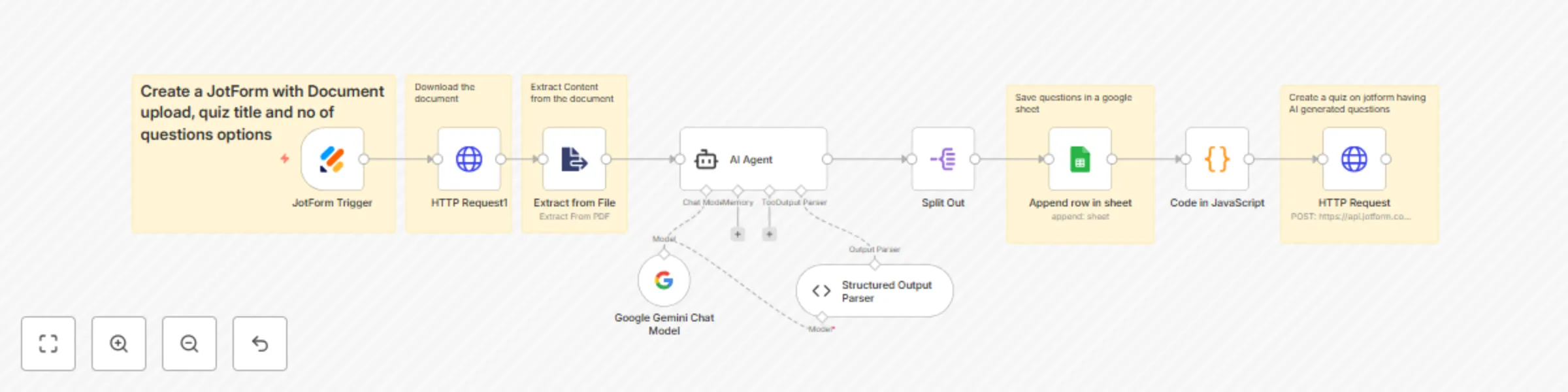
Instantly turn any document into a shareable online quiz! This n8n workflow automates the entire quiz creation process: a new Jotform submission triggers the flow, the Google Gemini AI extracts key concepts and generates multiple-choice questions with correct answers, saves the questions to a Google Sheet for record-keeping, and finally creates a fully built, ready-to-share Jotform quiz using an HTTP request.


How it Works

This powerful workflow acts as a complete "document-to-quiz" automation tool, simplifying the process of creating educational or testing materials:

  1. Trigger & Input: The process starts when a user fills out the main Jotform submission form, providing a document (PDF/file upload), the desired Quiz Title, and the Number of Questions to generate. Create a jotform like this: https://form.jotform.com/252856893250062 having fields for Quiz Name, File Upload and Number of questions.
  2. Document Processing: The workflow retrieves the uploaded document via an HTTP request and uses the Extract from File node to parse and extract the raw text content from the file.
  3. AI Question Generation: The extracted text, quiz title, and desired question count are passed to the Google Gemini AI Agent. Following strict instructions, the AI analyzes the content and generates the specified number of multiple-choice questions (with four options and the correct answer indicated) in a precise JSON format.
  4. Data Structuring: The generated JSON is validated and formatted using a Structured Output Parser and split into individual items for each question.
  5. Record Keeping (Google Sheets): Each generated question, along with all its options and the confirmed correct answer, is appended as a new row in a designated Google Sheet for centralized record-keeping and review.
  6. Jotform Quiz Creation (HTTP Request): The workflow dynamically constructs the required API body, converting the AI-generated questions and options into the necessary fields for a new Jotform. It then uses an HTTP Request node to call the Jotform API, creating a brand-new, ready-to-use quiz form.
  7. Final Output: The final output provides the link to the newly created quiz, which can be shared immediately for submissions.

Requirements

To deploy this automated quiz generator, ensure you have the following accounts and credentials configured in your n8n instance:

  • Jotform Credentials: An API Key is required for both the Jotform Trigger (to start the workflow) and for the final HTTP Request (to create the new quiz form via the API). Sign up for Jotform here: https://www.jotform.com/?partner=zainurrehman
  • Google Gemini API Key: An API key for the Google Gemini Chat Model to power the AI Agent for question generation.
  • Google Sheets Credentials: An OAuth2 or API Key credential for the Google Sheets node to save the generated questions.
  • Initial Jotform: A source Jotform that accepts the user input: a File Upload field, a Text field for the Quiz Title, and a Number field for the Number of Questions.

Pro Tip: After the final HTTP Request, add an additional step (like an Email or Slack node) to automatically send the generated quiz link back to the user who submitted the initial request!

1.2 Logical Blocks

This catalog entry is organized from the workflow JSON. The node-level section below shows the executable blocks available for review before importing the template.

2. Block-by-Block Analysis

Block 1 - Extract from File

Type / Role
n8n-nodes-base.extractFromFile - extractFromFile
Config choices
Version 1

Block 2 - AI Agent

Type / Role
@n8n/n8n-nodes-langchain.agent - agent
Config choices
Version 2.2

Block 3 - Google Gemini Chat Model

Type / Role
@n8n/n8n-nodes-langchain.lmChatGoogleGemini - lmChatGoogleGemini
Config choices
Version 1

Block 4 - Structured Output Parser

Type / Role
@n8n/n8n-nodes-langchain.outputParserStructured - outputParserStructured
Config choices
Version 1.3

Block 5 - Split Out

Type / Role
n8n-nodes-base.splitOut - splitOut
Config choices
Version 1

Block 6 - HTTP Request

Type / Role
n8n-nodes-base.httpRequest - httpRequest
Config choices
Version 4.2

Block 7 - Code in JavaScript

Type / Role
n8n-nodes-base.code - code
Config choices
Version 2

Block 8 - JotForm Trigger

Type / Role
n8n-nodes-base.jotFormTrigger - jotFormTrigger
Config choices
Version 1

Block 9 - HTTP Request1

Type / Role
n8n-nodes-base.httpRequest - httpRequest
Config choices
Version 4.2

Block 10 - Sticky Note

Type / Role
n8n-nodes-base.stickyNote - stickyNote
Config choices
Version 1

Block 11 - Sticky Note1

Type / Role
n8n-nodes-base.stickyNote - stickyNote
Config choices
Version 1

Block 12 - Sticky Note2

Type / Role
n8n-nodes-base.stickyNote - stickyNote
Config choices
Version 1

Block 13 - Sticky Note3

Type / Role
n8n-nodes-base.stickyNote - stickyNote
Config choices
Version 1

Block 14 - Sticky Note4

Type / Role
n8n-nodes-base.stickyNote - stickyNote
Config choices
Version 1

Block 15 - Append row in sheet

Type / Role
n8n-nodes-base.googleSheets - googleSheets
Config choices
Version 4.6

3. Summary Table

Workflow Automate quiz creation from documents with Google Gemini and Jotform
Complexity advanced
Nodes 15
Categories Content Creation, Multimodal AI
Author Zain Khan
Published 15 Oct 2025

4. Reproducing the Workflow from Scratch

  1. 1. Download the workflow JSON

    Use the JSON export at /data/workflows/9715/9715.json as the source template for this automation.

  2. 2. Import the template into n8n

    Open n8n, import the downloaded JSON, and review each node before activating the workflow.

  3. 3. Configure credentials and variables

    Replace placeholder credentials, API keys, webhook URLs, account IDs, and environment-specific values with your own settings.

  4. 4. Test with sample data

    Run the workflow manually or in a staging workspace, inspect node output, and confirm downstream systems receive the expected data.

  5. 5. Activate and monitor

    Enable the workflow only after testing, then monitor executions, errors, and rate limits during the first production runs.

5. General Notes & Resources

Review imported nodes carefully before activation. This catalog entry is intended to help you inspect the workflow structure, understand required services, and find related templates faster.

Node names, credentials, schedules, webhook paths, and external service limits may need adjustment for your workspace.

Frequently asked questions

What does Automate quiz creation from documents with Google Gemini and Jotform do?

AI Powered Quiz Generator for Instructors Instantly turn any document into a shareable online quiz! This n8n workflow automates the entire quiz creation process: a new Jotform submission trigg...

What do I need before importing this workflow?

Review the workflow JSON, configure any required credentials in n8n, and test the automation in a safe workspace before using it in production.

Can I customize this workflow?

Yes. Use the block-by-block analysis and the downloadable JSON to inspect each node, then adjust credentials, prompts, schedules, filters, or destinations for your Content Creation, Multimodal AI use case.