Block 1 - Parse Request Data
- Type / Role
- n8n-nodes-base.code - code
- Config choices
- Version 2


 Early Deal
This workflow is provided as-is. Please review and test before using in production.
Tired of juggling maintenance calls, lost requests, and slow vendor responses? This workflow streamlines the entire property maintenance process — from tenant request to vendor dispatch — powered b...
n8n-nodes-base.code, @n8n/n8n-nodes-langchain.agent, n8n-nodes-base.set, n8n-nodes-base.if, n8n-nodes-base.gmail, n8n-nodes-base.googlesheets, n8n-nodes-base.stickynote, @n8n/n8n-nodes-langchain.lmchatopenai
This workflow is cataloged by N8N Workflows and links back to its original n8n.io source page by Jitesh Dugar.
Original n8n.io sourceTired of juggling maintenance calls, lost requests, and slow vendor responses? This workflow streamlines the entire property maintenance process — from tenant request to vendor dispatch — powered by AI categorization and automated communication.
Cut resolution time from 5–7 days to under 24 hours and boost tenant satisfaction by 85% with zero manual follow-up.
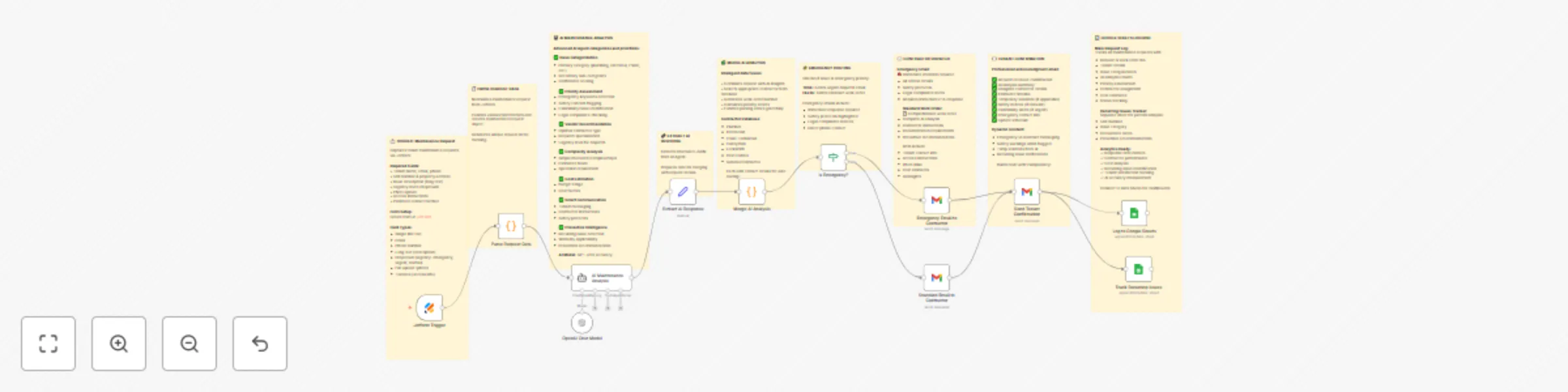
Transforms chaotic maintenance management into seamless automation:
📝 Captures Requests – Tenants submit issues via Jotform with unit number, issue description, urgency, and photos.
🤖 AI Categorization – OpenAI (GPT-4o-mini) analyzes and classifies issues (plumbing, HVAC, electrical, etc.).
⚙️ Smart Prioritization – Flags emergencies (leak, electrical failure) and assigns priority.
📬 Vendor Routing – Routes issue to the correct contractor or vendor based on AI category.
📧 Automated Communication – Sends acknowledgment to tenant and work order to vendor via Gmail.
📊 Audit Trail Logging – Optionally logs requests in Google Sheets for performance tracking and reporting.
🧠 AI-Powered Categorization – Intelligent issue type and priority detection.
🚨 Emergency Routing – Automatically escalates critical issues.
📤 Automated Work Orders – Sends detailed emails with property and tenant info.
📈 Google Sheets Logging – Transparent audit trail for compliance and analytics.
🔄 End-to-End Automation – From form submission to vendor dispatch in seconds.
💬 Sticky Notes Included – Every section annotated for easy understanding.
Property management companies
Real estate agencies and facility teams
Smart building operators
Co-living and rental startups
Maintenance coordinators managing 50–200+ requests monthly
Required Integrations:
Jotform – Maintenance request form Create your form for free on Jotform using this link
OpenAI (GPT-4o-mini) – Categorization and prioritization
Gmail – Automated email notifications
(Optional) Google Sheets – Logging and performance tracking
Import Template – Copy JSON into n8n and import.
Create Jotform – Include fields: Tenant name, email, unit number, issue description, urgency, photo upload.
Add Credentials – Configure Jotform, Gmail, and OpenAI credentials.
Set Vendor Emails – Update “Send to Contractor” Gmail node with vendor email IDs.
Test Workflow – Submit sample maintenance requests for AI categorization and routing.
Activate Workflow – Go live and let your tenants submit maintenance issues.
⏱️ 24-hour average resolution time (vs 5–7 days).
😀 85% higher tenant satisfaction with instant communication.
📉 Zero lost requests – every issue logged automatically.
🧠 AI-driven prioritization ensures critical issues handled first.
🕒 10+ hours saved weekly for property managers.
🧾 Add Google Sheets logging for a complete audit trail.
🔔 Include keywords like “leak,” “no power,” or “urgent” in AI prompts for faster emergency detection.
🧰 Expand vendor list dynamically using a Google Sheet lookup.
🧑🔧 Add follow-up automation to verify task completion from vendors.
📊 Create dashboards for monthly maintenance insights.
This workflow demonstrates:
AI categorization using OpenAI’s Chat Model (GPT-4o-mini)
Multi-path routing logic (emergency vs. normal)
Automated communication via Gmail
Optional data logging in Google Sheets
Annotated workflow with Sticky Notes for learning clarity
This catalog entry is organized from the workflow JSON. The node-level section below shows the executable blocks available for review before importing the template.
| Workflow | Automate property maintenance requests with GPT-4o-mini, Jotform and Gmail |
|---|---|
| Complexity | advanced |
| Nodes | 21 |
| Categories | Support Chatbot, AI Chatbot |
| Author | Jitesh Dugar |
| Published | 14 Oct 2025 |
Use the JSON export at /data/workflows/9649/9649.json as the source template for this automation.
Open n8n, import the downloaded JSON, and review each node before activating the workflow.
Replace placeholder credentials, API keys, webhook URLs, account IDs, and environment-specific values with your own settings.
Run the workflow manually or in a staging workspace, inspect node output, and confirm downstream systems receive the expected data.
Enable the workflow only after testing, then monitor executions, errors, and rate limits during the first production runs.
Review imported nodes carefully before activation. This catalog entry is intended to help you inspect the workflow structure, understand required services, and find related templates faster.
Node names, credentials, schedules, webhook paths, and external service limits may need adjustment for your workspace.
Tired of juggling maintenance calls, lost requests, and slow vendor responses? This workflow streamlines the entire property maintenance process — from tenant request to vendor dispatch — powered b...
Review the workflow JSON, configure any required credentials in n8n, and test the automation in a safe workspace before using it in production.
Yes. Use the block-by-block analysis and the downloadable JSON to inspect each node, then adjust credentials, prompts, schedules, filters, or destinations for your Support Chatbot, AI Chatbot use case.