Block 1 - Schedule Trigger
- Type / Role
- n8n-nodes-base.scheduleTrigger - scheduleTrigger
- Config choices
- Version 1.2


 Early Deal
This workflow is provided as-is. Please review and test before using in production.
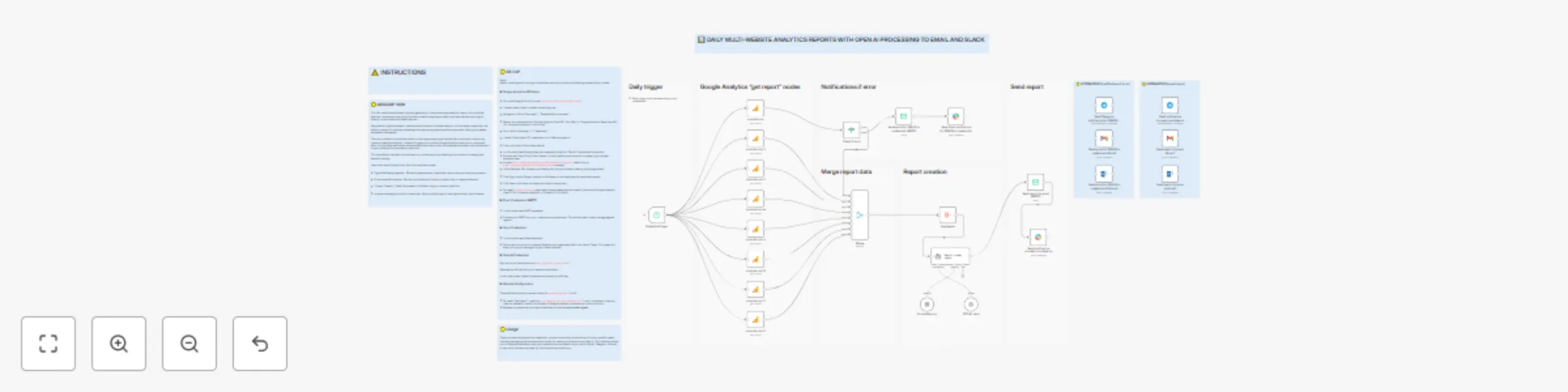
DESCRIPTION This n8n workflow automates the daily generation of comprehensive analytics reports from multiple websites, processes them using OpenAI's powerful language models, and then delivers ...
n8n-nodes-base.scheduletrigger, n8n-nodes-base.merge, @n8n/n8n-nodes-langchain.memorybufferwindow, n8n-nodes-base.aggregate, n8n-nodes-base.googleanalytics, n8n-nodes-base.stickynote, @n8n/n8n-nodes-langchain.agent, @n8n/n8n-nodes-langchain.lmchatopenai
This workflow is cataloged by N8N Workflows and links back to its original n8n.io source page by Guillaume.
Original n8n.io sourceThis n8n workflow automates the daily generation of comprehensive analytics reports from multiple websites, processes them using OpenAI's powerful language models, and then delivers the insights directly to your email and Slack channels.
Designed for digital marketers, website administrators, and data analysts, this template streamlines the tedious process of manually collecting and interpreting website performance data, offering immediate, actionable intelligence.
The core problem this workflow solves is the fragmentation and manual effort involved in monitoring numerous website analytics. Instead of logging into multiple Google Analytics accounts or properties daily, this workflow centralizes data extraction, enriches it with AI-powered summaries, and distributes it to your preferred communication platforms.
This significantly reduces the time spent on routine reporting, allowing you to focus on strategy and decision-making.
Users who would benefit most from this template include:
Digital Marketing Agencies: Efficiently generate and share client reports across multiple properties.
E-commerce Businesses: Monitor performance of various product sites or regional domains.
Content Creators: Track the success of different blogs or content platforms.
Anyone managing a portfolio of websites: Gain a unified view of their digital assets' performance.
Before importing and running this workflow, ensure you have the following prerequisites in place:
Go to the Google Cloud Console (https://console.cloud.google.com/).
Create a new project or select an existing one.
Navigate to "APIs & Services" > "Enabled APIs & services."
Search for and enable the "Google Analytics Data API" (for GA4) or "Google Analytics Reporting API" (for Universal Analytics, if still in use).
Go to "APIs & Services" > "Credentials."
Create "OAuth client ID" credentials for a "Web application."
Copy your client ID and client secret.
In n8n, add a new Google Analytics credential using the "OAuth2" authentication method.
Provide the Client ID and Client Secret. You will need to authorize n8n to access your Google Analytics data.
Scopes https://www.googleapis.com/auth/analytics.readonly (read-only) or https://www.googleapis.com/auth/analytics (manage)
OAuth Redirect URL Already pre-filled by n8n (copy this when creating the Google client)
Click Sign in with Google, choose the GA account, and approve the requested scopes.
Click Save – n8n tests the token and stores it encrypted.
For each yourwebsite.com node, select these credentials and specify the correct Google Analytics View ID (for Universal Analytics) or Property ID (for GA4).
In n8n, add a new SMTP credential.
Provide your SMTP host, port, username, and password. This will be used to send the aggregated reports.
In n8n, add a new Slack credential.
Follow the instructions to create a Slack App and generate a Bot User OAuth Token. This token will allow n8n to post messages to your Slack channels.
Sign up for an OpenAI account (https://platform.openai.com/).
Generate an API Key from your account dashboard.
In n8n, add a new OpenAI credential and paste your API Key.
The workflow currently includes nodes for yourwebsite.com (1 to 8).
Once you have configured the credentials, you can customize the workflow to fit your specific needs, including leveraging various alternative nodes for sending notifications and reports. This flexibility allows you to integrate seamlessly with your preferred communication tools such as Gmail, Telegram, Outlook, or any other service supported by n8n's extensive node library.
This catalog entry is organized from the workflow JSON. The node-level section below shows the executable blocks available for review before importing the template.
Showing the first 24 of 38 workflow blocks. Download the JSON for the full node graph.
| Workflow | Automate multi-website Google Analytics reports with GPT processing to email & Slack |
|---|---|
| Complexity | advanced |
| Nodes | 38 |
| Categories | Market Research, AI Summarization |
| Author | Guillaume |
| Published | 22 Jul 2025 |
Use the JSON export at /data/workflows/6258/6258.json as the source template for this automation.
Open n8n, import the downloaded JSON, and review each node before activating the workflow.
Replace placeholder credentials, API keys, webhook URLs, account IDs, and environment-specific values with your own settings.
Run the workflow manually or in a staging workspace, inspect node output, and confirm downstream systems receive the expected data.
Enable the workflow only after testing, then monitor executions, errors, and rate limits during the first production runs.
Review imported nodes carefully before activation. This catalog entry is intended to help you inspect the workflow structure, understand required services, and find related templates faster.
Node names, credentials, schedules, webhook paths, and external service limits may need adjustment for your workspace.
DESCRIPTION This n8n workflow automates the daily generation of comprehensive analytics reports from multiple websites, processes them using OpenAI's powerful language models, and then delivers ...
Review the workflow JSON, configure any required credentials in n8n, and test the automation in a safe workspace before using it in production.
Yes. Use the block-by-block analysis and the downloadable JSON to inspect each node, then adjust credentials, prompts, schedules, filters, or destinations for your Market Research, AI Summarization use case.