Block 1 - Data Structure1
- Type / Role
- n8n-nodes-base.set - set
- Config choices
- Version 1


 Early Deal
This workflow is provided as-is. Please review and test before using in production.
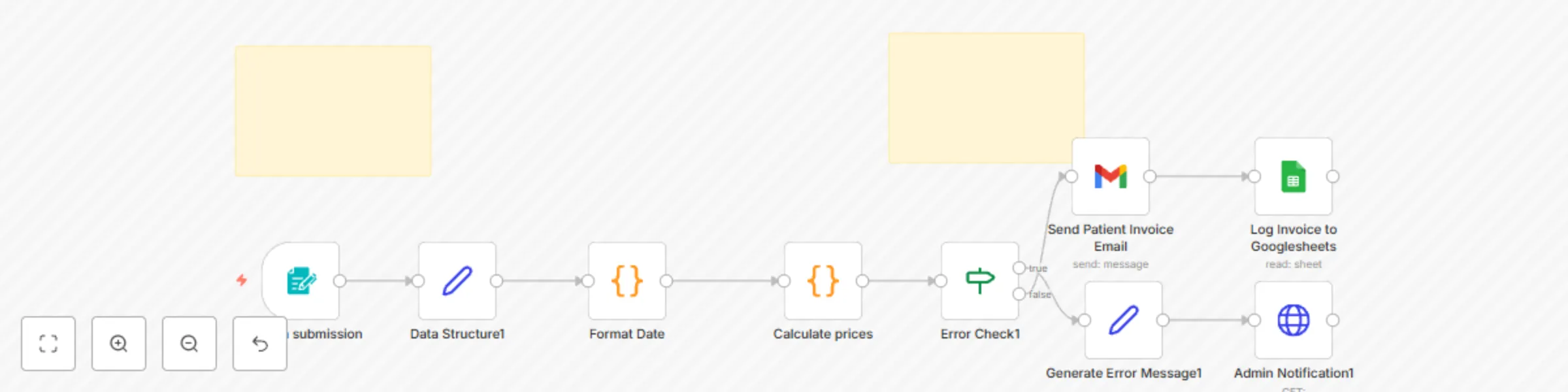
Automate Medical Billing with Google Sheets and Gmail Note : This template is designed for self hosted n8n instances. The workflow image above shows the complete automation flow. This n8n workflow ...
n8n-nodes-base.set, n8n-nodes-base.if, n8n-nodes-base.httprequest, n8n-nodes-base.formtrigger, n8n-nodes-base.code, n8n-nodes-base.stickynote, n8n-nodes-base.gmail, n8n-nodes-base.googlesheets
This workflow is cataloged by N8N Workflows and links back to its original n8n.io source page by David Olusola.
Original n8n.io sourceNote: This template is designed for self-hosted n8n instances. The workflow image above shows the complete automation flow.
This n8n workflow automates the patient billing process—from form submission to invoice generation, email delivery, and Google Sheets logging.
This workflow is ideal for:
Medical billing often involves repetitive data entry, invoice calculation, and communication. This workflow:
This automation builds a streamlined billing system that:
Before starting, ensure you have:
A self-hosted n8n instance
A Google account with access to:
A Slack Webhook URL (optional but included)
A designated Google Sheet to store invoices
Create a new Google Sheet and add the following columns in the first row (must match exactly):
Invoice No | Patient Name | Email | Date | Total Cost | Line Items | Payment Status
> ✅ Customizable: You can add columns like “Insurance Provider” or “Payment Status” if needed—just update the mapping in the Google Sheets node.
In n8n:
Go to Settings → Credentials
Add:
Ensure proper scopes are granted:
.../auth/spreadsheets.../auth/gmail.sendIn the Calculate prices code node:
const treatmentPrices = {
  "General Consultation": 60,
  "Blood Test - Basic Panel": 45,
  "Blood Test - Comprehensive": 120,
  "X-Ray - Single": 80,
  "Physical Therapy Session": 75,
  "Vaccination - Standard": 40,
  "Specialist Consultation": 120,
  "Minor Procedure": 150
};
> ✏️ Customizable: Add, remove, or change treatment names and prices.
In the On form submission node:
The form collects:
> ✏️ Customizable: Modify the form fields to include phone number, insurance info, etc.
Open the Send Patient Invoice Email node:
Example message:
Hi {{ $json.patientName }},

Thank you for visiting MediSure Clinic on {{ $json.formattedDate }}.
Here is a summary of your treatments:
{{ $json.lineItems }}

Total Due: **${{ $json.totalCost }}**

Best regards,
MediSure Billing Department
> ✏️ Customizable: Adjust the message, branding, and subject line to match your practice.
The Error Check and Generate Error Message nodes ensure:
> ✏️ Customizable: Replace Slack with email, webhook, or CRM notification if preferred.
The Log Invoice to Googlesheets node appends each record:
> ✏️ Customizable: You can change the target spreadsheet or sheet name.
Once configured:
Toggle the workflow Active
Submit a test form
Check:
| Component | How to Customize |
|---|---|
| Treatment Prices | Edit Calculate prices node code |
| Form Fields | Modify the On form submission node |
| Email Body | Change message in Send Patient Invoice Email |
| Slack Alerts | Replace Slack node with email or CRM action |
| Google Sheet Fields | Add/remove columns and update mappings |
Add downstream automations easily:
| Issue | Fix |
|---|---|
| Email not sent | Check Gmail credentials & quotas |
| Spreadsheet not updating | Confirm sheet ID and column names |
| Pricing not accurate | Review Calculate prices logic |
| Slack alert not sent | Check webhook URL format |
This catalog entry is organized from the workflow JSON. The node-level section below shows the executable blocks available for review before importing the template.
| Workflow | Automate medical billing with Google Sheets and Gmail |
|---|---|
| Complexity | intermediate |
| Nodes | 11 |
| Categories | Invoice Processing |
| Author | David Olusola |
| Published | 12 May 2025 |
Use the JSON export at /data/workflows/3998/3998.json as the source template for this automation.
Open n8n, import the downloaded JSON, and review each node before activating the workflow.
Replace placeholder credentials, API keys, webhook URLs, account IDs, and environment-specific values with your own settings.
Run the workflow manually or in a staging workspace, inspect node output, and confirm downstream systems receive the expected data.
Enable the workflow only after testing, then monitor executions, errors, and rate limits during the first production runs.
Review imported nodes carefully before activation. This catalog entry is intended to help you inspect the workflow structure, understand required services, and find related templates faster.
Node names, credentials, schedules, webhook paths, and external service limits may need adjustment for your workspace.
Automate Medical Billing with Google Sheets and Gmail Note : This template is designed for self hosted n8n instances. The workflow image above shows the complete automation flow. This n8n workflow ...
Review the workflow JSON, configure any required credentials in n8n, and test the automation in a safe workspace before using it in production.
Yes. Use the block-by-block analysis and the downloadable JSON to inspect each node, then adjust credentials, prompts, schedules, filters, or destinations for your Invoice Processing use case.