Block 1 - When clicking ‘Execute workflow’
- Type / Role
- n8n-nodes-base.manualTrigger - manualTrigger
- Config choices
- Version 1


 Early Deal
This workflow is provided as-is. Please review and test before using in production.
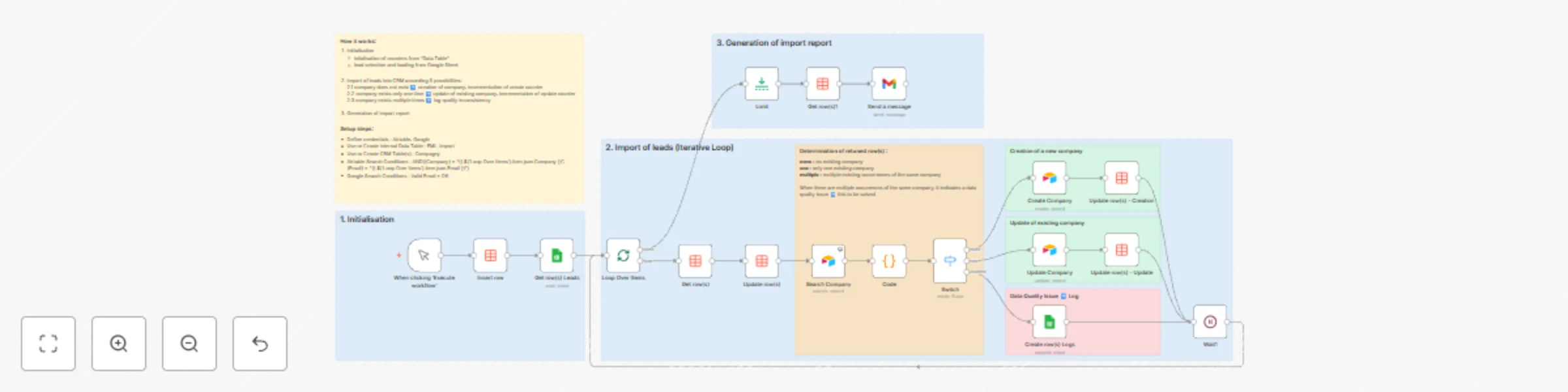
General Principles This workflow automates the import of leads into the Company table of a CRM built with Airtable. Its originality lies in leveraging the new " Data Table " node (an internal tab...
n8n-nodes-base.manualtrigger, n8n-nodes-base.stickynote, n8n-nodes-base.datatable, n8n-nodes-base.limit, n8n-nodes-base.gmail, n8n-nodes-base.wait, n8n-nodes-base.airtable, n8n-nodes-base.code
This workflow is cataloged by N8N Workflows and links back to its original n8n.io source page by Guy.
Original n8n.io sourceThis workflow automates the import of leads into the Company table of a CRM built with Airtable.
Its originality lies in leveraging the new "Data Table" node (an internal table within n8n) to generate an execution report.
📚 Why Data Tables: This approach eliminates the need for reading/writing operations on a Google Sheet file or an external database.
This workflow enables precise tracking of marketing actions while facilitating the historical record of interactions with prospects and clients.
A prior validation check on email address accuracy is required.
Must contain at least a Company table with the following fields:
Data Table Initialization: An internal n8n table is created to build the execution report.
Lead Selection: The workflow selects leads from the Google Sheet file (Sheet1 tab) where the condition "Valid Email" is equal to OK.
Company Existence Check: The Search Company node is configured with Always Output Data enabled. A JavaScript code node distinguishes three possibilities:
Company does not exist: create a new record and increment the created records counter.
Company exists once: update the record and increment the updated records counter.
Company appears multiple times: log the issue in the Leads file under the Logs tab, requiring a data quality procedure.
An execution report is generated and emailed, example format: Leads Import Report:
If the sum of records created and updated differs from the total records read, it indicates the presence of duplicates. A counter for duplicated companies could be added.
Need help customizing this (e.g., expanding Data Tables, connecting multiple surveys, or automating follow-ups)?
📧 [email protected] 🔗 guy.salvatore 🌐 smarthome-smartelec.fr
This catalog entry is organized from the workflow JSON. The node-level section below shows the executable blocks available for review before importing the template.
Showing the first 24 of 26 workflow blocks. Download the JSON for the full node graph.
| Workflow | Automate marketing leads import from Google Sheets to Airtable CRM |
|---|---|
| Complexity | advanced |
| Nodes | 26 |
| Categories | CRM |
| Author | Guy |
| Published | 20 Nov 2025 |
Use the JSON export at /data/workflows/11046/11046.json as the source template for this automation.
Open n8n, import the downloaded JSON, and review each node before activating the workflow.
Replace placeholder credentials, API keys, webhook URLs, account IDs, and environment-specific values with your own settings.
Run the workflow manually or in a staging workspace, inspect node output, and confirm downstream systems receive the expected data.
Enable the workflow only after testing, then monitor executions, errors, and rate limits during the first production runs.
Review imported nodes carefully before activation. This catalog entry is intended to help you inspect the workflow structure, understand required services, and find related templates faster.
Node names, credentials, schedules, webhook paths, and external service limits may need adjustment for your workspace.
General Principles This workflow automates the import of leads into the Company table of a CRM built with Airtable. Its originality lies in leveraging the new " Data Table " node (an internal tab...
Review the workflow JSON, configure any required credentials in n8n, and test the automation in a safe workspace before using it in production.
Yes. Use the block-by-block analysis and the downloadable JSON to inspect each node, then adjust credentials, prompts, schedules, filters, or destinations for your CRM use case.