Guy
Workflows by Guy
Automate marketing leads import from Google Sheets to Airtable CRM
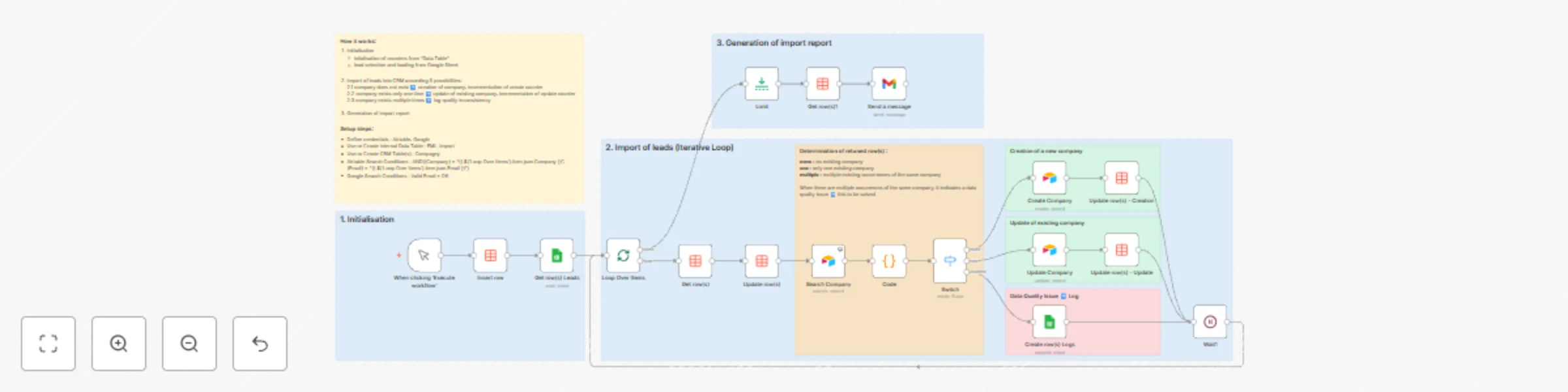
# 🎯General Principles This workflow automates the import of leads into the **Company** table of a CRM built with Airtable. Its originality lies in leveraging the new "**Data Table**" node (an internal table within n8n) to generate an execution report. **📚 Why Data Tables:** This approach eliminates the need for reading/writing operations on a Google Sheet file or an external database. ________________________________________ ## 🧩 It is structured on 3 main key steps: 1. Reading leads for which email address validity has been verified. 2. Creating or updating company information. 3. Generating of execution report. This workflow enables precise tracking of marketing actions while facilitating the historical record of interactions with prospects and clients. ________________________________________ ## Prerequisites ### Leads file: A prior validation check on email address accuracy is required. ### Airtable: Must contain at least a Company table with the following fields: * Company: company name * Business Leader: name of the executive * Activity: business sector (notary, accountant, plumber, electrician, etc.) * Address: main company address * Zip Code: postal code * City: city * Phone Number: phone number * Email: email address of a manager * URL Site: company website URL * Opt-in: company’s consent for commercial prospecting * Campaign: reserved for future marketing campaigns * Valid Email: indicator confirming email verification ________________________________________ ## ⚙️ Step-by-Step Description ### 1️⃣ Initialization and Lead Selection **Data Table Initialization:** An internal n8n table is created to build the execution report. **Lead Selection:** The workflow selects leads from the Google Sheet file (Sheet1 tab) where the condition "Valid Email" is equal to OK. ### 2️⃣ Iterative Loop **Company Existence Check:** The Search Company node is configured with Always Output Data enabled. A JavaScript code node distinguishes three possibilities: 1. Company does not exist: create a new record and increment the created records counter. 2. Company exists once: update the record and increment the updated records counter. 3. Company appears multiple times: log the issue in the Leads file under the Logs tab, requiring a data quality procedure. ### 3️⃣ Execution Report Generation An execution report is generated and emailed, example format: **Leads Import Report:** * Number of records read: 2392 * Number of records created: 2345 * Number of records updated: 42 If the sum of records created and updated differs from the total records read, it indicates **the presence of duplicates**. A counter for duplicated companies could be added. ________________________________________ ## ✅ Benefits of this template * Exception Management and Logging: Identification and traceability of inconsistencies during import with dedicated logs for issues. * Data Quality and Structuring: Built-in checks for duplicate detection, validation, and mapping to ensure accurate analysis and compliance. * Automated Reporting: Systematic production and delivery of a detailed execution report covering records read, created, and updated. ## 📬 Contact Need help customizing this (e.g., expanding Data Tables, connecting multiple surveys, or automating follow-ups)? 📧 [[email protected]]([email protected]) 🔗 [guy.salvatore](https://www.linkedin.com/in/guy-salvatore-3570911a/) 🌐 [smarthome-smartelec.fr](https://smarthome-smartelec.fr)
Automate marketing campaigns with Airtable CRM & Brevo email tracking
# 🎯 General principles This template automates the management of marketing campaign from a CRM based on Airtable, using Brevo for sending and tracking emails. ## 🧩 It is based on two main steps: 1. Sending emails to targeted companies in Airtable, creating an interaction record for each sent email. 2. Real-time tracking of events (email delivered / opened / clicked, unsubscribe request) via a n8n webhook, updating the corresponding interaction or company record. This workflow provides precise tracking of marketing actions and facilitates the history of interactions with prospects or clients. ________________________________________ # Prerequisites ### Airtable with at least 3 tables: * Company: Contains information about your clients or prospects. * Interaction: Log of exchanges and events. * Campaign: Information about the ongoing campaign. ### Brevo: * A predefined email template, which can include a link to a form. * API access for sending and tracking emails. ________________________________________ # ⚙️ Step-by-step description ## 1️⃣ Sending Emails ### Selecting targeted companies The workflow queries the Company table in Airtable, filtering on a tag or a specific field related to the campaign (e.g., Campaign = "1"). ### Preparing data for Brevo For each company, retrieves the necessary information: email address. ### Sending the email via Brevo Uses a Brevo Send Template node with a predefined template. Brevo returns a unique identifier for each email sent. ### Creating an interaction in Airtable A record is added to the Interaction table containing: * Company * Date and time of interaction * Media = email * Brevo email identifier ________________________________________ ## 2️⃣ Tracking Events ### Receiving Brevo events Brevo triggers a webhook to n8n for each event: * Delivered * Opened * Clicked * Unsubscribed ### Matching with the interaction * Based on the Brevo identifier received, the workflow finds the corresponding Interaction in Airtable. ### Updating the interaction * The interaction status is updated based on the event (e.g., "Opened" with date and time). ### Managing unsubscribes In case of an unsubscribe: * The workflow finds the Company associated via the interaction. * A specific field in the Company table (e.g., Opt-in) is updated to "No" in order to exclude this company from future campaigns. ________________________________________ ## ✅ Benefits of this template * Automated sending and real-time tracking. * Interaction history stored in the CRM. * RGPD (European regulations) compliance through automatic unsubscribe management. * Clear view of campaign effectiveness (open rates, clicks, etc.). ### 📬 Contact Need help customizing this (e.g., expanding Data Tables, connecting multiple surveys, or automating follow-ups)? 📧 [[email protected]]([email protected]) 🔗 [guy.salvatore](https://www.linkedin.com/in/guy-salvatore-3570911a/) 🌐 [smarthome-smartelec.fr](https://smarthome-smartelec.fr)