Block 1 - When clicking 'Execute workflow'
- Type / Role
- n8n-nodes-base.manualTrigger - manualTrigger
- Config choices
- Version 1


 Early Deal
This workflow is provided as-is. Please review and test before using in production.
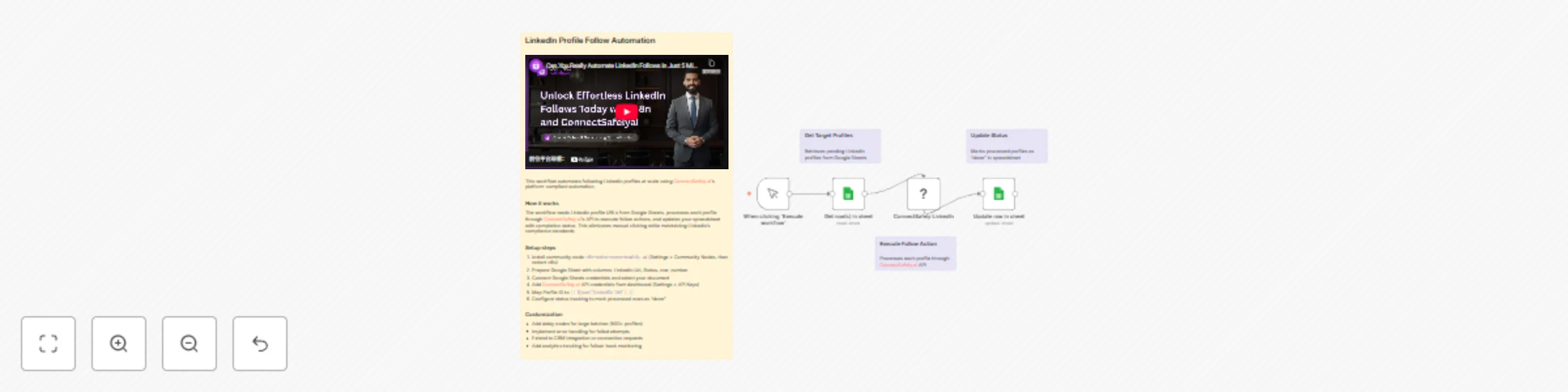
Follow LinkedIn profiles from Google Sheets via ConnectSafely Who's it for This workflow is designed for sales professionals, recruiters, marketers, and business development teams who need to scale...
n8n-nodes-base.manualtrigger, n8n-nodes-base.googlesheets, n8n-nodes-connectsafely-ai.connectsafelylinkedin, n8n-nodes-base.stickynote
This workflow is cataloged by N8N Workflows and links back to its original n8n.io source page by ConnectSafely.
Original n8n.io sourceThis workflow is designed for sales professionals, recruiters, marketers, and business development teams who need to scale their LinkedIn networking efforts. Perfect for anyone managing lead generation campaigns, building industry connections, or conducting competitor research at scale.
The workflow automates LinkedIn profile following by reading a list of target profiles from Google Sheets, processing each profile through ConnectSafely.ai's platform-compliant automation, and tracking completion status back to your spreadsheet. The automation maintains LinkedIn's compliance standards while eliminating manual clicking.
Watch the complete step-by-step implementation guide:
Install the official ConnectSafely.ai community node:
Package name: n8n-nodes-connectsafely.ai
Installation Methods:
Option A: Via n8n Interface
n8n-nodes-connectsafely.aiOption B: Via npm
npm install n8n-nodes-connectsafely.ai
Important: A complete n8n restart is required after installation for the nodes to appear.
Structure your Google Sheet with the following columns:
| Column Name | Description | Required |
|---|---|---|
LinkedIn Url |
LinkedIn profile URL or ID | Yes |
First Name |
Contact's first name | Optional |
Tagline |
Contact's headline/title | Optional |
Status |
Processing status (pending/done) | Yes |
row_number |
Auto-generated row identifier | Yes |
Sample Data Format:
LinkedIn Url: https://www.linkedin.com/in/username
Status: pending
{{ $json['LinkedIn Url'] }}Add a second Google Sheets node for status updates:
row_numberStatus → done{{ $('Get row(s) in sheet').item.json.row_number }}This ensures accurate tracking of processed profiles and enables workflow resumption.
Issue: ConnectSafely node not appearing after installation
Issue: Authentication errors with ConnectSafely API
Issue: Profile ID format errors
Issue: Google Sheets not updating status
row_number column exists and mapping is correctIssue: Workflow stops mid-execution
Status column with "pending" values; verify rate limitsThis workflow can be extended to include:
Stay updated with the latest automation tips, LinkedIn strategies, and platform updates:
Looking to build sophisticated LinkedIn automation workflows tailored to your business needs?
Contact our team for custom automation development, strategy consulting, and enterprise solutions.
We specialize in:
This catalog entry is organized from the workflow JSON. The node-level section below shows the executable blocks available for review before importing the template.
| Workflow | Automate LinkedIn Profile Following with Google Sheets and ConnectSafely |
|---|---|
| Complexity | intermediate |
| Nodes | 8 |
| Categories | Social Media |
| Author | ConnectSafely |
| Published | 21 Nov 2025 |
Use the JSON export at /data/workflows/11068/11068.json as the source template for this automation.
Open n8n, import the downloaded JSON, and review each node before activating the workflow.
Replace placeholder credentials, API keys, webhook URLs, account IDs, and environment-specific values with your own settings.
Run the workflow manually or in a staging workspace, inspect node output, and confirm downstream systems receive the expected data.
Enable the workflow only after testing, then monitor executions, errors, and rate limits during the first production runs.
Review imported nodes carefully before activation. This catalog entry is intended to help you inspect the workflow structure, understand required services, and find related templates faster.
Node names, credentials, schedules, webhook paths, and external service limits may need adjustment for your workspace.
Follow LinkedIn profiles from Google Sheets via ConnectSafely Who's it for This workflow is designed for sales professionals, recruiters, marketers, and business development teams who need to scale...
Review the workflow JSON, configure any required credentials in n8n, and test the automation in a safe workspace before using it in production.
Yes. Use the block-by-block analysis and the downloadable JSON to inspect each node, then adjust credentials, prompts, schedules, filters, or destinations for your Social Media use case.