Automate invoice data extraction from Google Drive to Airtable using Nanonets OCR & Command-R

Workflow preview

Workflow preview
100%
Automate invoice data extraction from Google Drive to Airtable using Nanonets OCR & Command-R preview
Open on n8n.io

Important notice

This workflow is provided as-is. Please review and test before using in production.

1. Workflow Overview

How it works This template creates a fully automated "hands off" pipeline for processing financial documents. It's perfect for small businesses, freelancers, or operations teams who want to stop ma...

Best for

  • Invoice Processing automation workflows
  • AI Summarization automation workflows
  • advanced n8n builders looking for reusable templates

Tools used

n8n-nodes-base.googledrive, n8n-nodes-base.splitinbatches, n8n-nodes-base.set, n8n-nodes-base.noop, @n8n/n8n-nodes-langchain.agent, @n8n/n8n-nodes-langchain.openai, n8n-nodes-base.googledrivetrigger, n8n-nodes-base.airtable

Source and attribution

This workflow is cataloged by N8N Workflows and links back to its original n8n.io source page by Ehsan.

Original n8n.io source

1.1 Workflow description

Title
Automate invoice data extraction from Google Drive to Airtable using Nanonets OCR & Command-R
Workflow name
Automate invoice data extraction from Google Drive to Airtable using Nanonets OCR & Command-R

How it works

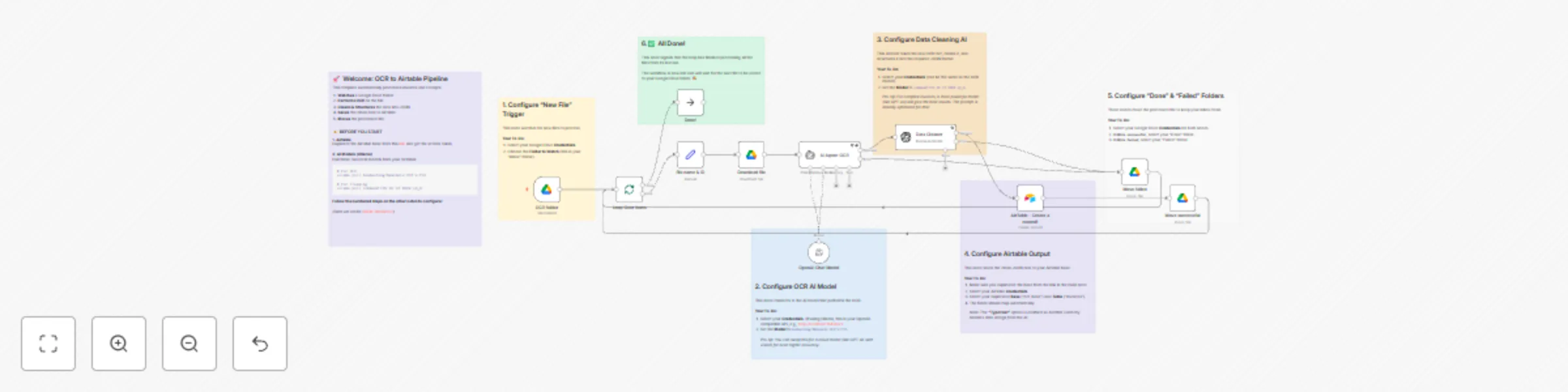
This template creates a fully automated "hands-off" pipeline for processing financial documents. It's perfect for small businesses, freelancers, or operations teams who want to stop manually entering invoice and receipt data.

When you drop a new image/multiple images file into a specific Google Drive folder, this workflow automatically:

  1. Triggers and downloads the new file.
  2. Performs OCR on the file using a local AI model (Nanonets-OCR-s) to extract all the raw text.
  3. Cleans & Structures the raw text using a second local AI model (command-r7b). This step turns messy text into a clean, predictable JSON object.
  4. Saves the structured data (like InvoiceNumber, TotalAmount, IssueDate, etc.) to a new record in your Airtable base.
  5. Moves the original file to a "Done" or "Failed" folder to keep your inbox clean and organized.

Requirements

  • Google Drive Account: For triggering the workflow and storing files.
  • Airtable Account: To store the final, structured data.
  • Ollama (Local AI): This template is designed to run locally for free. You must have Ollama running and pull two models from your terminal:
    • ollama pull benhaotang/Nanonets-OCR-s:F16
    • ollama pull command-r7b:7b-12-2024-q8_0

How to set up

Setup should take about 10-15 minutes. The workflow contains 7 sticky notes that will guide you step-by-step.

  1. Airtable: Use the link in the main sticky note ([1]) to duplicate the Airtable base to your own account.
  2. Ollama: Make sure you have pulled the two required models listed above.
  3. Credentials: You will need to add three credentials in n8n:
    • Your Google Drive (OAuth2) credentials.
    • Your Airtable (Personal Access Token) credentials.
    • Your Ollama credentials. (To do this, create an "OpenAI API" credential, set the Base URL to your local server (e.g., http://localhost:11434/v1), and use ollama as the API Key).
  4. Follow the Notes: Click through the workflow and follow the numbered sticky notes ([1] to [6]) to connect your credentials and select your folders for each node.

How to customize the workflow

  • Use Cloud AI: This template is flexible! You can easily swap the local Ollama models for a cloud provider (like OpenAI's GPT-4o or Anthropic's Claude 3). Just change the credentials and model name in the two AI nodes (OpenAI Chat Model and Data Cleaner).
  • Add More Fields: To extract more data (e.g., SupplierVATNumber), simply add the new field to the prompt in the Data Cleaner node and map it in the AirTable - Create a record1 node.

1.2 Logical Blocks

This catalog entry is organized from the workflow JSON. The node-level section below shows the executable blocks available for review before importing the template.

2. Block-by-Block Analysis

Block 1 - Download file

Type / Role
n8n-nodes-base.googleDrive - googleDrive
Config choices
Version 3

Block 2 - Move failed

Type / Role
n8n-nodes-base.googleDrive - googleDrive
Config choices
Version 3

Block 3 - Move successful

Type / Role
n8n-nodes-base.googleDrive - googleDrive
Config choices
Version 3

Block 4 - Loop Over Items

Type / Role
n8n-nodes-base.splitInBatches - splitInBatches
Config choices
Version 3

Block 5 - file name & ID

Type / Role
n8n-nodes-base.set - set
Config choices
Version 3.4

Block 6 - Done!

Type / Role
n8n-nodes-base.noOp - noOp
Config choices
Version 1

Block 7 - AI Agent-OCR

Type / Role
@n8n/n8n-nodes-langchain.agent - agent
Config choices
Version 2.2

Block 8 - Data Cleaner

Type / Role
@n8n/n8n-nodes-langchain.openAi - openAi
Config choices
Version 1.8

Block 9 - OCR folder

Type / Role
n8n-nodes-base.googleDriveTrigger - googleDriveTrigger
Config choices
Version 1

Block 10 - AirTable - Create a record1

Type / Role
n8n-nodes-base.airtable - airtable
Config choices
Version 2.1

Block 11 - Sticky Note

Type / Role
n8n-nodes-base.stickyNote - stickyNote
Config choices
Version 1

Block 12 - Sticky Note1

Type / Role
n8n-nodes-base.stickyNote - stickyNote
Config choices
Version 1

Block 13 - OpenAI Chat Model

Type / Role
@n8n/n8n-nodes-langchain.lmChatOpenAi - lmChatOpenAi
Config choices
Version 1.2

Block 14 - Sticky Note2

Type / Role
n8n-nodes-base.stickyNote - stickyNote
Config choices
Version 1

Block 15 - Sticky Note3

Type / Role
n8n-nodes-base.stickyNote - stickyNote
Config choices
Version 1

Block 16 - Sticky Note4

Type / Role
n8n-nodes-base.stickyNote - stickyNote
Config choices
Version 1

Block 17 - Sticky Note5

Type / Role
n8n-nodes-base.stickyNote - stickyNote
Config choices
Version 1

Block 18 - Sticky Note6

Type / Role
n8n-nodes-base.stickyNote - stickyNote
Config choices
Version 1

3. Summary Table

Workflow Automate invoice data extraction from Google Drive to Airtable using Nanonets OCR & Command-R
Complexity advanced
Nodes 18
Categories Invoice Processing, AI Summarization
Author Ehsan
Published 01 Nov 2025

4. Reproducing the Workflow from Scratch

  1. 1. Download the workflow JSON

    Use the JSON export at /data/workflows/10405/10405.json as the source template for this automation.

  2. 2. Import the template into n8n

    Open n8n, import the downloaded JSON, and review each node before activating the workflow.

  3. 3. Configure credentials and variables

    Replace placeholder credentials, API keys, webhook URLs, account IDs, and environment-specific values with your own settings.

  4. 4. Test with sample data

    Run the workflow manually or in a staging workspace, inspect node output, and confirm downstream systems receive the expected data.

  5. 5. Activate and monitor

    Enable the workflow only after testing, then monitor executions, errors, and rate limits during the first production runs.

5. General Notes & Resources

Review imported nodes carefully before activation. This catalog entry is intended to help you inspect the workflow structure, understand required services, and find related templates faster.

Node names, credentials, schedules, webhook paths, and external service limits may need adjustment for your workspace.

Frequently asked questions

What does Automate invoice data extraction from Google Drive to Airtable using Nanonets OCR & Command-R do?

How it works This template creates a fully automated "hands off" pipeline for processing financial documents. It's perfect for small businesses, freelancers, or operations teams who want to stop ma...

What do I need before importing this workflow?

Review the workflow JSON, configure any required credentials in n8n, and test the automation in a safe workspace before using it in production.

Can I customize this workflow?

Yes. Use the block-by-block analysis and the downloadable JSON to inspect each node, then adjust credentials, prompts, schedules, filters, or destinations for your Invoice Processing, AI Summarization use case.