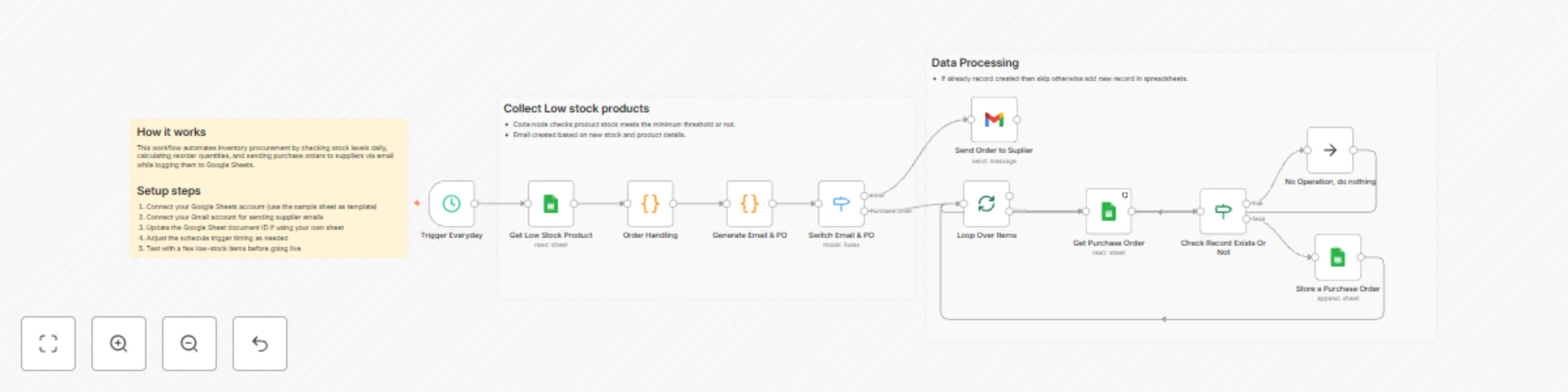
Automate inventory management with Google Sheets & Gmail

Workflow preview

Workflow preview
100%
Automate inventory management with Google Sheets & Gmail preview
Open on n8n.io

Important notice

This workflow is provided as-is. Please review and test before using in production.

1. Workflow Overview

What problem does this workflow solve? Managing inventory manually requires constant monitoring, manual purchase order creation, and back and forth communication with suppliers. This workflow aut...

Best for

  • Miscellaneous automation workflows
  • intermediate n8n builders looking for reusable templates

Tools used

n8n-nodes-base.gmail, n8n-nodes-base.switch, n8n-nodes-base.code, n8n-nodes-base.noop, n8n-nodes-base.splitinbatches, n8n-nodes-base.scheduletrigger, n8n-nodes-base.googlesheets, n8n-nodes-base.if

Source and attribution

This workflow is cataloged by N8N Workflows and links back to its original n8n.io source page by InfyOm Technologies.

Original n8n.io source

1.1 Workflow description

Title
Automate inventory management with Google Sheets & Gmail
Workflow name
Automate inventory management with Google Sheets & Gmail

โœ… What problem does this workflow solve?

Managing inventory manually requires constant monitoring, manual purchase order creation, and back-and-forth communication with suppliers.
This workflow automates the entire inventory replenishment cycle โ€” from detecting low-stock items to generating purchase orders and emailing suppliers automatically.
It ensures accurate stock levels, reduces manual work, and prevents stockouts.


๐Ÿ’ก Main Use Cases

  • ๐Ÿ” Identify low-stock items automatically based on thresholds
  • ๐Ÿ“Š Perform scheduled daily inventory checks
  • ๐Ÿงพ Auto-generate purchase orders for items that need replenishment
  • โœ‰๏ธ Email purchase orders directly to suppliers
  • ๐Ÿ“„ Update Google Sheets with order and inventory tracking information

๐Ÿง  How It Works โ€“ Step-by-Step

1. โฐ Scheduled Trigger

The workflow runs automatically every day (or any chosen interval) to begin inventory checks without manual involvement.


2. ๐Ÿ“‰ Get Low-Stock Items

Reads your Google Sheets inventory file to identify items where current stock < minimum stock threshold.


3. ๐Ÿงฎ Process Each Low-Stock Item

For every item below the # Header 1threshold:

  • Calculates the required order quantity
  • Generates purchase order details, including
    • SKU / Item Name
    • Quantity Needed
    • Supplier Email
    • Stock Levels

4. ๐Ÿ”€ Conditional Flow

For each low-stock item:

Purchase Order Actions
  • Creates a purchase order email using the generated details
  • Sends the PO automatically to the supplier via Gmail
  • Logs the PO entry in Google Sheets with:
    • Item Details
    • Order Quantity
    • Supplier
    • Timestamp
    • Status (โ€œPO Sentโ€)

5. ๐Ÿ“ข Notifications

Sends purchase order emails directly to suppliers.
(Optional) Internal notifications (Slack/email) can be added for procurement visibility.


๐Ÿ“Š Logging & Reporting

All actions โ€” PO creation, stock levels, supplier emails โ€” are written back to Google Sheets for complete auditability and reporting.


๐Ÿ‘ค Who can use this?

Perfect for:

  • Retail & eCommerce businesses
  • Warehouse teams
  • Procurement & purchasing departments
  • Manufacturing operations
  • Any business managing physical inventory

๐Ÿš€ Benefits

  • โฑ Automated stock monitoring
  • ๐Ÿ“ฆ Prevents stockouts
  • โœ‰๏ธ Eliminates manual PO creation
  • ๐Ÿ“š Creates a complete audit trail
  • ๐Ÿง  Smart, rule-based reorder logic

1.2 Logical Blocks

This catalog entry is organized from the workflow JSON. The node-level section below shows the executable blocks available for review before importing the template.

2. Block-by-Block Analysis

Block 1 - Send Order to Suplier

Type / Role
n8n-nodes-base.gmail - gmail
Config choices
Version 2.1

Block 2 - Switch Email & PO

Type / Role
n8n-nodes-base.switch - switch
Config choices
Version 3.2

Block 3 - Generate Email & PO

Type / Role
n8n-nodes-base.code - code
Config choices
Version 2

Block 4 - Order Handling

Type / Role
n8n-nodes-base.code - code
Config choices
Version 2

Block 5 - No Operation, do nothing

Type / Role
n8n-nodes-base.noOp - noOp
Config choices
Version 1

Block 6 - Loop Over Items

Type / Role
n8n-nodes-base.splitInBatches - splitInBatches
Config choices
Version 3

Block 7 - Trigger Everyday

Type / Role
n8n-nodes-base.scheduleTrigger - scheduleTrigger
Config choices
Version 1.2

Block 8 - Get Low Stock Product

Type / Role
n8n-nodes-base.googleSheets - googleSheets
Config choices
Version 4.7

Block 9 - Get Purchase Order

Type / Role
n8n-nodes-base.googleSheets - googleSheets
Config choices
Version 4.7

Block 10 - Check Record Exists Or Not

Type / Role
n8n-nodes-base.if - if
Config choices
Version 2.2

Block 11 - Store a Purchase Order

Type / Role
n8n-nodes-base.googleSheets - googleSheets
Config choices
Version 4.7

Block 12 - Sticky Note

Type / Role
n8n-nodes-base.stickyNote - stickyNote
Config choices
Version 1

Block 13 - Sticky Note1

Type / Role
n8n-nodes-base.stickyNote - stickyNote
Config choices
Version 1

Block 14 - Sticky Note2

Type / Role
n8n-nodes-base.stickyNote - stickyNote
Config choices
Version 1

3. Summary Table

Workflow Automate inventory management with Google Sheets & Gmail
Complexity intermediate
Nodes 14
Categories Miscellaneous
Author InfyOm Technologies
Published 11 Dec 2025

4. Reproducing the Workflow from Scratch

  1. 1. Download the workflow JSON

    Use the JSON export at /data/workflows/11679/11679.json as the source template for this automation.

  2. 2. Import the template into n8n

    Open n8n, import the downloaded JSON, and review each node before activating the workflow.

  3. 3. Configure credentials and variables

    Replace placeholder credentials, API keys, webhook URLs, account IDs, and environment-specific values with your own settings.

  4. 4. Test with sample data

    Run the workflow manually or in a staging workspace, inspect node output, and confirm downstream systems receive the expected data.

  5. 5. Activate and monitor

    Enable the workflow only after testing, then monitor executions, errors, and rate limits during the first production runs.

5. General Notes & Resources

Review imported nodes carefully before activation. This catalog entry is intended to help you inspect the workflow structure, understand required services, and find related templates faster.

Node names, credentials, schedules, webhook paths, and external service limits may need adjustment for your workspace.

Frequently asked questions

What does Automate inventory management with Google Sheets & Gmail do?

What problem does this workflow solve? Managing inventory manually requires constant monitoring, manual purchase order creation, and back and forth communication with suppliers. This workflow aut...

What do I need before importing this workflow?

Review the workflow JSON, configure any required credentials in n8n, and test the automation in a safe workspace before using it in production.

Can I customize this workflow?

Yes. Use the block-by-block analysis and the downloadable JSON to inspect each node, then adjust credentials, prompts, schedules, filters, or destinations for your Miscellaneous use case.