Automate Instagram profile analysis with Airtop scraping and GPT-4o intelligence

Workflow preview

Workflow preview
100%
Automate Instagram profile analysis with Airtop scraping and GPT-4o intelligence preview
Open on n8n.io

Important notice

This workflow is provided as-is. Please review and test before using in production.

1. Workflow Overview

What's up Guys. I'm Luís 🏻‍ ️ If you need to analyze dozens of Instagram profiles every week, this isn't just another automation. It’s your new secret weapon. It’s a fully structured workflow fo...

Best for

  • AI Summarization automation workflows
  • Multimodal AI automation workflows
  • advanced n8n builders looking for reusable templates

Tools used

n8n-nodes-base.airtop, @n8n/n8n-nodes-langchain.outputparserautofixing, @n8n/n8n-nodes-langchain.lmchatopenai, @n8n/n8n-nodes-langchain.outputparserstructured, @n8n/n8n-nodes-langchain.agent, n8n-nodes-base.googlesheetstrigger, n8n-nodes-base.splitinbatches, n8n-nodes-base.googlesheets

Source and attribution

This workflow is cataloged by N8N Workflows and links back to its original n8n.io source page by Luís Philipe Trindade.

Original n8n.io source

1.1 Workflow description

Title
Automate Instagram profile analysis with Airtop scraping and GPT-4o intelligence
Workflow name
Automate Instagram profile analysis with Airtop scraping and GPT-4o intelligence

What's up Guys. I'm Luís 🙋🏻‍♂️

If you need to analyze dozens of Instagram profiles every week, this isn't just another automation. It’s your new secret weapon.

It’s a fully structured workflow for anyone who needs to analyze Instagram profiles at scale, with AI, and keep everything tracked and organized — no manual effort, no copy-paste, and total control over the process.

What this workflow does:

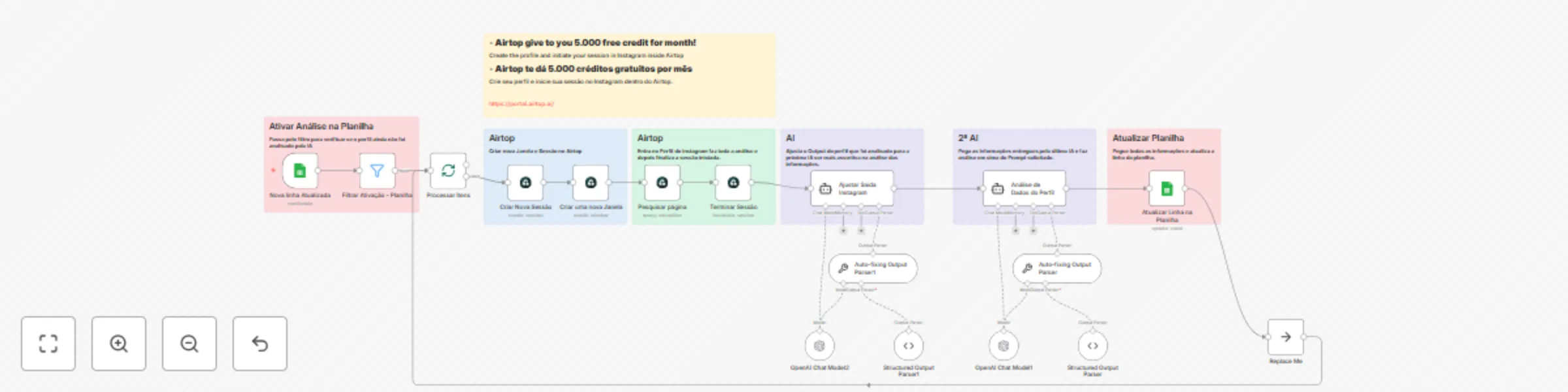
  • Detects when a new or updated Instagram profile appears in Google Sheets
  • Checks if the profile still needs analysis
  • Creates a account in Airtop and after create a session and new window in Airtop for Instagram scraping (Airtop offers 5,000 free credits/month!)
  • Automatically accesses the Instagram profile and scrapes public data
  • Cleans and refines the data with OpenAI (AI) for maximum accuracy
  • Performs a second layer of AI analysis for deep, actionable insights
  • Updates all results and insights directly back into Google Sheets

🧩 How the flow is structured

This workflow is strategically divided into two independent parts to ensure clarity, organization, and easy scalability:

Part 1 – Profile Capture and Data Extraction
  • Triggered by a new/updated row in Google Sheets - Take here your Template of Google Sheets <> [TEMPLATE] - Instagram Profiles
  • Checks if the profile needs analysis
  • Starts a session and new window on Airtop
  • Scrapes the public Instagram data
Part 2 – AI Analysis and Results Delivery
  • Cleans and structures Airtop’s output for AI analysis
  • Uses OpenAI to process and refine the data
  • Applies a second AI prompt for actionable insights
  • Updates Google Sheets with all processed results

This structure makes the flow easier to manage, customize, and scale — plug in other tools without breaking the logic.

Tools used:

Airtop (Instagram scraping & session management)
Google Sheets (database & dashboard)
OpenAI (data parsing, refinement & analysis)

How to set it up:

  • Connect your Google Sheet to the workflow
  • Register on Airtop, get your free credits, and set up your session: https://portal.airtop.ai/
  • Add your Airtop credentials in n8n
  • Add your OpenAI API key
  • (Optional) Customize the AI prompts and sheet logic

Why this workflow stands out:

📊 Fully automated: analyze dozens or hundreds of profiles without manual work
🤖 Double-layer AI analysis for maximum insights
🚀 Built to scale — ideal for agencies, marketing teams, communities, and creators
📝 Everything tracked and accessible in Google Sheets
🔗 Airtop integration: scrape Instagram with zero headache


✅ Works on both n8n Cloud and Self-hosted
🔐 100% secure. No hacks. No shortcuts.

Want to adapt this flow for your business, team, or community?

📩 Custom requests: WhatsApp me at +5534992569346


Português <> PT-BR

Fala, galera! Eu sou o Luís 🙋🏻‍♂️

Se você precisa analisar vários perfis do Instagram por semana, esse não é só mais um fluxo, é uma verdadeira mão na roda.

É uma automação ponta a ponta, feita pra quem analisa perfis do Instagram em escala, com IA, tudo organizado direto na planilha, e sem trabalho manual ou copiar e colar.

O que esse fluxo faz:

  • Detecta quando um novo perfil é cadastrado ou atualizado no Google Sheets
  • Confere se o perfil ainda precisa ser analisado
  • Cria uma nova conta no Airtop e depois Cria uma sessão e uma nova janela no Airtop para buscar dados do Instagram (Airtop libera 5.000 créditos grátis todo mês!)
  • Acessa automaticamente o perfil do Instagram e coleta os dados públicos
  • Limpa e ajusta os dados com a OpenAI para garantir máxima precisão
  • Realiza uma segunda análise com IA para entregar insights profundos
  • Atualiza todos os resultados direto na sua planilha do Google Sheets

🧩 Como o fluxo está estruturado

Esse fluxo foi estrategicamente dividido em duas partes independentes, garantindo clareza, organização e escalabilidade:

Parte 1 – Captura do Perfil e Extração dos Dados
  • Dispara quando um perfil novo ou atualizado aparece na planilha. Pegue aqui o Template da sua planilha. <> [TEMPLATE] - Instagram Profiles
  • Verifica se precisa de análise
  • Inicia sessão e janela nova no Airtop
  • Faz o scraping dos dados públicos do Instagram
Parte 2 – Análise com IA e Entrega dos Resultados
  • Limpa e estrutura a saída do Airtop para análise por IA
  • Usa a OpenAI para processar e refinar os dados
  • Aplica um segundo prompt de IA para gerar diagnósticos e recomendações
  • Atualiza todos os resultados prontos na planilha

Essa estrutura torna o fluxo muito mais fácil de manter, adaptar e escalar — pode integrar novas ferramentas sem bagunçar nada.

Ferramentas utilizadas:

Airtop (raspagem e gerenciamento de sessão do Instagram)
Google Sheets (base e painel de acompanhamento)
OpenAI (tratamento, ajuste e análise via IA)

Como configurar:

  • Conecte sua planilha Google Sheets ao fluxo
  • Cadastre-se no Airtop e ative seus créditos gratuitos: https://portal.airtop.ai/
  • Adicione suas credenciais do Airtop no n8n
  • Coloque sua chave da OpenAI
  • (Opcional) Personalize os prompts da IA e a lógica da planilha

Por que esse fluxo se destaca:

📊 Automação completa: analise dezenas ou centenas de perfis sem esforço manual
🤖 Dupla análise IA para insights de verdade
🚀 Pronto pra escalar — ideal para agências, times de marketing, comunidades e criadores
📝 Tudo rastreado e acessível no Google Sheets
🔗 Integração Airtop: scraping do Instagram sem dor de cabeça


✅ Compatível com n8n Cloud e Self-hosted
🔐 100% seguro. Sem gambiarra. Sem atalhos.

Quer adaptar esse fluxo pro seu negócio, time ou comunidade?

📩 Solicitação personalizada: me chama no WhatsApp +5534992569346


1.2 Logical Blocks

This catalog entry is organized from the workflow JSON. The node-level section below shows the executable blocks available for review before importing the template.

2. Block-by-Block Analysis

Block 1 - Criar Nova Sessão

Type / Role
n8n-nodes-base.airtop - airtop
Config choices
Version 1

Block 2 - Criar uma nova Janela

Type / Role
n8n-nodes-base.airtop - airtop
Config choices
Version 1

Block 3 - Pesquisar página

Type / Role
n8n-nodes-base.airtop - airtop
Config choices
Version 1

Block 4 - Terminar Sessão

Type / Role
n8n-nodes-base.airtop - airtop
Config choices
Version 1

Block 5 - Auto-fixing Output Parser

Type / Role
@n8n/n8n-nodes-langchain.outputParserAutofixing - outputParserAutofixing
Config choices
Version 1

Block 6 - OpenAI Chat Model1

Type / Role
@n8n/n8n-nodes-langchain.lmChatOpenAi - lmChatOpenAi
Config choices
Version 1.2

Block 7 - Structured Output Parser

Type / Role
@n8n/n8n-nodes-langchain.outputParserStructured - outputParserStructured
Config choices
Version 1.2

Block 8 - Auto-fixing Output Parser1

Type / Role
@n8n/n8n-nodes-langchain.outputParserAutofixing - outputParserAutofixing
Config choices
Version 1

Block 9 - OpenAI Chat Model2

Type / Role
@n8n/n8n-nodes-langchain.lmChatOpenAi - lmChatOpenAi
Config choices
Version 1.2

Block 10 - Structured Output Parser1

Type / Role
@n8n/n8n-nodes-langchain.outputParserStructured - outputParserStructured
Config choices
Version 1.2

Block 11 - Ajustar Saída Instagram

Type / Role
@n8n/n8n-nodes-langchain.agent - agent
Config choices
Version 1.9

Block 12 - Análise de Dados do Perfil

Type / Role
@n8n/n8n-nodes-langchain.agent - agent
Config choices
Version 1.9

Block 13 - Nova linha Atualizada

Type / Role
n8n-nodes-base.googleSheetsTrigger - googleSheetsTrigger
Config choices
Version 1

Block 14 - Processar Itens

Type / Role
n8n-nodes-base.splitInBatches - splitInBatches
Config choices
Version 3

Block 15 - Atualizar Linha na Planilha

Type / Role
n8n-nodes-base.googleSheets - googleSheets
Config choices
Version 4.6

Block 16 - Replace Me

Type / Role
n8n-nodes-base.noOp - noOp
Config choices
Version 1

Block 17 - Filtrar Ativação - Planilha

Type / Role
n8n-nodes-base.filter - filter
Config choices
Version 2.2

Block 18 - Sticky Note

Type / Role
n8n-nodes-base.stickyNote - stickyNote
Config choices
Version 1

Block 19 - Sticky Note1

Type / Role
n8n-nodes-base.stickyNote - stickyNote
Config choices
Version 1

Block 20 - Sticky Note2

Type / Role
n8n-nodes-base.stickyNote - stickyNote
Config choices
Version 1

Block 21 - Sticky Note3

Type / Role
n8n-nodes-base.stickyNote - stickyNote
Config choices
Version 1

Block 22 - Sticky Note4

Type / Role
n8n-nodes-base.stickyNote - stickyNote
Config choices
Version 1

Block 23 - Sticky Note5

Type / Role
n8n-nodes-base.stickyNote - stickyNote
Config choices
Version 1

Block 24 - Sticky Note6

Type / Role
n8n-nodes-base.stickyNote - stickyNote
Config choices
Version 1

3. Summary Table

Workflow Automate Instagram profile analysis with Airtop scraping and GPT-4o intelligence
Complexity advanced
Nodes 24
Categories AI Summarization, Multimodal AI
Author Luís Philipe Trindade
Published 17 Aug 2025

4. Reproducing the Workflow from Scratch

  1. 1. Download the workflow JSON

    Use the JSON export at /data/workflows/7481/7481.json as the source template for this automation.

  2. 2. Import the template into n8n

    Open n8n, import the downloaded JSON, and review each node before activating the workflow.

  3. 3. Configure credentials and variables

    Replace placeholder credentials, API keys, webhook URLs, account IDs, and environment-specific values with your own settings.

  4. 4. Test with sample data

    Run the workflow manually or in a staging workspace, inspect node output, and confirm downstream systems receive the expected data.

  5. 5. Activate and monitor

    Enable the workflow only after testing, then monitor executions, errors, and rate limits during the first production runs.

5. General Notes & Resources

Review imported nodes carefully before activation. This catalog entry is intended to help you inspect the workflow structure, understand required services, and find related templates faster.

Node names, credentials, schedules, webhook paths, and external service limits may need adjustment for your workspace.

Frequently asked questions

What does Automate Instagram profile analysis with Airtop scraping and GPT-4o intelligence do?

What's up Guys. I'm Luís 🏻‍ ️ If you need to analyze dozens of Instagram profiles every week, this isn't just another automation. It’s your new secret weapon. It’s a fully structured workflow fo...

What do I need before importing this workflow?

Review the workflow JSON, configure any required credentials in n8n, and test the automation in a safe workspace before using it in production.

Can I customize this workflow?

Yes. Use the block-by-block analysis and the downloadable JSON to inspect each node, then adjust credentials, prompts, schedules, filters, or destinations for your AI Summarization, Multimodal AI use case.