Block 1 - Sticky Note1
- Type / Role
- n8n-nodes-base.stickyNote - stickyNote
- Config choices
- Version 1


 Early Deal
This workflow is provided as-is. Please review and test before using in production.
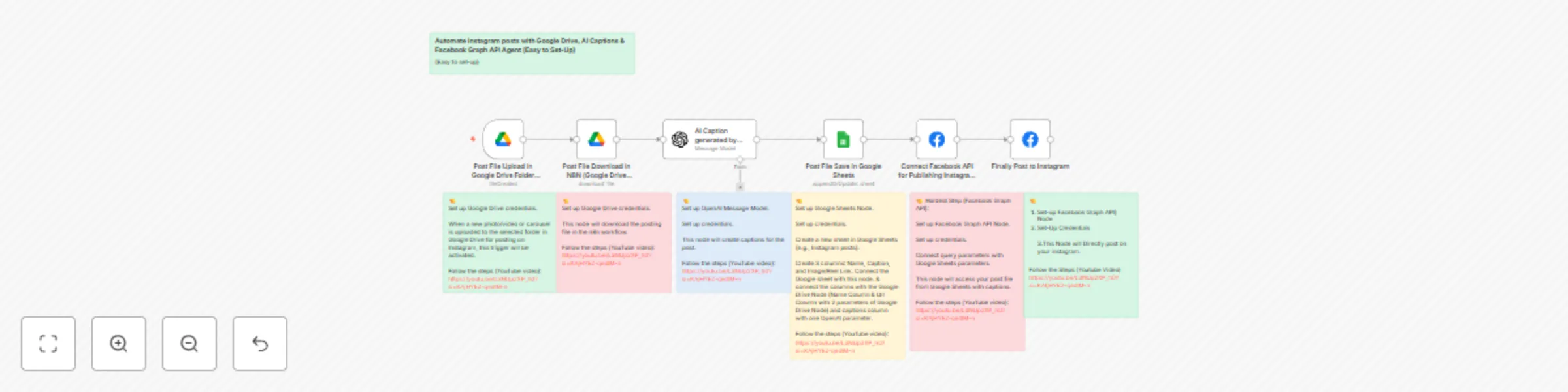
This template streamlines your Instagram content posting workflow by connecting Google Drive for image storage, using OpenAI for AI generated captions, and leveraging Facebook Graph API for automat...
n8n-nodes-base.stickynote, n8n-nodes-base.facebookgraphapi, n8n-nodes-base.googledrivetrigger, n8n-nodes-base.googledrive, @n8n/n8n-nodes-langchain.openai, n8n-nodes-base.googlesheets
This workflow is cataloged by N8N Workflows and links back to its original n8n.io source page by Sagar.
Original n8n.io sourceThis template streamlines your Instagram content posting workflow by connecting Google Drive for image storage, using OpenAI for AI-generated captions, and leveraging Facebook Graph API for automated publishing.
Pre-requisites Before setting up this workflow, ensure you have:
A Google account with access to Google Drive
An OpenAI API key for AI caption generation
A Facebook Developer account with Instagram Graph API access
An Instagram Business or Creator account connected to a Facebook Page
n8n.io account with workflow access
Setup Instructions
Name: Filename of your image in Google Drive
Caption: Optional custom caption (leave empty for AI-generated captions)
URL: your Video Reel or Image in Google Drive
Specify the folder path where your Instagram image/Video are stored
Configure the node to retrieve image files based on filenames from your Google Sheet
Configure the OpenAI node to generate engaging captions based on image content
Adjust temperature and model parameters for desired creativity level
Set up the Facebook Graph API node to post to your Instagram Business/Creator account
Ensure proper image formatting (1:1, 4:5, or 16:9 aspect ratios supported by Instagram)
Set up error handling to notify you of any posting failures
Add conditional nodes to use either custom or AI-generated captions
Execution Instructions After completing all connections, test the workflow with a single image
Monitor the execution in the n8n dashboard to ensure proper functioning
View the "Executions" tab to track successful posts and troubleshoot any errors
Adjust posting frequency and scheduling as needed
This template saves hours of manual Instagram posting work while maintaining an authentic presence. Perfect for social media managers, content creators, and businesses looking to maintain consistent Instagram activity without the daily manual effort.
The workflow handles image retrieval, caption generation or customization, proper Instagram API formatting, scheduled posting, and execution tracking - all in one automated solution.
This catalog entry is organized from the workflow JSON. The node-level section below shows the executable blocks available for review before importing the template.
| Workflow | Automate Instagram posts with Google Drive, AI captions & Facebook API |
|---|---|
| Complexity | intermediate |
| Nodes | 13 |
| Categories | Social Media, Multimodal AI |
| Author | Sagar |
| Published | 08 Apr 2025 |
Use the JSON export at /data/workflows/3478/3478.json as the source template for this automation.
Open n8n, import the downloaded JSON, and review each node before activating the workflow.
Replace placeholder credentials, API keys, webhook URLs, account IDs, and environment-specific values with your own settings.
Run the workflow manually or in a staging workspace, inspect node output, and confirm downstream systems receive the expected data.
Enable the workflow only after testing, then monitor executions, errors, and rate limits during the first production runs.
Review imported nodes carefully before activation. This catalog entry is intended to help you inspect the workflow structure, understand required services, and find related templates faster.
Node names, credentials, schedules, webhook paths, and external service limits may need adjustment for your workspace.
This template streamlines your Instagram content posting workflow by connecting Google Drive for image storage, using OpenAI for AI generated captions, and leveraging Facebook Graph API for automat...
Review the workflow JSON, configure any required credentials in n8n, and test the automation in a safe workspace before using it in production.
Yes. Use the block-by-block analysis and the downloadable JSON to inspect each node, then adjust credentials, prompts, schedules, filters, or destinations for your Social Media, Multimodal AI use case.