Block 1 - Schedule Trigger
- Type / Role
- n8n-nodes-base.cron - cron
- Config choices
- Version 1


 Early Deal
This workflow is provided as-is. Please review and test before using in production.
This enterprise grade n8n workflow automates influencer contract compliance for Instagram campaigns — from deadline tracking to breach detection — using Claude AI , Instagram API, and smart reminde...
n8n-nodes-base.cron, n8n-nodes-base.googlesheets, n8n-nodes-base.splitinbatches, n8n-nodes-base.code, n8n-nodes-base.if, n8n-nodes-base.slack, n8n-nodes-base.httprequest, n8n-nodes-base.set
This workflow is cataloged by N8N Workflows and links back to its original n8n.io source page by Oneclick AI Squad.
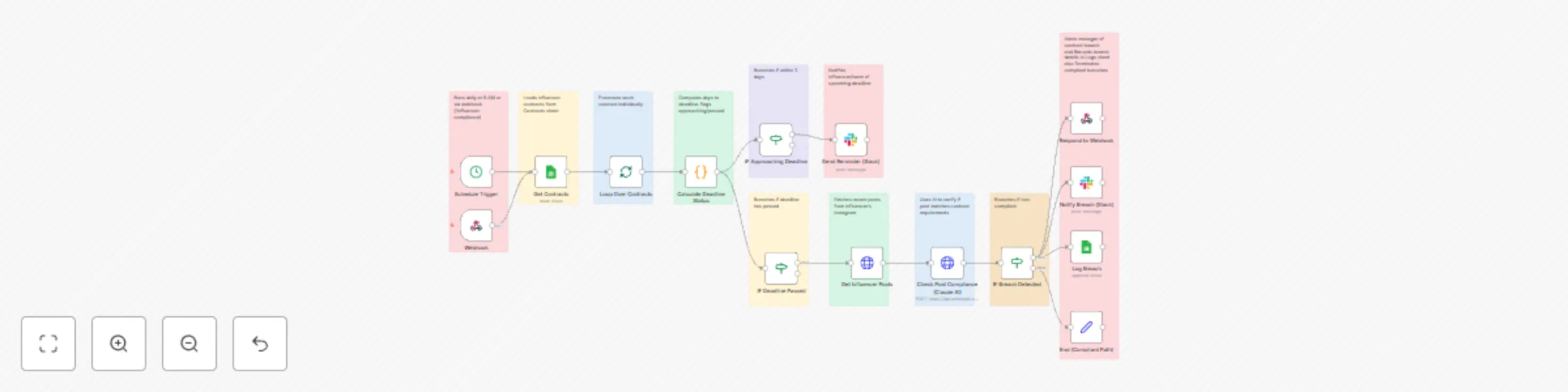
Original n8n.io sourceThis enterprise-grade n8n workflow automates influencer contract compliance for Instagram campaigns — from deadline tracking to breach detection — using Claude AI, Instagram API, and smart reminders. It ensures timely deliverables by monitoring posts, sending proactive alerts, and escalating breaches, all with zero manual oversight.
| Step | Node | Description |
|---|---|---|
| 1 | Schedule Trigger | Runs daily at 9 AM or via webhook (/influencer-compliance) |
| 2 | Get Contracts | Loads influencer contracts from Contracts sheet |
| 3 | Loop Over Contracts | Processes each contract individually |
| 4 | Calculate Deadline Status | Computes days to deadline, flags approaching/passed |
| 5 | IF Approaching Deadline | Branches if within 3 days |
| 6 | Send Reminder (Slack) | Notifies influencer/team of upcoming deadline |
| 7 | IF Deadline Passed | Branches if deadline has passed |
| 8 | Get Influencer Posts | Fetches recent posts from influencer's Instagram |
| 9 | Check Post Compliance (Claude AI) | Uses AI to verify if post matches contract requirements |
| 10 | IF Breach Detected | Branches if non-compliant |
| 11 | Notify Breach (Slack) | Alerts manager of contract breach |
| 12 | Log Breach | Records breach details in Logs sheet |
| 13 | End (Compliant Path) | Terminates compliant branches |
| Integration | Details |
|---|---|
| Google Sheets | Service account with spreadsheet access |
| Instagram API | Business access token for fetching media |
| Claude AI | Anthropic API key for claude-3-5-sonnet-20241022 |
| Slack | Webhook or OAuth app |
Ensure your Google Sheets include:
ContractsLogs/webhook/influencer-compliance (for real-time updates)Use manual execution to confirm:
| campaignId | influencerName | influencerUserId | deadline | requiredHashtag | campaignDescription |
|---|---|---|---|---|---|
| CAMP-001 | InfluencerX | 1234567890 | 2023-12-31 | #BrandPromo | Promote new product |
| campaignId | influencerName | action | timestamp | details |
|---|---|---|---|---|
| CAMP-001 | InfluencerX | Breach Detected | 2023-10-01T12:00:00Z | Failed to post by deadline |
| Requirement | Version/Access |
|---|---|
| n8n | v1.50+ (AI and API integrations supported) |
| Claude AI API | claude-3-5-sonnet-20241022 |
| Instagram Graph API | Business account access token |
| Google Sheets API | https://www.googleapis.com/auth/spreadsheets |
| Slack Webhook | Required for notifications |
Result: A single automated system that tracks, reminds, and enforces influencer deliverables — with full AI verification and zero manual work.
Get in touch with us for custom n8n automation!
This catalog entry is organized from the workflow JSON. The node-level section below shows the executable blocks available for review before importing the template.
Showing the first 24 of 26 workflow blocks. Download the JSON for the full node graph.
| Workflow | Automate Instagram influencer contract compliance with Claude AI & Slack alerts |
|---|---|
| Complexity | advanced |
| Nodes | 26 |
| Categories | Social Media, AI Summarization |
| Author | Oneclick AI Squad |
| Published | 30 Oct 2025 |
Use the JSON export at /data/workflows/10333/10333.json as the source template for this automation.
Open n8n, import the downloaded JSON, and review each node before activating the workflow.
Replace placeholder credentials, API keys, webhook URLs, account IDs, and environment-specific values with your own settings.
Run the workflow manually or in a staging workspace, inspect node output, and confirm downstream systems receive the expected data.
Enable the workflow only after testing, then monitor executions, errors, and rate limits during the first production runs.
Review imported nodes carefully before activation. This catalog entry is intended to help you inspect the workflow structure, understand required services, and find related templates faster.
Node names, credentials, schedules, webhook paths, and external service limits may need adjustment for your workspace.
This enterprise grade n8n workflow automates influencer contract compliance for Instagram campaigns — from deadline tracking to breach detection — using Claude AI , Instagram API, and smart reminde...
Review the workflow JSON, configure any required credentials in n8n, and test the automation in a safe workspace before using it in production.
Yes. Use the block-by-block analysis and the downloadable JSON to inspect each node, then adjust credentials, prompts, schedules, filters, or destinations for your Social Media, AI Summarization use case.