Block 1 - Unnamed node
- Type / Role
- n8n-nodes-base.stickyNote - stickyNote
- Config choices
- Version 1


 Early Deal
This workflow is provided as-is. Please review and test before using in production.
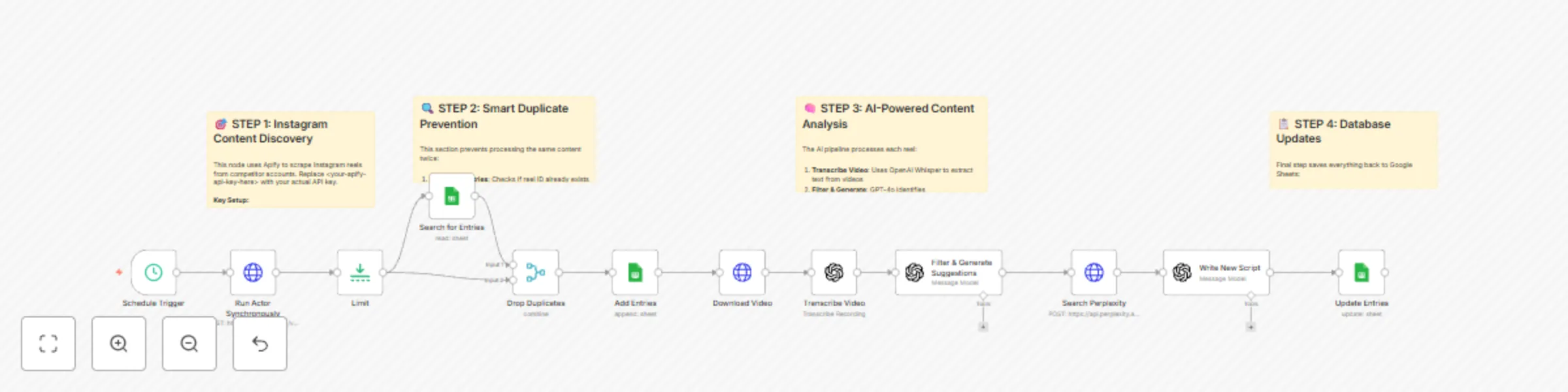
This workflow creates an end to end Instagram content pipeline that automatically discovers trending content from competitor channels, extracts valuable insights, and generates new high quality scr...
n8n-nodes-base.stickynote, n8n-nodes-base.httprequest, n8n-nodes-base.limit, @n8n/n8n-nodes-langchain.openai, n8n-nodes-base.googlesheets, n8n-nodes-base.merge, n8n-nodes-base.scheduletrigger
This workflow is cataloged by N8N Workflows and links back to its original n8n.io source page by Nick Saraev.
Original n8n.io sourceThis workflow creates an end-to-end Instagram content pipeline that automatically discovers trending content from competitor channels, extracts valuable insights, and generates new high-quality scripts for your own content creation. The system helped scale an Instagram channel from 0 to 10,000 followers in just 15 days through intelligent content repurposing.
Benefits:
How It Works:
Required Google Sheets Database Setup: Before running this workflow, create a Google Sheets database with these exact column headers: Essential Columns:
id - Unique Instagram post identifier (primary key for duplicate detection) timestamp - When the reel was posted caption - Original reel caption text hashtags - Hashtags used in the post videoUrl - Direct link to download the video file username - Account that posted the reel scrapedTranscript - Original transcript from video (added by workflow) newTranscript - AI-generated script for your content (added by workflow)
Additional Tracking Columns:
shortCode - Instagram's internal post code url - Public Instagram post URL commentsCount - Number of comments firstComment - Top comment on the post likesCount - Number of likes videoViewCount - View count metrics videoDuration - Length of video in seconds
Setup Instructions:
Create a new Google Sheet with these column headers in the first row Name the sheet "Reels" Connect your Google Sheets OAuth credentials in n8n Update the document ID in the workflow nodes
The merge logic relies on the id column to prevent duplicate processing, so this structure is essential for the workflow to function correctly.
Business Use Cases:
Revenue Potential:
This exact system can be sold as a service for $3,000-$5,000 to growing channels or agencies. The automation saves 10+ hours weekly of manual research and content planning.
Watch the Complete Build Process
Want to see exactly how this system was built from scratch? Nick Saraev walks through the entire development process in this comprehensive tutorial, including all the debugging, dead ends, and problem-solving that goes into building real automation systems.
🎥 Watch: "The N8N Instagram Parasite System (10K Followers In 15 Days)"
This 1.5-hour deep-dive shows the actual build process - not a polished demo, but real system development with all the thinking and iteration included.
Set Up Steps:
More AI Automation Systems: For more advanced automation tutorials and business systems, check out My YouTube Channel where I share proven automation strategies that generate real revenue.
This catalog entry is organized from the workflow JSON. The node-level section below shows the executable blocks available for review before importing the template.
| Workflow | Automate Instagram content discovery & repurposing w/ Apify, GPT-4o & Perplexity |
|---|---|
| Complexity | advanced |
| Nodes | 16 |
| Categories | Content Creation, Multimodal AI |
| Author | Nick Saraev |
| Published | 04 Jun 2025 |
Use the JSON export at /data/workflows/4658/4658.json as the source template for this automation.
Open n8n, import the downloaded JSON, and review each node before activating the workflow.
Replace placeholder credentials, API keys, webhook URLs, account IDs, and environment-specific values with your own settings.
Run the workflow manually or in a staging workspace, inspect node output, and confirm downstream systems receive the expected data.
Enable the workflow only after testing, then monitor executions, errors, and rate limits during the first production runs.
Review imported nodes carefully before activation. This catalog entry is intended to help you inspect the workflow structure, understand required services, and find related templates faster.
Node names, credentials, schedules, webhook paths, and external service limits may need adjustment for your workspace.
This workflow creates an end to end Instagram content pipeline that automatically discovers trending content from competitor channels, extracts valuable insights, and generates new high quality scr...
Review the workflow JSON, configure any required credentials in n8n, and test the automation in a safe workspace before using it in production.
Yes. Use the block-by-block analysis and the downloadable JSON to inspect each node, then adjust credentials, prompts, schedules, filters, or destinations for your Content Creation, Multimodal AI use case.