Block 1 - Schedule Trigger
- Type / Role
- n8n-nodes-base.cron - cron
- Config choices
- Version 1


 Early Deal
This workflow is provided as-is. Please review and test before using in production.
This enterprise grade n8n workflow automates the Instagram complaint handling process — from detection to resolution — using Claude AI , dynamic ticket assignment, and SLA enforcement. It converts ...
n8n-nodes-base.cron, n8n-nodes-base.httprequest, n8n-nodes-base.splitinbatches, n8n-nodes-base.set, n8n-nodes-base.if, n8n-nodes-base.googlesheets, n8n-nodes-base.slack, n8n-nodes-base.wait
This workflow is cataloged by N8N Workflows and links back to its original n8n.io source page by Oneclick AI Squad.
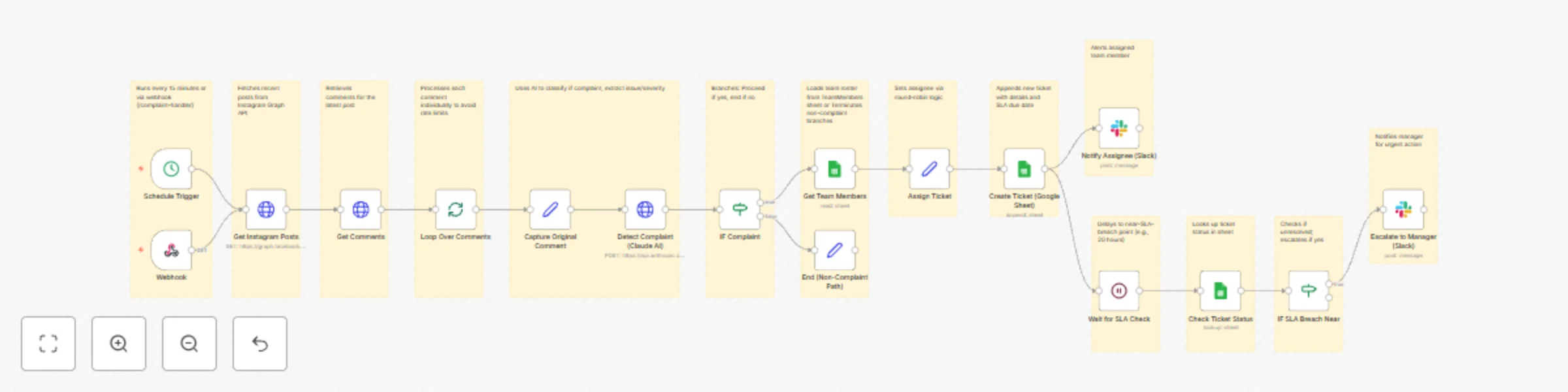
Original n8n.io sourceThis enterprise-grade n8n workflow automates the Instagram complaint handling process — from detection to resolution — using Claude AI, dynamic ticket assignment, and SLA enforcement. It converts customer complaints in comments into actionable support tickets with auto-assignment, escalation alerts, and full audit trails, ensuring timely responses and improved customer satisfaction with zero manual intervention.
| Step | Node | Description |
|---|---|---|
| 1 | Schedule Trigger | Runs every 15 minutes or via webhook (/complaint-handler) |
| 2 | Get Instagram Posts | Fetches recent posts from Instagram Graph API |
| 3 | Get Comments | Retrieves comments for the latest post |
| 4 | Loop Over Comments | Processes each comment individually to avoid rate limits |
| 5 | Detect Complaint (Claude AI) | Uses AI to classify if complaint, extract issue/severity |
| 6 | IF Complaint | Branches: Proceed if yes, end if no |
| 7 | Get Team Members | Loads team roster from TeamMembers sheet |
| 8 | Assign Ticket | Sets assignee via round-robin logic |
| 9 | Create Ticket (Google Sheet) | Appends new ticket with details and SLA due date |
| 10 | Notify Assignee (Slack) | Alerts assigned team member |
| 11 | Wait for SLA Check | Delays to near-SLA-breach point (e.g., 20 hours) |
| 12 | Check Ticket Status | Looks up ticket status in sheet |
| 13 | IF SLA Breach Near | Checks if unresolved; escalates if yes |
| 14 | Escalate to Manager (Slack) | Notifies manager for urgent action |
| 15 | End (Non-Complaint Path) | Terminates non-complaint branches |
| Integration | Details |
|---|---|
| Instagram API | Access token from Facebook Developer Portal |
| Claude AI | Anthropic API key for claude-3-5-sonnet-20241022 |
| Google Sheets | Service account with spreadsheet access |
| Slack | Webhook or OAuth app |
Ensure your Google Sheets include:
SupportTicketsTeamMembers/webhook/complaint-handler (for real-time Instagram notifications if set up)Use manual execution to confirm:
| ticketId | commentText | user | createdAt | assignedTo | status | slaDue | issueType | severity |
|---|---|---|---|---|---|---|---|---|
| TKT-12345678 | Sample complaint text | user123 | 2023-10-01T12:00:00Z | [email protected] | Open | 2023-10-02T12:00:00Z | Product Issue | Medium |
| name | |
|---|---|
| John Doe | [email protected] |
| Jane Smith | [email protected] |
| Requirement | Version/Access |
|---|---|
| n8n | v1.50+ (AI integrations supported) |
| Claude AI API | claude-3-5-sonnet-20241022 |
| Instagram Graph API | Business account access token |
| Google Sheets API | https://www.googleapis.com/auth/spreadsheets |
| Slack Webhook | Required for notifications |
Result: A single automated system that detects, tickets, assigns, and enforces SLAs on Instagram complaints — with full AI intelligence and zero manual work.
Explore More AI Workflows: Get in touch with us for custom n8n automation!
This catalog entry is organized from the workflow JSON. The node-level section below shows the executable blocks available for review before importing the template.
Showing the first 24 of 31 workflow blocks. Download the JSON for the full node graph.
| Workflow | Automate Instagram complaint handling with Claude AI, tickets & SLA management |
|---|---|
| Complexity | advanced |
| Nodes | 31 |
| Categories | Ticket Management, AI Summarization |
| Author | Oneclick AI Squad |
| Published | 30 Oct 2025 |
Use the JSON export at /data/workflows/10324/10324.json as the source template for this automation.
Open n8n, import the downloaded JSON, and review each node before activating the workflow.
Replace placeholder credentials, API keys, webhook URLs, account IDs, and environment-specific values with your own settings.
Run the workflow manually or in a staging workspace, inspect node output, and confirm downstream systems receive the expected data.
Enable the workflow only after testing, then monitor executions, errors, and rate limits during the first production runs.
Review imported nodes carefully before activation. This catalog entry is intended to help you inspect the workflow structure, understand required services, and find related templates faster.
Node names, credentials, schedules, webhook paths, and external service limits may need adjustment for your workspace.
This enterprise grade n8n workflow automates the Instagram complaint handling process — from detection to resolution — using Claude AI , dynamic ticket assignment, and SLA enforcement. It converts ...
Review the workflow JSON, configure any required credentials in n8n, and test the automation in a safe workspace before using it in production.
Yes. Use the block-by-block analysis and the downloadable JSON to inspect each node, then adjust credentials, prompts, schedules, filters, or destinations for your Ticket Management, AI Summarization use case.