Automate Instagram comment replies with OpenAI and Redis tracking

Workflow preview

Workflow preview
100%
Automate Instagram comment replies with OpenAI and Redis tracking preview
Open on n8n.io

Important notice

This workflow is provided as-is. Please review and test before using in production.

1. Workflow Overview

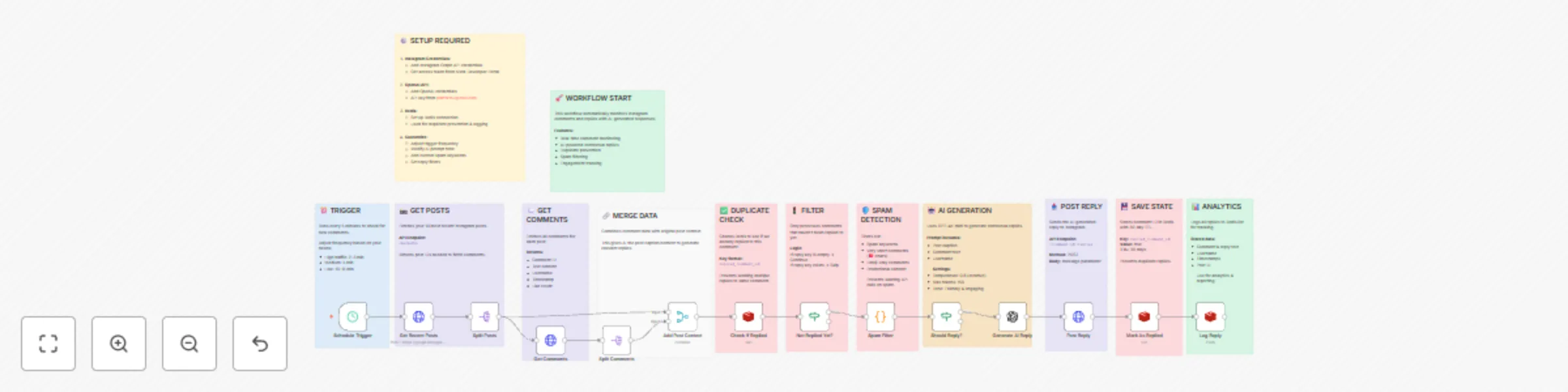
This workflow automatically replies to new comments on your Instagram posts using smart AI. It checks your recent posts, finds unread comments, and skips spam or duplicates. The AI reads the post a...

Best for

  • Social Media automation workflows
  • Multimodal AI automation workflows
  • advanced n8n builders looking for reusable templates

Tools used

n8n-nodes-base.stickynote, n8n-nodes-base.scheduletrigger, n8n-nodes-base.httprequest, n8n-nodes-base.splitout, n8n-nodes-base.merge, n8n-nodes-base.redis, n8n-nodes-base.if, n8n-nodes-base.code

Source and attribution

This workflow is cataloged by N8N Workflows and links back to its original n8n.io source page by Oneclick AI Squad.

Original n8n.io source

1.1 Workflow description

Title
Automate Instagram comment replies with OpenAI and Redis tracking
Workflow name
Automate Instagram comment replies with OpenAI and Redis tracking

This workflow automatically replies to new comments on your Instagram posts using smart AI.
It checks your recent posts, finds unread comments, and skips spam or duplicates.
The AI reads the post and comments to create a friendly, natural reply with emojis.
It posts the reply instantly and logs everything so you can track engagement.
Perfect for busy creators — stays active 24/7 without you lifting a finger!

What It Monitors

  • Recent Instagram Posts: Fetches the latest posts based on your account activity.
  • New Comments: Detects unreplied comments in real time.
  • Reply Eligibility: Filters spam, duplicates, and already replied comments.
  • AI-Generated Responses: Creates personalized, engaging replies using post context.

Features

  • Runs on a schedule trigger (High traffic: 2–3 min | Medium: 5 min | Low: 10+ min).
  • Fetches recent posts and their comments via Instagram Graph API.
  • Context-aware AI replies using post caption + comment content.
  • Spam & duplicate filtering to avoid unwanted or repeated replies.
  • Tone-friendly & emoji-rich responses for higher engagement.
  • Logs every reply with metadata (post ID, comment ID, timestamp).

Workflow Steps

Node Name Description
Schedule Trigger Triggers workflow based on traffic level (2–10 min intervals).
Get Recent Posts Fetches recent posts using Instagram Graph API. Returns post IDs needed to fetch comments.
Split Posts Splits batch of posts into individual items for parallel processing.
Get Comments For each post, retrieves comments with content, username, timestamp, like count.
Split Comments Splits comments into individual items for granular processing.
Add Post Context Combines comment + original post caption to generate relevant replies.
Check if Replied Checks if AI has already replied to this comment (prevents duplicate replies).
Not Replied Yet? Routes only unreplied comments forward.
Spam Filter Filters out spam using:
• Spam keywords
• Empty/one-word comments
• Excessive emojis
• Known spam patterns
Should Reply? Final logic gate:
• If reply key exists → Skip
• If spam → Skip
• Else → Proceed
Generate AI Reply Uses OpenAI (or compatible LLM):
• Input: Post caption + comment
• Tone: Friendly & engaging
• Max tokens: 150
• Temperature: 0.8 (creative)
Post Reply Posts AI-generated reply via Instagram API:
• Method: POST
• Body: message parameter
• TTL: 30 days
Mark As Replied Updates internal tracking to prevent duplicate replies.
Log Reply Logs full reply details:
• Post ID
• Comment ID
• Username
• Reply text
• Timestamp
• Used for analytics & reporting

How to Use

  1. Copy the JSON configuration of the workflow.
  2. Import it into your n8n workspace.
  3. Configure Instagram Graph API credentials (Business/Creator Account required).
  4. Set up OpenAI API key in the Generate AI Reply node.
  5. Activate the workflow.
  6. Monitor replies in Instagram and execution logs in n8n.

> The bot will only reply once per comment, skip spam, and use full post context for natural responses.


Requirements

  • n8n account and self-hosted or cloud instance.
  • Instagram Business or Creator Account with Graph API access.
  • Facebook App with pages_read_engagement, pages_manage_comments permissions.
  • OpenAI API key (or compatible LLM endpoint).
  • Valid access token with long-lived permissions.

Customizing this Workflow

  • Change Schedule Trigger interval based on post frequency (e.g., every 1 min for viral accounts).
  • Update Spam Filter keywords list for brand-specific spam patterns.
  • Modify Generate AI Reply prompt to match your brand voice (e.g., formal, humorous, Gen-Z).
  • Adjust Temperature (0.5 = consistent, 1.0 = creative) and Max Tokens.
  • Replace OpenAI with Claude, Gemini, or local LLM via HTTP request.
  • Add approval step (manual review) before posting replies.
  • Export logs to Google Sheets, Airtable, or database for analytics.

Explore More AI Workflows: https://www.oneclickitsolution.com/contact-us/

1.2 Logical Blocks

This catalog entry is organized from the workflow JSON. The node-level section below shows the executable blocks available for review before importing the template.

2. Block-by-Block Analysis

Block 1 - Sticky Note

Type / Role
n8n-nodes-base.stickyNote - stickyNote
Config choices
Version 1

Block 2 - Schedule Trigger

Type / Role
n8n-nodes-base.scheduleTrigger - scheduleTrigger
Config choices
Version 1

Block 3 - Sticky Note1

Type / Role
n8n-nodes-base.stickyNote - stickyNote
Config choices
Version 1

Block 4 - Get Recent Posts

Type / Role
n8n-nodes-base.httpRequest - httpRequest
Config choices
Version 4.1

Block 5 - Sticky Note2

Type / Role
n8n-nodes-base.stickyNote - stickyNote
Config choices
Version 1

Block 6 - Split Posts

Type / Role
n8n-nodes-base.splitOut - splitOut
Config choices
Version 1

Block 7 - Get Comments

Type / Role
n8n-nodes-base.httpRequest - httpRequest
Config choices
Version 4.1

Block 8 - Sticky Note3

Type / Role
n8n-nodes-base.stickyNote - stickyNote
Config choices
Version 1

Block 9 - Split Comments

Type / Role
n8n-nodes-base.splitOut - splitOut
Config choices
Version 1

Block 10 - Add Post Context

Type / Role
n8n-nodes-base.merge - merge
Config choices
Version 2.1

Block 11 - Sticky Note4

Type / Role
n8n-nodes-base.stickyNote - stickyNote
Config choices
Version 1

Block 12 - Check If Replied

Type / Role
n8n-nodes-base.redis - redis
Config choices
Version 1

Block 13 - Sticky Note5

Type / Role
n8n-nodes-base.stickyNote - stickyNote
Config choices
Version 1

Block 14 - Not Replied Yet?

Type / Role
n8n-nodes-base.if - if
Config choices
Version 1

Block 15 - Sticky Note6

Type / Role
n8n-nodes-base.stickyNote - stickyNote
Config choices
Version 1

Block 16 - Spam Filter

Type / Role
n8n-nodes-base.code - code
Config choices
Version 2

Block 17 - Sticky Note7

Type / Role
n8n-nodes-base.stickyNote - stickyNote
Config choices
Version 1

Block 18 - Should Reply?

Type / Role
n8n-nodes-base.if - if
Config choices
Version 1

Block 19 - Generate AI Reply

Type / Role
@n8n/n8n-nodes-langchain.openAi - openAi
Config choices
Version 1.3

Block 20 - Sticky Note8

Type / Role
n8n-nodes-base.stickyNote - stickyNote
Config choices
Version 1

Block 21 - Post Reply

Type / Role
n8n-nodes-base.httpRequest - httpRequest
Config choices
Version 4.1

Block 22 - Sticky Note9

Type / Role
n8n-nodes-base.stickyNote - stickyNote
Config choices
Version 1

Block 23 - Mark As Replied

Type / Role
n8n-nodes-base.redis - redis
Config choices
Version 1

Block 24 - Sticky Note10

Type / Role
n8n-nodes-base.stickyNote - stickyNote
Config choices
Version 1

Showing the first 24 of 27 workflow blocks. Download the JSON for the full node graph.

3. Summary Table

Workflow Automate Instagram comment replies with OpenAI and Redis tracking
Complexity advanced
Nodes 27
Categories Social Media, Multimodal AI
Author Oneclick AI Squad
Published 30 Oct 2025

4. Reproducing the Workflow from Scratch

  1. 1. Download the workflow JSON

    Use the JSON export at /data/workflows/10307/10307.json as the source template for this automation.

  2. 2. Import the template into n8n

    Open n8n, import the downloaded JSON, and review each node before activating the workflow.

  3. 3. Configure credentials and variables

    Replace placeholder credentials, API keys, webhook URLs, account IDs, and environment-specific values with your own settings.

  4. 4. Test with sample data

    Run the workflow manually or in a staging workspace, inspect node output, and confirm downstream systems receive the expected data.

  5. 5. Activate and monitor

    Enable the workflow only after testing, then monitor executions, errors, and rate limits during the first production runs.

5. General Notes & Resources

Review imported nodes carefully before activation. This catalog entry is intended to help you inspect the workflow structure, understand required services, and find related templates faster.

Node names, credentials, schedules, webhook paths, and external service limits may need adjustment for your workspace.

Frequently asked questions

What does Automate Instagram comment replies with OpenAI and Redis tracking do?

This workflow automatically replies to new comments on your Instagram posts using smart AI. It checks your recent posts, finds unread comments, and skips spam or duplicates. The AI reads the post a...

What do I need before importing this workflow?

Review the workflow JSON, configure any required credentials in n8n, and test the automation in a safe workspace before using it in production.

Can I customize this workflow?

Yes. Use the block-by-block analysis and the downloadable JSON to inspect each node, then adjust credentials, prompts, schedules, filters, or destinations for your Social Media, Multimodal AI use case.