Block 1 - Webhook - Receive Request
- Type / Role
- n8n-nodes-base.webhook - webhook
- Config choices
- Version 1.1


 Early Deal
This workflow is provided as-is. Please review and test before using in production.
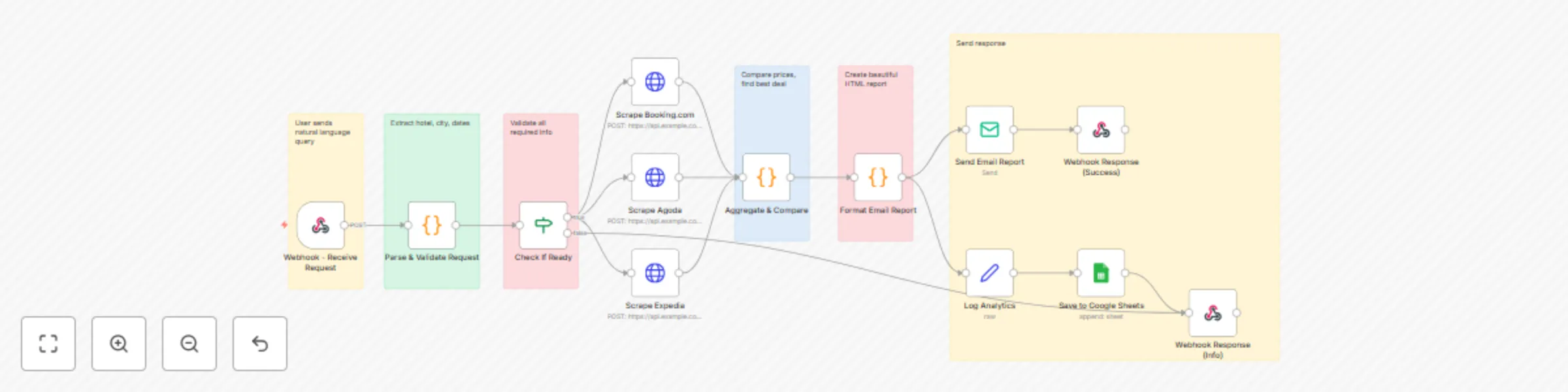
This is a production ready, end to end workflow that automatically compares hotel prices across multiple booking platforms and delivers beautiful email reports to users. Unlike basic building block...
n8n-nodes-base.webhook, n8n-nodes-base.code, n8n-nodes-base.if, n8n-nodes-base.httprequest, n8n-nodes-base.emailsend, n8n-nodes-base.respondtowebhook, n8n-nodes-base.set, n8n-nodes-base.googlesheets
This workflow is cataloged by N8N Workflows and links back to its original n8n.io source page by Oneclick AI Squad.
Original n8n.io sourceThis is a production-ready, end-to-end workflow that automatically compares hotel prices across multiple booking platforms and delivers beautiful email reports to users. Unlike basic building blocks, this workflow is a complete solution ready to deploy.
Settings → Credentials → Add Credential → SMTP

Host: smtp.gmail.com (for Gmail)
Port: 587
User: [email protected]
Password: your-app-password (not regular password!)
Gmail Setup:
Settings → Credentials → Add Credential → Google Sheets OAuth2

Follow the OAuth flow to connect your Google account
Sheet Setup:
timestamp, query, hotel, city, checkIn, checkOut, bestPrice, platform, totalResults, userEmailYou need to create a scraping API that the workflow calls. Here are your options:
Create a simple Flask API wrapper:
# api_wrapper.py
from flask import Flask, request, jsonify
import subprocess
import json

app = Flask(__name__)

@app.route('/scrape/<platform>', methods=['POST'])
def scrape(platform):
    data = request.json
    query = f"{data['checkIn']} to {data['checkOut']}, {data['hotel']}, {data['city']}"

    try:
        result = subprocess.run(
            ['python3', 'price_scrap_2.py', query, platform],
            capture_output=True,
            text=True,
            timeout=30
        )

        # Parse your script output
        output = result.stdout
        # Assuming your script returns price data

        return jsonify({
            'price': extracted_price,
            'currency': 'USD',
            'roomType': 'Standard Room',
            'url': booking_url,
            'availability': True
        })
    except Exception as e:
        return jsonify({'error': str(e)}), 500

if __name__ == '__main__':
    app.run(host='0.0.0.0', port=5000)
Deploy:
pip install flask
python api_wrapper.py
Update n8n HTTP Request nodes:
URL: http://your-server-ip:5000/scrape/booking
URL: http://your-server-ip:5000/scrape/agoda
URL: http://your-server-ip:5000/scrape/expedia
Recommended Services:
Example with ScraperAPI:
// In HTTP Request node
URL: http://api.scraperapi.com
Query Parameters:
  api_key: YOUR_API_KEY
  url: https://booking.com/search?hotel={{$json.hotelName}}...
Keep your SSH approach but improve it:
// SSH Node Configuration
Host: your-server-ip
Command: python3 /path/to/price_scrap_2.py "{{$json.hotelName}}" "{{$json.city}}" "{{$json.checkInISO}}" "{{$json.checkOutISO}}" "booking"
https://your-n8n.com/webhook/hotel-price-check)curl -X POST https://your-n8n.com/webhook/hotel-price-check \
-H "Content-Type: application/json" \
-d '{
"message": "I want to check Marriott Hotel in Singapore from 15th March to 18th March",
"email": "[email protected]",
"name": "John Doe"
}'
{
  "message": "Hilton Hotel in Dubai from 20th December to 23rd December",
  "email": "[email protected]",
  "name": "Sarah"
}
{
  "message": "I need prices for Taj Hotel, Mumbai. Check-in: 5th January, Check-out: 8th January",
  "email": "[email protected]"
}
{
  "message": "Hyatt Singapore March 10 to March 13",
  "email": "[email protected]"
}
Steps:
Edit the "Format Email Report" node's JavaScript:
Using Twilio:
Add Redis or n8n's built-in cache:
// Before scraping, check cache
const cacheKey = `${hotelName}-${city}-${checkIn}-${checkOut}`;
const cached = await $cache.get(cacheKey);

if (cached && Date.now() - cached.timestamp < 3600000) {
  return cached.data; // Use 1-hour cache
}
The workflow automatically logs to Google Sheets. Create a dashboard with:
Metrics to track:
Example Sheet Formulas:
// Total searches today
=COUNTIF(A:A, TODAY())

// Most popular hotel
=INDEX(C:C, MODE(MATCH(C:C, C:C, 0)))

// Average best price
=AVERAGE(G:G)
Add a node after "Aggregate & Compare":
// Alert if prices are unusually high
if (bestDeal.price > avgPrice * 1.5) {
  // Send alert to admin
  return [{
    json: {
      alert: true,
      message: `High prices detected for ${hotelName}`
    }
  }];
}
The workflow includes comprehensive error handling:
If user doesn't provide hotel/city/dates → Responds with helpful prompt
If all platforms fail → Sends "No results" email with suggestions
If some platforms work → Shows available results + notes errors
Uses continueOnFail: true to prevent workflow crashes
Add rate limiting to prevent abuse:
// In Parse & Validate node
const userEmail = $json.email;
const recentSearches = await $cache.get(`searches:${userEmail}`);

if (recentSearches && recentSearches.length > 10) {
  return [{
    json: {
      status: 'rate_limited',
      response: 'Too many requests. Please try again in 1 hour.'
    }
  }];
}
Already implemented - validates hotel names, cities, dates
Add email verification before first use:
// Send verification code
const code = Math.random().toString(36).substring(7);
await $sendEmail({
  to: userEmail,
  subject: 'Verify your email',
  body: `Your code: ${code}`
});
Pros: No maintenance, automatic updates Cons: Monthly cost
# Using Docker
docker run -it --rm \
  --name n8n \
  -p 5678:5678 \
  -v ~/.n8n:/home/node/.n8n \
  n8nio/n8n

# Using npm
npm install -g n8n
n8n start
Pros: Free, full control Cons: You manage updates
Solution:
Solution:
Solution:
Solution:
This catalog entry is organized from the workflow JSON. The node-level section below shows the executable blocks available for review before importing the template.
| Workflow | Automate hotel price comparison with multi-platform scraping and email reporting |
|---|---|
| Complexity | advanced |
| Nodes | 19 |
| Categories | Market Research |
| Author | Oneclick AI Squad |
| Published | 16 Oct 2025 |
Use the JSON export at /data/workflows/9777/9777.json as the source template for this automation.
Open n8n, import the downloaded JSON, and review each node before activating the workflow.
Replace placeholder credentials, API keys, webhook URLs, account IDs, and environment-specific values with your own settings.
Run the workflow manually or in a staging workspace, inspect node output, and confirm downstream systems receive the expected data.
Enable the workflow only after testing, then monitor executions, errors, and rate limits during the first production runs.
Review imported nodes carefully before activation. This catalog entry is intended to help you inspect the workflow structure, understand required services, and find related templates faster.
Node names, credentials, schedules, webhook paths, and external service limits may need adjustment for your workspace.
This is a production ready, end to end workflow that automatically compares hotel prices across multiple booking platforms and delivers beautiful email reports to users. Unlike basic building block...
Review the workflow JSON, configure any required credentials in n8n, and test the automation in a safe workspace before using it in production.
Yes. Use the block-by-block analysis and the downloadable JSON to inspect each node, then adjust credentials, prompts, schedules, filters, or destinations for your Market Research use case.