Block 1 - Monthly Schedule Trigger
- Type / Role
- n8n-nodes-base.scheduleTrigger - scheduleTrigger
- Config choices
- Version 1


 Early Deal
This workflow is provided as-is. Please review and test before using in production.
Google Ads Monthly Performance Optimization (Channable + Google Ads + Relevance AI) Overview This workflow automatically analyzes your Google Ads performance every month , identifies top perf...
n8n-nodes-base.scheduletrigger, n8n-nodes-base.httprequest, n8n-nodes-base.code, n8n-nodes-base.splitinbatches, n8n-nodes-base.googlesheets, n8n-nodes-base.slack, n8n-nodes-base.stickynote
This workflow is cataloged by N8N Workflows and links back to its original n8n.io source page by Nikan Noorafkan.
Original n8n.io sourceThis workflow automatically analyzes your Google Ads performance every month, identifies top-performing themes and categories, and regenerates optimized ad copy using Relevance AI — powered by insights from your Channable product feed.
It then saves the improved ads to Google Sheets for review and sends a detailed performance report to your Slack workspace.
Ideal for marketing teams who want to automate ad optimization at scale with zero manual intervention.
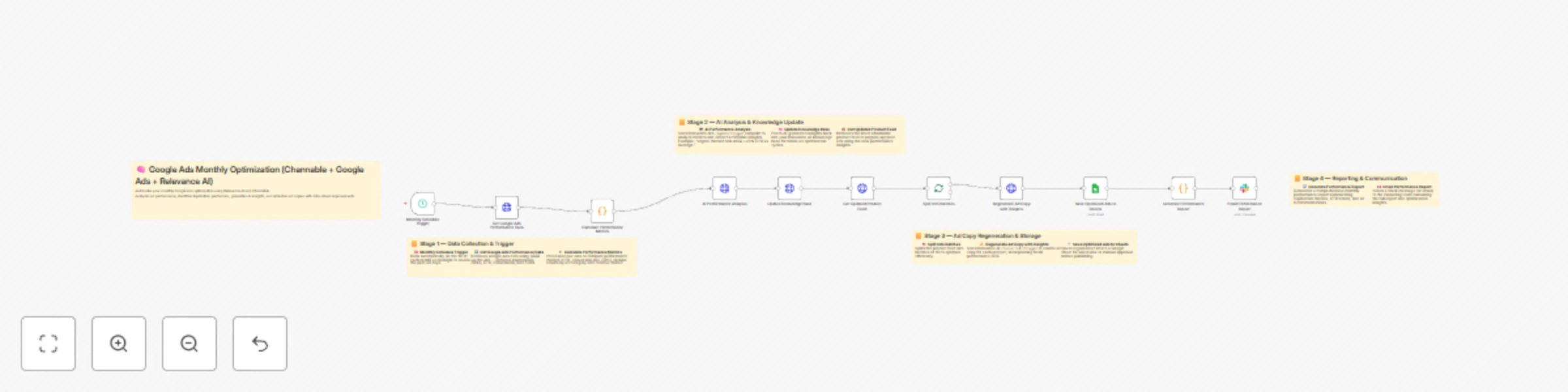
| Step | Node | Description |
|---|---|---|
| 1 | Monthly Schedule Trigger | Runs automatically on the 1st of each month to review last 30 days of data. |
| 2 | Get Google Ads Performance Data | Fetches ad metrics via GAQL query (impressions, clicks, CTR, etc.). |
| 3 | Calculate Performance Metrics | Groups results by ad group and theme to find top/bottom performers. |
| 4 | AI Performance Analysis (Relevance AI) | Generates human-readable insights and improvement suggestions. |
| 5 | Update Knowledge Base (Relevance AI) | Saves new insights for future ad copy training. |
| 6 | Get Updated Product Feed (Channable) | Retrieves the latest catalog items for ad regeneration. |
| 7 | Split Into Batches | Splits the feed into groups of 50 to avoid API rate limits. |
| 8 | Regenerate Ad Copy with Insights (Relevance AI) | Rewrites ad copy with the latest product and performance data. |
| 9 | Save Optimized Ads to Sheets | Writes output to your “Optimized Ads” Google Sheet. |
| 10 | Generate Performance Report | Summarizes the AI analysis, CTR trends, and key insights. |
| 11 | Email Performance Report (Slack) | Sends report directly to your Slack channel/team. |
Before running the workflow, make sure you have:
Add these environment variables to your n8n instance (via .env or UI):
| Variable | Description |
|---|---|
GOOGLE_ADS_API_VERSION |
API version (e.g., v17). |
GOOGLE_ADS_CUSTOMER_ID |
Your Google Ads customer ID. |
RELEVANCE_AI_API_URL |
Base Relevance AI API URL (e.g., https://api.relevanceai.com/v1). |
RELEVANCE_AGENT_PERFORMANCE_ID |
ID of your Relevance AI Agent for performance analysis. |
RELEVANCE_KNOWLEDGE_SOURCE_ID |
Knowledge base or dataset ID used to store insights. |
RELEVANCE_TOOL_AD_COPY_ID |
Relevance AI tool ID for generating ad copy. |
CHANNABLE_API_URL |
Channable API endpoint (e.g., https://api.channable.com/v1). |
CHANNABLE_COMPANY_ID |
Your Channable company ID. |
CHANNABLE_PROJECT_ID |
Your Channable project ID. |
FEED_ID |
The feed ID for product data. |
GOOGLE_SHEET_ID |
ID of your Google Sheet to store optimized ads. |
SLACK_WEBHOOK_URL |
Slack Incoming Webhook URL for sending reports. |
| Credential | Type | Usage |
|---|---|---|
| Google Ads OAuth2 API | OAuth2 | Authenticates your Ads API queries. |
| HTTP Header Auth (Relevance AI & Channable) | Header | Uses your API key as Authorization: Bearer <key>. |
| Google Sheets OAuth2 API | OAuth2 | Writes optimized ads to Sheets. |
| Slack Webhook | Webhook | Sends monthly reports to your team channel. |
{
  "insights": [
    "Ad groups using 'vegan' and 'organic' messaging achieved +23% CTR.",
    "'Budget' keyword ads underperformed (-15% CTR).",
    "Campaigns featuring 'new' or 'bestseller' tags showed higher conversion rates."
  ],
  "recommendations": [
    "Increase ad spend for top-performing 'vegan' and 'premium' categories.",
    "Revise copy for 'budget' and 'sale' ads with low CTR."
  ]
}
| Product | Category | Old Headline | New Headline | CTR Change | Theme |
|---|---|---|---|---|---|
| Organic Protein Bar | Snacks | “Healthy Energy Anytime” | “Organic Protein Bar — 100% Natural Fuel” | +12% | Organic |
| Eco Face Cream | Skincare | “Gentle Hydration” | “Vegan Face Cream — Clean, Natural Moisture” | +17% | Vegan |
cron: 0 0 1 * *).# 30-Day Performance Optimization Report
Date: 2025-10-01
Analysis Period: Last 30 days
Ads Analyzed: 842
Top Performing Themes
1. Vegan: 5.2% CTR (34 ads)
2. Premium: 4.9% CTR (28 ads)
Underperforming Themes
1. Budget: 1.8% CTR (12 ads)
AI Insights
“Vegan” and “Premium” themes outperform baseline by +22% CTR.
“Budget” ads underperform due to lack of value framing.
Next Optimization Cycle: 2025-11-01
Developed for AI-driven marketing teams leveraging Google Ads, Channable, and Relevance AI to achieve continuous ad improvement — fully automated via n8n.
This catalog entry is organized from the workflow JSON. The node-level section below shows the executable blocks available for review before importing the template.
| Workflow | Automate Google Ads copy optimization with Channable feed and Relevance AI |
|---|---|
| Complexity | advanced |
| Nodes | 16 |
| Categories | Content Creation, Multimodal AI |
| Author | Nikan Noorafkan |
| Published | 22 Oct 2025 |
Use the JSON export at /data/workflows/10058/10058.json as the source template for this automation.
Open n8n, import the downloaded JSON, and review each node before activating the workflow.
Replace placeholder credentials, API keys, webhook URLs, account IDs, and environment-specific values with your own settings.
Run the workflow manually or in a staging workspace, inspect node output, and confirm downstream systems receive the expected data.
Enable the workflow only after testing, then monitor executions, errors, and rate limits during the first production runs.
Review imported nodes carefully before activation. This catalog entry is intended to help you inspect the workflow structure, understand required services, and find related templates faster.
Node names, credentials, schedules, webhook paths, and external service limits may need adjustment for your workspace.
Google Ads Monthly Performance Optimization (Channable + Google Ads + Relevance AI) Overview This workflow automatically analyzes your Google Ads performance every month , identifies top perf...
Review the workflow JSON, configure any required credentials in n8n, and test the automation in a safe workspace before using it in production.
Yes. Use the block-by-block analysis and the downloadable JSON to inspect each node, then adjust credentials, prompts, schedules, filters, or destinations for your Content Creation, Multimodal AI use case.