Automate GitHub PR linting with Google Gemini AI and auto-fix PRs

Workflow preview

Workflow preview
100%
Automate GitHub PR linting with Google Gemini AI and auto-fix PRs preview
Open on n8n.io

Important notice

This workflow is provided as-is. Please review and test before using in production.

1. Workflow Overview

LintGuardian: Automated PR Linting with n8n & AI What It Does LintGuardian is an n8n workflow template that automates code quality enforcement for GitHub repositories. When a pull request is create...

Best for

  • DevOps automation workflows
  • Multimodal AI automation workflows
  • advanced n8n builders looking for reusable templates

Tools used

n8n-nodes-base.webhook, @n8n/n8n-nodes-langchain.agent, n8n-nodes-base.respondtowebhook, n8n-nodes-base.httprequest, n8n-nodes-base.converttofile, n8n-nodes-base.extractfromfile, n8n-nodes-base.set, n8n-nodes-base.aggregate

Source and attribution

This workflow is cataloged by N8N Workflows and links back to its original n8n.io source page by Adam Bertram.

Original n8n.io source

1.1 Workflow description

Title
Automate GitHub PR linting with Google Gemini AI and auto-fix PRs
Workflow name
Automate GitHub PR linting with Google Gemini AI and auto-fix PRs

LintGuardian: Automated PR Linting with n8n & AI

What It Does

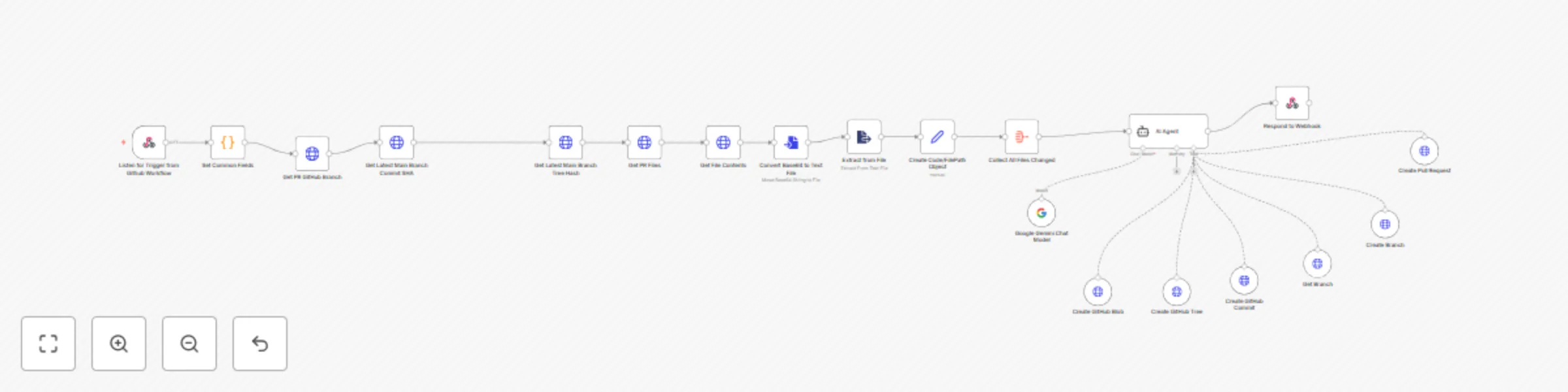
LintGuardian is an n8n workflow template that automates code quality enforcement for GitHub repositories. When a pull request is created, the workflow automatically analyzes the changed files, identifies linting issues, fixes them, and submits a new PR with corrections. This eliminates manual code style reviews, reduces back-and-forth comments, and lets your team focus on functionality rather than formatting.

How It Works

The workflow is triggered by a GitHub webhook when a PR is created. It fetches all changed files from the PR using the GitHub API, processes them through an AI-powered linting service (Google Gemini), and automatically generates fixes. The AI agent then creates a new branch with the corrected files and submits a "linting fixes" PR against the original branch. Developers can review and merge these fixes with a single click, keeping code consistently formatted with minimal effort.

Prerequisites

To use this template, you'll need:

  1. n8n instance: Either self-hosted or using n8n.cloud
  2. GitHub repository: Where you want to enforce linting standards
  3. GitHub Personal Access Token: With permissions for repo access (repo, workflow, admin:repo_hook)
  4. Google AI API Key: For the Gemini language model that powers the linting analysis
  5. GitHub webhook: Configured to send PR creation events to your n8n instance

Setup Instructions

  1. Import the template into your n8n instance
  2. Configure credentials:
  3. Update repository information:
    • Locate the "Set Common Fields" code node at the beginning of the workflow
    • Change the gitHubRepoName and gitHubOrgName values to match your repository
    const commonFields = {
      'gitHubRepoName': 'your-repo-name',
      'gitHubOrgName': 'your-org-name'
    }
    
  4. Configure the webhook: Create a file named .github/workflows/lint-guardian.yml in your repository replacing the Trigger n8n Workflow step with your webhook:
    name: Lint Guardian
    
    on:
      pull_request:
        types: [opened, synchronize]
    
    jobs:
      trigger-linting:
        runs-on: ubuntu-latest
        steps:
          - name: Trigger n8n Workflow
            uses: fjogeleit/http-request-action@v1
            with:
              url: 'https://your-n8n-instance.com/webhook/1da5a6e1-9453-4a65-bbac-a1fed633f6ad'
              method: 'POST'
              contentType: 'application/json'
              data: |
                {
                  "pull_request_number": ${{ github.event.pull_request.number }},
                  "repository": "${{ github.repository }}",
                  "branch": "${{ github.event.pull_request.head.ref }}",
                  "base_branch": "${{ github.event.pull_request.base.ref }}"
                }
              preventFailureOnNoResponse: true
    
  5. Customize linting rules (optional):
    • Modify the AI Agent's system message to specify your team's linting preferences
    • Adjust file handling if you have specific file types to focus on or ignore

Security Considerations

When creating your GitHub Personal Access Token, remember to:

  • Choose the minimal permissions needed (repo, workflow, admin:repo_hook)
  • Set an appropriate expiration date
  • Treat your token like a password and store it securely
  • Consider using GitHub's fine-grained personal access tokens for more limited scope

As GitHub documentation notes: "Personal access tokens are like passwords, and they share the same inherent security risks."

Extending the Template

You can enhance this workflow by:

  • Adding Slack notifications when linting fixes are submitted
  • Creating custom linting rules specific to your team's needs
  • Expanding it to handle different types of code quality checks
  • Adding approval steps for more controlled environments

This template provides an excellent starting point that you can customize to fit your team's exact workflow and code style requirements.

1.2 Logical Blocks

This catalog entry is organized from the workflow JSON. The node-level section below shows the executable blocks available for review before importing the template.

2. Block-by-Block Analysis

Block 1 - Listen for Trigger from Github Workflow

Type / Role
n8n-nodes-base.webhook - webhook
Config choices
Version 1

Block 2 - AI Agent

Type / Role
@n8n/n8n-nodes-langchain.agent - agent
Config choices
Version 1.9

Block 3 - Respond to Webhook

Type / Role
n8n-nodes-base.respondToWebhook - respondToWebhook
Config choices
Version 1.2

Block 4 - Get PR Files

Type / Role
n8n-nodes-base.httpRequest - httpRequest
Config choices
Version 4.2

Block 5 - Get File Contents

Type / Role
n8n-nodes-base.httpRequest - httpRequest
Config choices
Version 4.2

Block 6 - Convert Base64 to Text File

Type / Role
n8n-nodes-base.convertToFile - convertToFile
Config choices
Version 1.1

Block 7 - Extract from File

Type / Role
n8n-nodes-base.extractFromFile - extractFromFile
Config choices
Version 1

Block 8 - Create Code/FilePath Object

Type / Role
n8n-nodes-base.set - set
Config choices
Version 3.4

Block 9 - Collect All Files Changed

Type / Role
n8n-nodes-base.aggregate - aggregate
Config choices
Version 1

Block 10 - Get PR GitHub Branch

Type / Role
n8n-nodes-base.httpRequest - httpRequest
Config choices
Version 4.2

Block 11 - Create GitHub Blob

Type / Role
n8n-nodes-base.httpRequestTool - httpRequestTool
Config choices
Version 4.2

Block 12 - Create GitHub Tree

Type / Role
n8n-nodes-base.httpRequestTool - httpRequestTool
Config choices
Version 4.2

Block 13 - Create GitHub Commit

Type / Role
n8n-nodes-base.httpRequestTool - httpRequestTool
Config choices
Version 4.2

Block 14 - Create Pull Request

Type / Role
n8n-nodes-base.httpRequestTool - httpRequestTool
Config choices
Version 4.2

Block 15 - Create Branch

Type / Role
n8n-nodes-base.httpRequestTool - httpRequestTool
Config choices
Version 4.2

Block 16 - Get Latest Main Branch Commit SHA

Type / Role
n8n-nodes-base.httpRequest - httpRequest
Config choices
Version 4.2

Block 17 - Get Latest Main Branch Tree Hash

Type / Role
n8n-nodes-base.httpRequest - httpRequest
Config choices
Version 4.2

Block 18 - Get Branch

Type / Role
n8n-nodes-base.httpRequestTool - httpRequestTool
Config choices
Version 4.2

Block 19 - Google Gemini Chat Model

Type / Role
@n8n/n8n-nodes-langchain.lmChatGoogleGemini - lmChatGoogleGemini
Config choices
Version 1

Block 20 - Set Common Fields

Type / Role
n8n-nodes-base.code - code
Config choices
Version 2

3. Summary Table

Workflow Automate GitHub PR linting with Google Gemini AI and auto-fix PRs
Complexity advanced
Nodes 20
Categories DevOps, Multimodal AI
Author Adam Bertram
Published 15 May 2025

4. Reproducing the Workflow from Scratch

  1. 1. Download the workflow JSON

    Use the JSON export at /data/workflows/4073/4073.json as the source template for this automation.

  2. 2. Import the template into n8n

    Open n8n, import the downloaded JSON, and review each node before activating the workflow.

  3. 3. Configure credentials and variables

    Replace placeholder credentials, API keys, webhook URLs, account IDs, and environment-specific values with your own settings.

  4. 4. Test with sample data

    Run the workflow manually or in a staging workspace, inspect node output, and confirm downstream systems receive the expected data.

  5. 5. Activate and monitor

    Enable the workflow only after testing, then monitor executions, errors, and rate limits during the first production runs.

5. General Notes & Resources

Review imported nodes carefully before activation. This catalog entry is intended to help you inspect the workflow structure, understand required services, and find related templates faster.

Node names, credentials, schedules, webhook paths, and external service limits may need adjustment for your workspace.

Frequently asked questions

What does Automate GitHub PR linting with Google Gemini AI and auto-fix PRs do?

LintGuardian: Automated PR Linting with n8n & AI What It Does LintGuardian is an n8n workflow template that automates code quality enforcement for GitHub repositories. When a pull request is create...

What do I need before importing this workflow?

Review the workflow JSON, configure any required credentials in n8n, and test the automation in a safe workspace before using it in production.

Can I customize this workflow?

Yes. Use the block-by-block analysis and the downloadable JSON to inspect each node, then adjust credentials, prompts, schedules, filters, or destinations for your DevOps, Multimodal AI use case.