Automate GDPR Consent Management with Azure OpenAI Emails and Slack Alerts

Workflow preview

Workflow preview
100%
Automate GDPR Consent Management with Azure OpenAI Emails and Slack Alerts preview
Open on n8n.io

Important notice

This workflow is provided as-is. Please review and test before using in production.

1. Workflow Overview

Automate user consent collection with a seamless workflow that captures form submissions, stores them securely, and sends professional AI generated confirmation emails . This template streamlin...

Best for

  • Document Extraction automation workflows
  • Multimodal AI automation workflows
  • advanced n8n builders looking for reusable templates

Tools used

n8n-nodes-base.stickynote, n8n-nodes-base.webhook, n8n-nodes-base.googlesheets, @n8n/n8n-nodes-langchain.agent, n8n-nodes-base.emailsend, n8n-nodes-base.code, n8n-nodes-base.slack, n8n-nodes-base.set

Source and attribution

This workflow is cataloged by N8N Workflows and links back to its original n8n.io source page by Rahul Joshi.

Original n8n.io source

1.1 Workflow description

Title
Automate GDPR Consent Management with Azure OpenAI Emails and Slack Alerts
Workflow name
Automate GDPR Consent Management with Azure OpenAI Emails and Slack Alerts

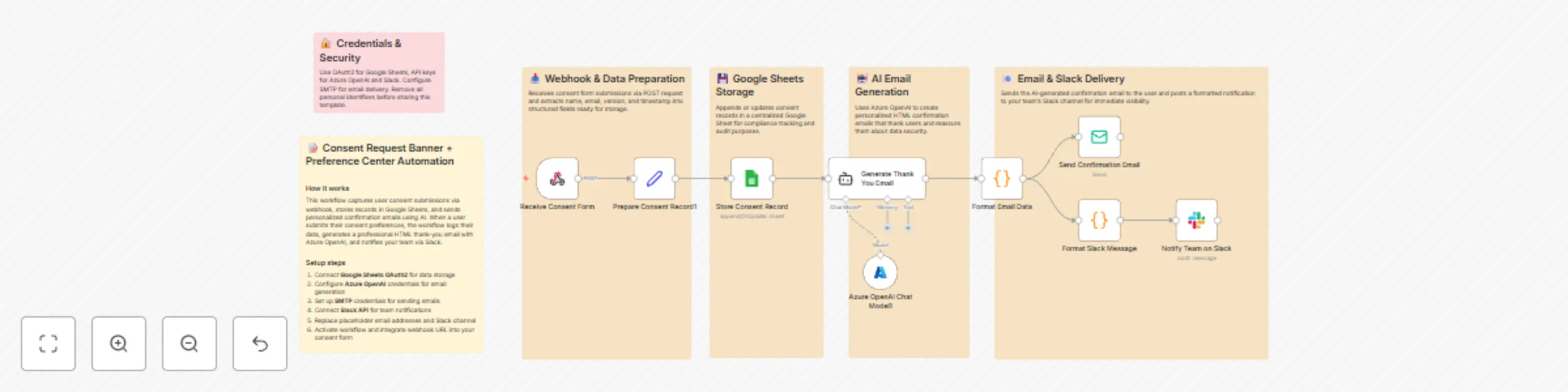
Automate user consent collection with a seamless workflow that captures form submissions, stores them securely, and sends professional AI-generated confirmation emails πŸ“§πŸ€–. This template streamlines compliance by logging every consent action directly into Google Sheets while also notifying your internal team instantly through Slack. With built-in Azure OpenAI email generation, every user receives a personalized, secure, trust-building confirmation without manual intervention. Perfect for DPDP/GDPR-aligned consent management systems. What This Template Does Receives user consent submissions via a

Webhook trigger πŸš€

  • Extracts name, email, version, and timestamp for structured processing πŸ”
  • Saves or updates the record in Google Sheets for audit and compliance tracking πŸ“„
  • Generates a responsive HTML thank-you email using Azure OpenAI πŸ€–
  • Formats the output into a clean subject + email body via a Code node 🧩
  • Sends the user a confirmation email via SMTP πŸ“§
  • Converts HTML into a Slack-friendly message for internal alerts πŸ””
  • Posts the formatted notification to your Slack channel for instant visibility πŸ’¬

Key Benefits

βœ… Fully automated consent loggingβ€”no manual tracking required βœ… AI-generated HTML emails ensure professional, consistent communication βœ… Real-time Slack alerts keep your team informed instantly βœ… Compliant with DPDP/GDPR consent tracking best practices βœ… Easy to integrate into any website or mobile app via webhook βœ… Ensures audit-ready records with accurate timestamps and version history

Features

  • Webhook trigger for instant consent capture
  • Google Sheets integration for centralized data storage
  • Azure OpenAI-powered HTML email generation
  • SMTP email delivery with dynamic fields
  • Slack API integration for real-time notifications
  • Custom JS transformations for email + Slack formatting
  • Timestamp automatic insertion for compliance

Requirements

  • Google Sheets OAuth2 credentials
  • Azure OpenAI API key
  • SMTP email credentials (e.g., Gmail, Outlook, SendGrid)

Slack API credentials

  • A consent form or preference center that can send POST requests
  • Target Audience
  • SaaS founders needing user consent management
  • EdTech, HealthTech, FinTech, and compliance-heavy platforms
  • Data Protection & Privacy teams (DPDP/GDPR compliance)
  • Automation consultants building consent or preferences centers

If you want, I can also generate: βœ… Landing page text for this template βœ… A companion version for "Consent Withdrawal" βœ… A website prompt for Lovable to auto-generate UI/buttons

1.2 Logical Blocks

This catalog entry is organized from the workflow JSON. The node-level section below shows the executable blocks available for review before importing the template.

2. Block-by-Block Analysis

Block 1 - Overview Sticky

Type / Role
n8n-nodes-base.stickyNote - stickyNote
Config choices
Version 1

Block 2 - Trigger Section Sticky

Type / Role
n8n-nodes-base.stickyNote - stickyNote
Config choices
Version 1

Block 3 - Storage Section Sticky

Type / Role
n8n-nodes-base.stickyNote - stickyNote
Config choices
Version 1

Block 4 - AI Section Sticky

Type / Role
n8n-nodes-base.stickyNote - stickyNote
Config choices
Version 1

Block 5 - Notifications Section Sticky

Type / Role
n8n-nodes-base.stickyNote - stickyNote
Config choices
Version 1

Block 6 - Security Sticky

Type / Role
n8n-nodes-base.stickyNote - stickyNote
Config choices
Version 1

Block 7 - Receive Consent Form

Type / Role
n8n-nodes-base.webhook - webhook
Config choices
Version 2.1

Block 8 - Store Consent Record

Type / Role
n8n-nodes-base.googleSheets - googleSheets
Config choices
Version 4.7

Block 9 - Generate Thank You Email

Type / Role
@n8n/n8n-nodes-langchain.agent - agent
Config choices
Version 2.2

Block 10 - Send Confirmation Email

Type / Role
n8n-nodes-base.emailSend - emailSend
Config choices
Version 2.1

Block 11 - Format Email Data

Type / Role
n8n-nodes-base.code - code
Config choices
Version 2

Block 12 - Notify Team on Slack

Type / Role
n8n-nodes-base.slack - slack
Config choices
Version 2.3

Block 13 - Format Slack Message

Type / Role
n8n-nodes-base.code - code
Config choices
Version 2

Block 14 - Prepare Consent Record1

Type / Role
n8n-nodes-base.set - set
Config choices
Version 2

Block 15 - Azure OpenAI Chat Model1

Type / Role
@n8n/n8n-nodes-langchain.lmChatAzureOpenAi - lmChatAzureOpenAi
Config choices
Version 1

3. Summary Table

Workflow Automate GDPR Consent Management with Azure OpenAI Emails and Slack Alerts
Complexity advanced
Nodes 15
Categories Document Extraction, Multimodal AI
Author Rahul Joshi
Published 21 Nov 2025

4. Reproducing the Workflow from Scratch

  1. 1. Download the workflow JSON

    Use the JSON export at /data/workflows/11072/11072.json as the source template for this automation.

  2. 2. Import the template into n8n

    Open n8n, import the downloaded JSON, and review each node before activating the workflow.

  3. 3. Configure credentials and variables

    Replace placeholder credentials, API keys, webhook URLs, account IDs, and environment-specific values with your own settings.

  4. 4. Test with sample data

    Run the workflow manually or in a staging workspace, inspect node output, and confirm downstream systems receive the expected data.

  5. 5. Activate and monitor

    Enable the workflow only after testing, then monitor executions, errors, and rate limits during the first production runs.

5. General Notes & Resources

Review imported nodes carefully before activation. This catalog entry is intended to help you inspect the workflow structure, understand required services, and find related templates faster.

Node names, credentials, schedules, webhook paths, and external service limits may need adjustment for your workspace.

Frequently asked questions

What does Automate GDPR Consent Management with Azure OpenAI Emails and Slack Alerts do?

Automate user consent collection with a seamless workflow that captures form submissions, stores them securely, and sends professional AI generated confirmation emails . This template streamlin...

What do I need before importing this workflow?

Review the workflow JSON, configure any required credentials in n8n, and test the automation in a safe workspace before using it in production.

Can I customize this workflow?

Yes. Use the block-by-block analysis and the downloadable JSON to inspect each node, then adjust credentials, prompts, schedules, filters, or destinations for your Document Extraction, Multimodal AI use case.