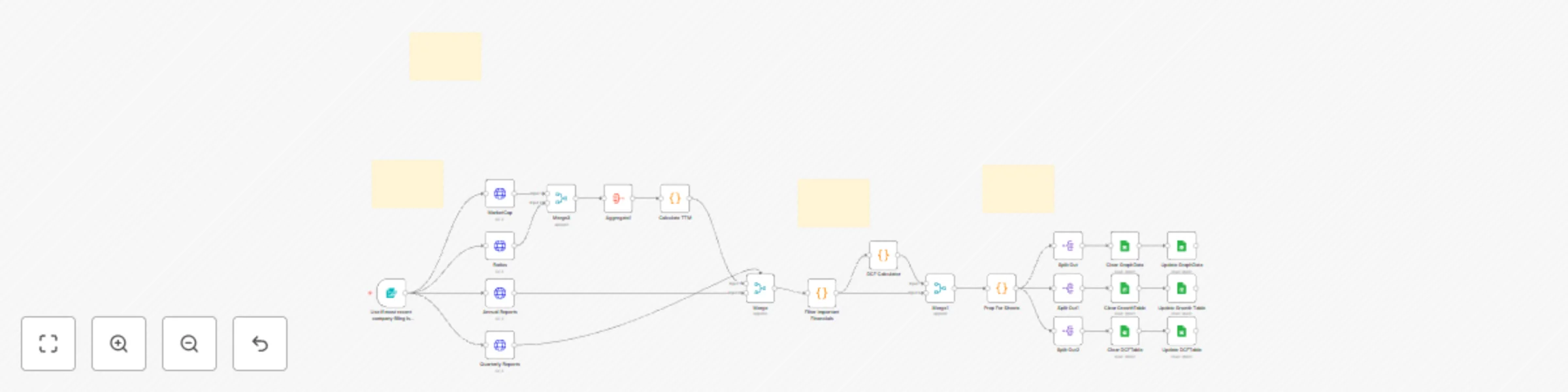
Automate fundamental stock analysis with FinnHub data and Google Sheets DCF calculator

Workflow preview

Workflow preview
100%
Automate fundamental stock analysis with FinnHub data and Google Sheets DCF calculator preview
Open on n8n.io

Important notice

This workflow is provided as-is. Please review and test before using in production.

1. Workflow Overview

Demonstration video Disclaimers This workflow contains custom community nodes that requires local network version of n8n. This analysis is fo...

Best for

  • Crypto Trading automation workflows
  • advanced n8n builders looking for reusable templates

Tools used

n8n-nodes-base.formtrigger, n8n-nodes-base.code, n8n-nodes-base.httprequest, n8n-nodes-base.merge, n8n-nodes-base.stickynote, n8n-nodes-base.splitout, n8n-nodes-base.aggregate, n8n-nodes-base.googlesheets

Source and attribution

This workflow is cataloged by N8N Workflows and links back to its original n8n.io source page by AiAgent.

Original n8n.io source

1.1 Workflow description

Title
Automate fundamental stock analysis with FinnHub data and Google Sheets DCF calculator
Workflow name
Automate fundamental stock analysis with FinnHub data and Google Sheets DCF calculator

Demonstration video

Disclaimers

This workflow contains custom community nodes that requires local network version of n8n.

This analysis is for informational and educational purposes only and does not constitute financial advice, investment advice, or a recommendation to buy or sell any security. This model is based on historical, publicly available data and future projections are purely theoretical. Stock market investing involves substantial risk, including the loss of principal. All investment decisions are solely the responsibility of the user.


What It Does

Our proprietary workflow automates the most time-intensive components of fundamental research: Data Acquisition, TTM Aggregation, Growth Forecasting, and Intrinsic Valuation.

Institutional Data Engine: Automatically extracts and cleans the last 6 years of annual reports and quarterly reports from FinnHub.

TTM & Q4 Derivation: Proprietary code handles calculates the true Trailing Twelve Months (TTM) figures for Revenue, Net Income, FCF, Dividends, and Stock-Based Compensation (SBC).

Advanced Growth Metrics: The system instantly calculates vital performance indicators: 3-Year & 5-Year Compound Annual Growth Rates (CAGR) for Revenue, Net Income, Free Cash Flow (FCF), and Dividends.

Intrinsic Valuation (DCF): The workflow applies a Discounted Cash Flow (DCF) model, using the calculated TTM FCF as the base for a multi-year explicit forecast, generating a theoretical intrinsic price target for the company's stock.

Automated Reporting: All current snapshots, growth metrics, and historical data are cleanly transferred to a Google Sheets template where charts, tables, and dashboards auto-populate instantly.

This solution provides investors with rapid, objective, and institutional-grade financial modeling at zero cost-to-run.


Who This is For

This platform is designed for data-driven investors and financial analysts who need to quickly screen companies, compare competitors, and access precise DCF valuations and growth trends without the manual effort of data compilation and spreadsheet modeling. It is ideal for anyone seeking objective, automatically generated financial insights.


How It Works

  • Data Acquisition & Structuring: The system initiates by securely extracting comprehensive historical financial data and regulatory filings (10-K, 10-Q) from FinnHub using the target stock ticker.
  • Core Metric Calculation & Cleaning: Proprietary code processes the raw reports to extract key financial metrics, including revenue, net income, free cash flow, debt, cash & cash equivalents, dividends, stock based compensation, outstanding shares for all periods.
  • TTM metrics: The workflow calculates the current TTM for all flow metrics (revenue, net income, FCF, and dividends) by summing the four most recent periods.
  • Growth Rate Calculation (CAGR & YoY): The workflow branches to calculate long-term performance indicators, generating the 3 & 5-Year CAGR for revenue, net income, FCF, and dividends.
  • Discounted Cash Flow (DCF) Valuation: The workflow initiates the DCF model, projecting the calculated TTM FCF forward over an explicit period and discounting the cash flows to generate a theoretical intrinsic stock price.
  • Presentation & Reporting (Google Sheets): All calculated data (TTM and SEC reports), Growth Metrics, and DCF model is organized and written to a dedicated Google Sheet. The sheet's pre-built charts and tables instantly auto-populate upon execution.


Set Up Steps

  1. You will need a FinnHub account and API key to connect to the Https Request Nodes. FinnHub is a free service.
  2. You will need a Google cloud and sheets account to create and connect the final Google Sheets document.
  3. Requires OAuth which is free.
  4. There is no cost to execute the workflow.
  5. Detailed instructions included to obtain API keys and OAuth for Google cloud.

1.2 Logical Blocks

This catalog entry is organized from the workflow JSON. The node-level section below shows the executable blocks available for review before importing the template.

2. Block-by-Block Analysis

Block 1 - Use if most recent company filing is quarterly report

Type / Role
n8n-nodes-base.formTrigger - formTrigger
Config choices
Version 2.3

Block 2 - Filter Important Financials

Type / Role
n8n-nodes-base.code - code
Config choices
Version 2

Block 3 - Quarterly Reports

Type / Role
n8n-nodes-base.httpRequest - httpRequest
Config choices
Version 4.3

Block 4 - Merge

Type / Role
n8n-nodes-base.merge - merge
Config choices
Version 3.2

Block 5 - Sticky Note

Type / Role
n8n-nodes-base.stickyNote - stickyNote
Config choices
Version 1

Block 6 - Merge1

Type / Role
n8n-nodes-base.merge - merge
Config choices
Version 3.2

Block 7 - Split Out

Type / Role
n8n-nodes-base.splitOut - splitOut
Config choices
Version 1

Block 8 - Split Out1

Type / Role
n8n-nodes-base.splitOut - splitOut
Config choices
Version 1

Block 9 - Split Out2

Type / Role
n8n-nodes-base.splitOut - splitOut
Config choices
Version 1

Block 10 - Ratios

Type / Role
n8n-nodes-base.httpRequest - httpRequest
Config choices
Version 4.3

Block 11 - MarketCap

Type / Role
n8n-nodes-base.httpRequest - httpRequest
Config choices
Version 4.3

Block 12 - Aggregate1

Type / Role
n8n-nodes-base.aggregate - aggregate
Config choices
Version 1

Block 13 - Calculate TTM

Type / Role
n8n-nodes-base.code - code
Config choices
Version 2

Block 14 - Merge3

Type / Role
n8n-nodes-base.merge - merge
Config choices
Version 3.2

Block 15 - DCF Calculator

Type / Role
n8n-nodes-base.code - code
Config choices
Version 2

Block 16 - Prep For Sheets

Type / Role
n8n-nodes-base.code - code
Config choices
Version 2

Block 17 - Clear GraphData

Type / Role
n8n-nodes-base.googleSheets - googleSheets
Config choices
Version 4.7

Block 18 - Update GraphData

Type / Role
n8n-nodes-base.googleSheets - googleSheets
Config choices
Version 4.7

Block 19 - Clear GrowthTable

Type / Role
n8n-nodes-base.googleSheets - googleSheets
Config choices
Version 4.7

Block 20 - Update Growth Table

Type / Role
n8n-nodes-base.googleSheets - googleSheets
Config choices
Version 4.7

Block 21 - Clear DCFTable

Type / Role
n8n-nodes-base.googleSheets - googleSheets
Config choices
Version 4.7

Block 22 - Update DCFTable

Type / Role
n8n-nodes-base.googleSheets - googleSheets
Config choices
Version 4.7

Block 23 - Annual Reports

Type / Role
n8n-nodes-base.httpRequest - httpRequest
Config choices
Version 4.3

Block 24 - Sticky Note2

Type / Role
n8n-nodes-base.stickyNote - stickyNote
Config choices
Version 1

Showing the first 24 of 26 workflow blocks. Download the JSON for the full node graph.

3. Summary Table

Workflow Automate fundamental stock analysis with FinnHub data and Google Sheets DCF calculator
Complexity advanced
Nodes 26
Categories Crypto Trading
Author AiAgent
Published 11 Dec 2025

4. Reproducing the Workflow from Scratch

  1. 1. Download the workflow JSON

    Use the JSON export at /data/workflows/11674/11674.json as the source template for this automation.

  2. 2. Import the template into n8n

    Open n8n, import the downloaded JSON, and review each node before activating the workflow.

  3. 3. Configure credentials and variables

    Replace placeholder credentials, API keys, webhook URLs, account IDs, and environment-specific values with your own settings.

  4. 4. Test with sample data

    Run the workflow manually or in a staging workspace, inspect node output, and confirm downstream systems receive the expected data.

  5. 5. Activate and monitor

    Enable the workflow only after testing, then monitor executions, errors, and rate limits during the first production runs.

5. General Notes & Resources

Review imported nodes carefully before activation. This catalog entry is intended to help you inspect the workflow structure, understand required services, and find related templates faster.

Node names, credentials, schedules, webhook paths, and external service limits may need adjustment for your workspace.

Frequently asked questions

What does Automate fundamental stock analysis with FinnHub data and Google Sheets DCF calculator do?

Demonstration video Disclaimers This workflow contains custom community nodes that requires local network version of n8n. This analysis is fo...

What do I need before importing this workflow?

Review the workflow JSON, configure any required credentials in n8n, and test the automation in a safe workspace before using it in production.

Can I customize this workflow?

Yes. Use the block-by-block analysis and the downloadable JSON to inspect each node, then adjust credentials, prompts, schedules, filters, or destinations for your Crypto Trading use case.