Block 1 - Sticky Note1
- Type / Role
- n8n-nodes-base.stickyNote - stickyNote
- Config choices
- Version 1


 Early Deal
This workflow is provided as-is. Please review and test before using in production.
Validated RSVP Confirmation with Automated Badge Generation Overview: This comprehensive workflow automates the entire event RSVP process from form submission to attendee confirmation, including re...
n8n-nodes-base.stickynote, n8n-nodes-base.if, n8n-nodes-base.set, n8n-nodes-base.gmail, n8n-nodes-base.googlesheets, n8n-nodes-verifiemail.verifiemail, n8n-nodes-base.webhook, n8n-nodes-htmlcsstoimage.htmlcsstoimage
This workflow is cataloged by N8N Workflows and links back to its original n8n.io source page by Jitesh Dugar.
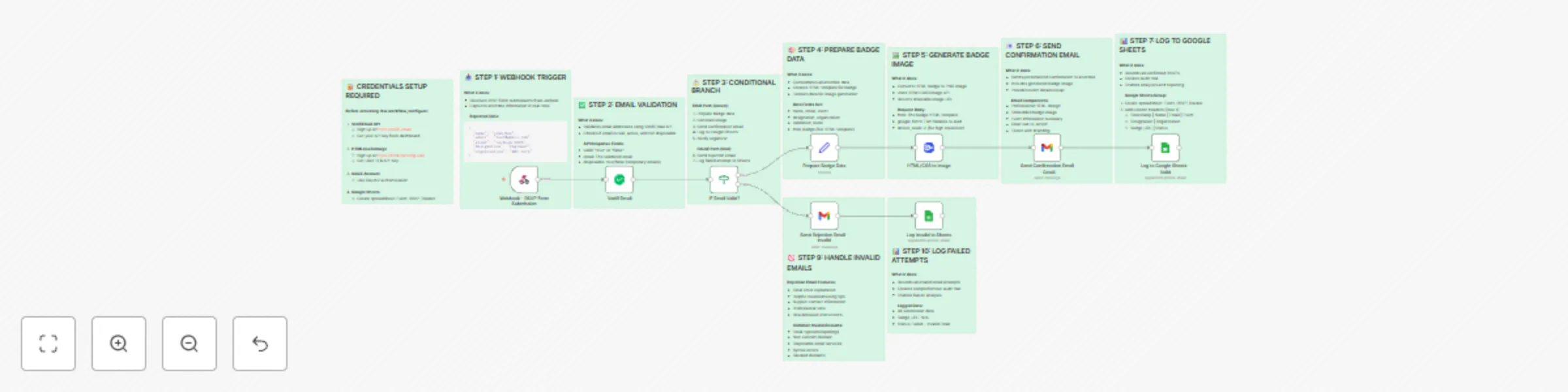
Original n8n.io sourceThis comprehensive workflow automates the entire event RSVP process from form submission to attendee confirmation, including real-time email validation and personalized digital badge generation.
• Real-time Email Validation - Verify attendee emails using VerifiEmail API to prevent fake registrations
• Automated Badge Generation - Create beautiful, personalized event badges with attendee details
• Smart Email Routing - Send confirmation emails with badges for valid emails, rejection notices for invalid ones
• Comprehensive Logging - Track all RSVPs (both valid and invalid) in Google Sheets for analytics
• Dual Path Logic - Handle valid and invalid submissions differently with conditional branching
• Anti-Fraud Protection - Detect disposable emails and invalid domains automatically
• Conference organizers managing hundreds of RSVPs • Corporate event planners requiring verified attendee lists • Webinar hosts preventing fake registrations • Workshop coordinators issuing digital badges • Community event managers tracking attendance
• Reduces manual verification time by 95% • Eliminates fake email registrations • Creates professional branded badges automatically • Provides real-time RSVP tracking and analytics • Improves attendee experience with instant confirmations • Maintains clean, verified contact lists
• n8n (cloud or self-hosted) • VerifiEmail API (https://verifi.email) • HTMLCssToImage API (https://htmlcsstoimg.com) • Gmail account (OAuth2) • Google Sheets
When someone submits your event RSVP form, this workflow instantly validates their email, generates a personalized badge with their details, and emails them a confirmation—all within seconds. Invalid emails receive a helpful rejection notice, and every submission is logged for your records. No manual work required!
The workflow includes a fully customizable HTML badge template featuring: • Gradient background with modern design • Attendee name, designation, and organization • Event name and date • Email address and validation timestamp • Google Fonts (Poppins) for professional typography
Track metrics like: • Total RSVPs received • Valid vs invalid email ratio • Event-wise registration breakdown • Temporal patterns • Organization/company distribution
• Processing time: ~3-5 seconds per RSVP • Scales to handle 100+ concurrent submissions • Email delivery within 10 seconds • Real-time Google Sheets updates
This workflow demonstrates: • Webhook integration patterns • API authentication methods • Conditional workflow branching • HTML-to-image conversion • Email automation best practices • Data logging strategies • Error handling techniques
This catalog entry is organized from the workflow JSON. The node-level section below shows the executable blocks available for review before importing the template.
| Workflow | Automate event RSVPs with email validation & badge generation using VerifiEmail & HTMLCssToImage |
|---|---|
| Complexity | advanced |
| Nodes | 19 |
| Categories | Ticket Management |
| Author | Jitesh Dugar |
| Published | 25 Oct 2025 |
Use the JSON export at /data/workflows/10169/10169.json as the source template for this automation.
Open n8n, import the downloaded JSON, and review each node before activating the workflow.
Replace placeholder credentials, API keys, webhook URLs, account IDs, and environment-specific values with your own settings.
Run the workflow manually or in a staging workspace, inspect node output, and confirm downstream systems receive the expected data.
Enable the workflow only after testing, then monitor executions, errors, and rate limits during the first production runs.
Review imported nodes carefully before activation. This catalog entry is intended to help you inspect the workflow structure, understand required services, and find related templates faster.
Node names, credentials, schedules, webhook paths, and external service limits may need adjustment for your workspace.
Validated RSVP Confirmation with Automated Badge Generation Overview: This comprehensive workflow automates the entire event RSVP process from form submission to attendee confirmation, including re...
Review the workflow JSON, configure any required credentials in n8n, and test the automation in a safe workspace before using it in production.
Yes. Use the block-by-block analysis and the downloadable JSON to inspect each node, then adjust credentials, prompts, schedules, filters, or destinations for your Ticket Management use case.