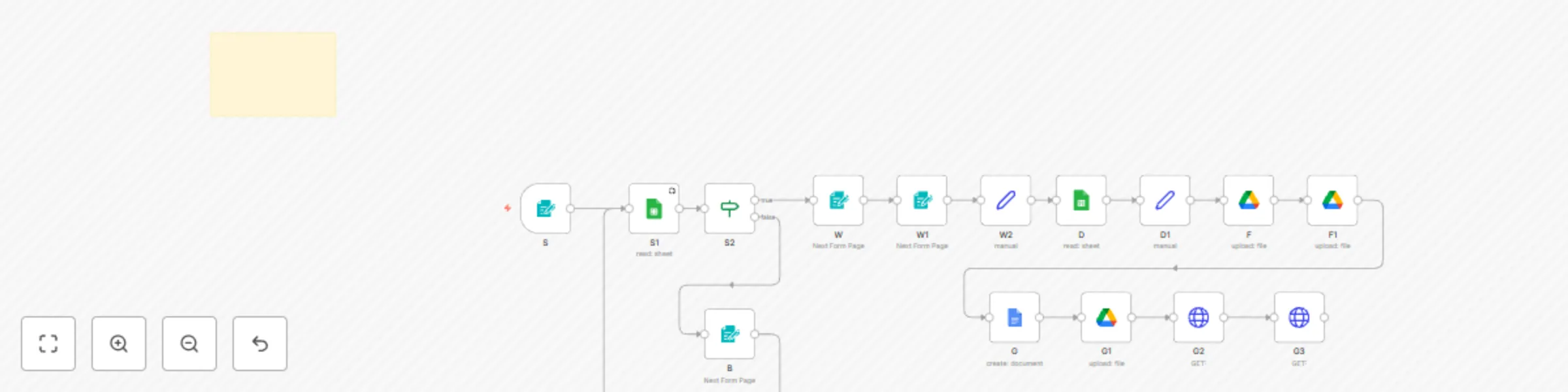
Automate end-to-end contract signatures with Google Docs, Drive and SignNow

Workflow preview

Workflow preview
100%
Automate end-to-end contract signatures with Google Docs, Drive and SignNow preview
Open on n8n.io

Important notice

This workflow is provided as-is. Please review and test before using in production.

1. Workflow Overview

️ Automate Document Signatures with SignNow (End to End Contract Automation) Close Contracts on Autopilot — From Onboarding to Signed PDF This workflow turns contract process into a fully automate...

Best for

  • Document Extraction automation workflows
  • advanced n8n builders looking for reusable templates

Tools used

n8n-nodes-base.stickynote, n8n-nodes-base.formtrigger, n8n-nodes-base.googlesheets, n8n-nodes-base.if, n8n-nodes-base.form, n8n-nodes-base.set, n8n-nodes-base.googledrive, n8n-nodes-base.googledocs

Source and attribution

This workflow is cataloged by N8N Workflows and links back to its original n8n.io source page by Lenouar.

Original n8n.io source

1.1 Workflow description

Title
Automate end-to-end contract signatures with Google Docs, Drive and SignNow
Workflow name
Automate end-to-end contract signatures with Google Docs, Drive and SignNow

✍️ Automate Document Signatures with SignNow (End-to-End Contract Automation)

Close Contracts on Autopilot — From Onboarding to Signed PDF

This workflow turns contract process into a fully automated, production-ready signing pipeline.

No manual document edits.
No chasing signatures.
No broken onboarding flows.

From the moment a user submits their details, the system generates, sends, tracks, and delivers a legally signed contract automatically.


Who This Workflow Is Built For

Agencies onboarding new clients at scale
Training providers & instructors issuing agreements
HR teams handling offers & contractor contracts
Consultants & service providers with repeatable contracts
✅ Any business tired of manual contract handling

If you send the same type of contract again and again, this is built for you.


What This Workflow Does (Business & Technical View)

  1. User fills in your n8n form
  2. Dynamic contract generation
    • Your contract template auto-filled with user form details.
    • Contract sent to user by email
  3. Digital signature via SignNow
  4. Post-signature automation
    • The final signed PDF is emailed to the signer.
    • Records are updated in Google Sheets for audit & tracking.

Everything happens without human intervention.


Why This Template Is Valuable

  • Eliminates manual contract preparation
  • Zero follow-up required for signatures
  • Consistent, compliant documents every time
  • Scales infinitely with no added admin workload
  • Audit-friendly (all signers logged and stored)

This workflow replaces hours of admin work with a single automation.


Why Buy This Instead of Building It Yourself

  • Save 20–30+ hours of SignNow API learning and debugging
  • Avoid common pitfalls:
    • Missing SignNow tags
    • Broken callbacks
    • Incorrect PDF field extraction
  • Get a battle-tested flow already wired across:
    • Google Docs
    • Google Drive
    • Google Sheets
    • SignNow
    • Email delivery

This is not a toy example — it’s a real onboarding system used in production.


Technical Requirements

  • n8n (self-hosted or cloud)
  • SignNow account with API access
  • Google Docs / Drive / Sheets access
  • Email sender (Gmail, Outlook, or SMTP)
  • A public n8n URL for SignNow webhook callbacks

⚠️ Your Google Docs template must include valid SignNow field tags to enable auto-invites and signature capture.


Customization Options

  • Replace the contract template with any agreement type
  • Add more fields to onboarding forms
  • Extend to CRM, Slack, or internal approval flows
  • Customize branding and email messaging

Bottom Line 💡

If contracts are part of your business, this workflow pays for itself immediately.

One form submission → one signed contract → zero manual steps.

This is how modern businesses handle agreements at scale.


👉 By purchasing this template, you receive:

  • Full n8n workflow JSON
  • Step-by-step setup guidelines by email
  • Basic email support

This is not just automation — it’s contract operations, done right.

1.2 Logical Blocks

This catalog entry is organized from the workflow JSON. The node-level section below shows the executable blocks available for review before importing the template.

2. Block-by-Block Analysis

Block 1 - Sticky Note

Type / Role
n8n-nodes-base.stickyNote - stickyNote
Config choices
Version 1

Block 2 - S

Type / Role
n8n-nodes-base.formTrigger - formTrigger
Config choices
Version 2.3

Block 3 - S1

Type / Role
n8n-nodes-base.googleSheets - googleSheets
Config choices
Version 4.7

Block 4 - S2

Type / Role
n8n-nodes-base.if - if
Config choices
Version 2.2

Block 5 - W

Type / Role
n8n-nodes-base.form - form
Config choices
Version 2.3

Block 6 - W1

Type / Role
n8n-nodes-base.form - form
Config choices
Version 2.3

Block 7 - W2

Type / Role
n8n-nodes-base.set - set
Config choices
Version 3.4

Block 8 - D

Type / Role
n8n-nodes-base.googleSheets - googleSheets
Config choices
Version 4.7

Block 9 - D1

Type / Role
n8n-nodes-base.set - set
Config choices
Version 3.4

Block 10 - F

Type / Role
n8n-nodes-base.googleDrive - googleDrive
Config choices
Version 3

Block 11 - F1

Type / Role
n8n-nodes-base.googleDrive - googleDrive
Config choices
Version 3

Block 12 - G

Type / Role
n8n-nodes-base.googleDocs - googleDocs
Config choices
Version 2

Block 13 - G1

Type / Role
n8n-nodes-base.googleDrive - googleDrive
Config choices
Version 3

Block 14 - G2

Type / Role
n8n-nodes-base.httpRequest - httpRequest
Config choices
Version 4.2

Block 15 - G3

Type / Role
n8n-nodes-base.httpRequest - httpRequest
Config choices
Version 4.2

Block 16 - B

Type / Role
n8n-nodes-base.form - form
Config choices
Version 2.3

3. Summary Table

Workflow Automate end-to-end contract signatures with Google Docs, Drive and SignNow
Complexity advanced
Nodes 16
Categories Document Extraction
Author Lenouar
Published 20 Dec 2025

4. Reproducing the Workflow from Scratch

  1. 1. Download the workflow JSON

    Use the JSON export at /data/workflows/11984/11984.json as the source template for this automation.

  2. 2. Import the template into n8n

    Open n8n, import the downloaded JSON, and review each node before activating the workflow.

  3. 3. Configure credentials and variables

    Replace placeholder credentials, API keys, webhook URLs, account IDs, and environment-specific values with your own settings.

  4. 4. Test with sample data

    Run the workflow manually or in a staging workspace, inspect node output, and confirm downstream systems receive the expected data.

  5. 5. Activate and monitor

    Enable the workflow only after testing, then monitor executions, errors, and rate limits during the first production runs.

5. General Notes & Resources

Review imported nodes carefully before activation. This catalog entry is intended to help you inspect the workflow structure, understand required services, and find related templates faster.

Node names, credentials, schedules, webhook paths, and external service limits may need adjustment for your workspace.

Frequently asked questions

What does Automate end-to-end contract signatures with Google Docs, Drive and SignNow do?

️ Automate Document Signatures with SignNow (End to End Contract Automation) Close Contracts on Autopilot — From Onboarding to Signed PDF This workflow turns contract process into a fully automate...

What do I need before importing this workflow?

Review the workflow JSON, configure any required credentials in n8n, and test the automation in a safe workspace before using it in production.

Can I customize this workflow?

Yes. Use the block-by-block analysis and the downloadable JSON to inspect each node, then adjust credentials, prompts, schedules, filters, or destinations for your Document Extraction use case.