Block 1 - Stripe Webhook
- Type / Role
- n8n-nodes-base.webhook - webhook
- Config choices
- Version 1


 Early Deal
This workflow is provided as-is. Please review and test before using in production.
Overview This workflow automates the end to end delivery of digital products after a successful Stripe checkout. It eliminates manual fulfillment, keeps a structured sales log in Notion, and option...
n8n-nodes-base.webhook, n8n-nodes-base.httprequest, n8n-nodes-base.if, n8n-nodes-base.emailsend, n8n-nodes-base.notion, n8n-nodes-base.telegram
This workflow is cataloged by N8N Workflows and links back to its original n8n.io source page by Shelly-Ann Davy.
Original n8n.io sourceOverview
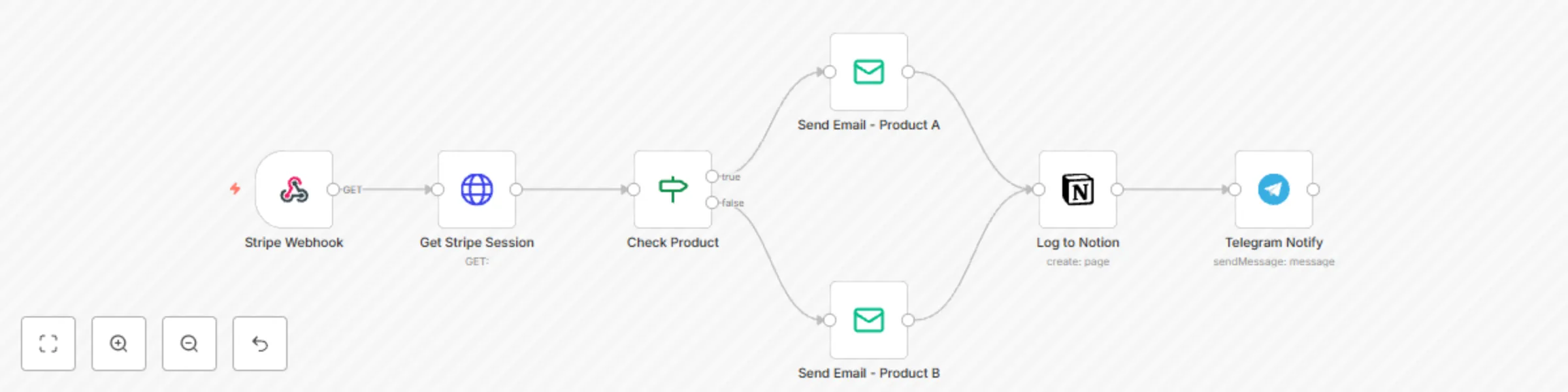
This workflow automates the end-to-end delivery of digital products after a successful Stripe checkout. It eliminates manual fulfillment, keeps a structured sales log in Notion, and optionally notifies you in Telegram.
It’s designed for template sellers, coaches, course creators, and micro-SaaS owners who want to professionalize their delivery process without custom code.
Workflow Logic
Webhook Trigger (Stripe)
Listens for the checkout.session.completed event.
Path: /stripe-webhook
Method: POST
Response Mode: onReceived
HTTP Request – Get Checkout Session
Fetches full session details from Stripe API.
URL: https://api.stripe.com/v1/checkout/sessions/{{$json.body.data.object.id}}
Authentication: Header Auth (Authorization: Bearer YOUR_STRIPE_SECRET_KEY)
IF Node – Check Product
Evaluates line_items.data[0].description from Stripe response.
Routes flow depending on which product was purchased (e.g., Notion Template A vs Notion Template B).
Email Send Nodes
Sends product delivery emails with personalized greeting and download link.
To: {{$json.customer_details.email}}
Subject: Your Elegant Template is Ready ✨
Body text includes product-specific link.
Notion Node – Log Sale
Creates a page in your Sales Log database.
Properties:
Name → {{$json.customer_details.name}}
Email → {{$json.customer_details.email}}
Product → {{$json.line_items.data[0].description}}
Date → {{$now}}
Status → Delivered
Telegram Notify Node (Optional)
Sends you a private message:
💸 New Sale!
Product: {{ $json.line_items.data[0].description }}
Buyer: {{ $json.customer_details.name }}
Requires YOUR_TELEGRAM_CHAT_ID and bot token.
Node List
Webhook (Stripe)
HTTP Request (Stripe API)
IF (Check Product)
Email Send (Product Delivery)
Notion (Create Page)
Telegram (Send Message)
Setup Instructions
Stripe:
Create a webhook endpoint in your Stripe dashboard.
Subscribe to checkout.session.completed.
Add your secret key into the HTTP Request node (YOUR_STRIPE_SECRET_KEY).
Notion:
Create a Sales Log database.
Share with your Notion API integration.
Replace YOUR_NOTION_DATABASE_ID with the correct ID.
Email:
Configure SMTP credentials or Gmail OAuth in the Email Send node.
Update sender email (fromEmail).
Telegram (Optional):
Create a bot with BotFather.
Get your chat ID.
Add your token and YOUR_TELEGRAM_CHAT_ID in the node.
Why It’s Gallery-Ready
✅ Clear business use case (digital delivery, sales tracking).
✅ Proper variable usage ($json syntax, no hardcoded customer data).
✅ No exposed API keys (placeholders provided).
✅ Markdown-based documentation with H2 headings.
✅ Broad but specific: works for any digital seller (Notion, PDFs, Canva, courses).
Example Use Cases
Auto-deliver Notion templates or digital kits after Stripe checkout.
Log all sales in a Notion database for tracking/reporting.
Send instant Telegram notifications so you never miss a new customer.
Replace manual fulfillment with a professional automation pipeline.
✨ With this workflow, you’ll never have to manually email files again. Customers are delighted with instant delivery, your sales records stay organized, and you gain real-time visibility on every transaction.
This catalog entry is organized from the workflow JSON. The node-level section below shows the executable blocks available for review before importing the template.
| Workflow | Automate digital product delivery & sales tracking with Stripe, Email, Notion & Telegram |
|---|---|
| Complexity | intermediate |
| Nodes | 7 |
| Categories | CRM |
| Author | Shelly-Ann Davy |
| Published | 15 Sept 2025 |
Use the JSON export at /data/workflows/8588/8588.json as the source template for this automation.
Open n8n, import the downloaded JSON, and review each node before activating the workflow.
Replace placeholder credentials, API keys, webhook URLs, account IDs, and environment-specific values with your own settings.
Run the workflow manually or in a staging workspace, inspect node output, and confirm downstream systems receive the expected data.
Enable the workflow only after testing, then monitor executions, errors, and rate limits during the first production runs.
Review imported nodes carefully before activation. This catalog entry is intended to help you inspect the workflow structure, understand required services, and find related templates faster.
Node names, credentials, schedules, webhook paths, and external service limits may need adjustment for your workspace.
Overview This workflow automates the end to end delivery of digital products after a successful Stripe checkout. It eliminates manual fulfillment, keeps a structured sales log in Notion, and option...
Review the workflow JSON, configure any required credentials in n8n, and test the automation in a safe workspace before using it in production.
Yes. Use the block-by-block analysis and the downloadable JSON to inspect each node, then adjust credentials, prompts, schedules, filters, or destinations for your CRM use case.