Block 1 - Extract from File
- Type / Role
- n8n-nodes-base.extractFromFile - extractFromFile
- Config choices
- Version 1


 Early Deal
This workflow is provided as-is. Please review and test before using in production.
This n8n template from Intuz provides a complete solution to automate the extraction of critical information from PDF documents like faxes, or any PDFs. It uses the power ...
n8n-nodes-base.extractfromfile, n8n-nodes-base.googledrive, n8n-nodes-base.httprequest, n8n-nodes-base.set, n8n-nodes-base.googlesheets, @n8n/n8n-nodes-langchain.chainllm, @n8n/n8n-nodes-langchain.lmchatgooglegemini, @n8n/n8n-nodes-langchain.outputparserstructured
This workflow is cataloged by N8N Workflows and links back to its original n8n.io source page by Intuz .
Original n8n.io sourceIt uses the power of Google Gemini's multimodal capabilities to read the document, identify key fields, and organize the data into a structured format, saving it directly to a Google Sheet.
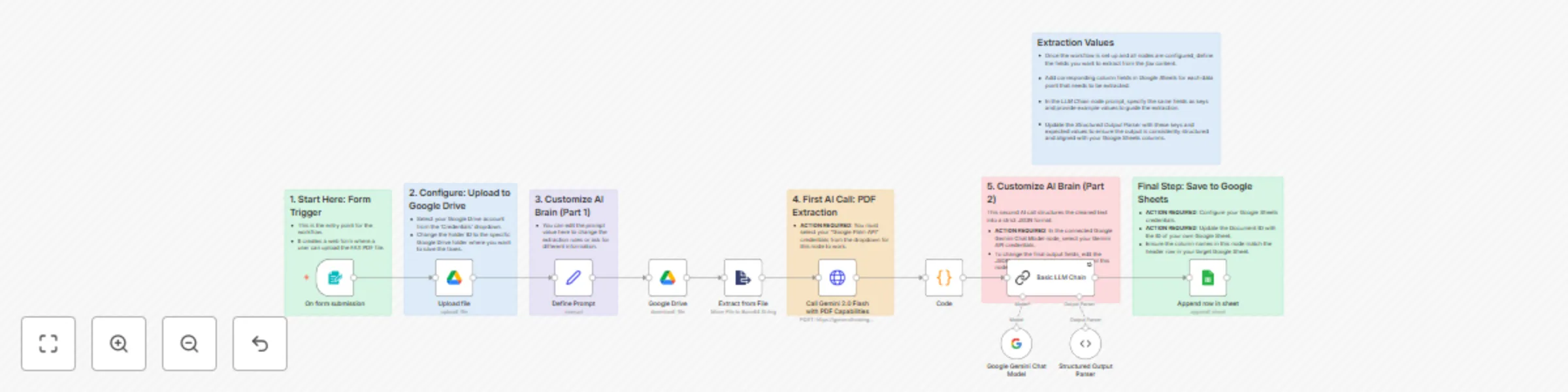
1. Upload via Web Form: The process starts when a user uploads a fax (as a PDF file) through a simple, secure web form generated by n8n.
2. AI Document Analysis: The PDF is sent directly to Google Gemini's advanced multimodal model, which reads the entire document—including text, tables, and form fields. It extracts all relevant information based on a detailed prompt.
3. AI Data Structuring: The raw extracted text is then passed to a second AI step. This step cleans the information and strictly structures it into a predictable JSON format (e.g., Patient ID, Name, DOB, etc.).
4. Save to Google Sheets: The final, structured data is automatically appended as a new, clean row in your designated Google Sheet, creating an organized and usable dataset from the unstructured fax.
1. n8n Instance & Required Nodes:
2. Google Accounts:
Here is a detailed, step-by-step guide to help you configure and run this workflow.
1. Before You Begin: Prerequisites Please ensure you have the following ready:
2. Step-by-Step Configuration Step 1: Import the Workflow
Step 2: Set Up the Form Trigger The workflow starts with the "On form submission" node.
Step 3: Configure the Google Drive Node
Step 4: Configure the Google Gemini AI Nodes (Very Important) This workflow uses AI in two places, and both need to be connected.
Step 5: (Optional) Customize What Data is Extracted You have full control over what information the AI looks for.
Step 6: Configure the Final Google Sheets Node
4. Running the Workflow
Click here- Get Started
This catalog entry is organized from the workflow JSON. The node-level section below shows the executable blocks available for review before importing the template.
| Workflow | Automate data extraction from faxes & PDFs using Google Gemini and Google Sheets |
|---|---|
| Complexity | advanced |
| Nodes | 18 |
| Categories | Document Extraction, Multimodal AI |
| Author | Intuz |
| Published | 26 Sept 2025 |
Use the JSON export at /data/workflows/8939/8939.json as the source template for this automation.
Open n8n, import the downloaded JSON, and review each node before activating the workflow.
Replace placeholder credentials, API keys, webhook URLs, account IDs, and environment-specific values with your own settings.
Run the workflow manually or in a staging workspace, inspect node output, and confirm downstream systems receive the expected data.
Enable the workflow only after testing, then monitor executions, errors, and rate limits during the first production runs.
Review imported nodes carefully before activation. This catalog entry is intended to help you inspect the workflow structure, understand required services, and find related templates faster.
Node names, credentials, schedules, webhook paths, and external service limits may need adjustment for your workspace.
This n8n template from Intuz provides a complete solution to automate the extraction of critical information from PDF documents like faxes, or any PDFs. It uses the power ...
Review the workflow JSON, configure any required credentials in n8n, and test the automation in a safe workspace before using it in production.
Yes. Use the block-by-block analysis and the downloadable JSON to inspect each node, then adjust credentials, prompts, schedules, filters, or destinations for your Document Extraction, Multimodal AI use case.