Automate call center sentiment analysis with GPT-4o-mini and Google Sheets

Workflow preview

Workflow preview
100%
Automate call center sentiment analysis with GPT-4o-mini and Google Sheets preview
Open on n8n.io

Important notice

This workflow is provided as-is. Please review and test before using in production.

1. Workflow Overview

What problem does this workflow solve? Call centers often record conversations for quality control and training, but reviewing every transcript manually is tedious and inefficient. This workflow ...

Best for

  • AI Summarization automation workflows
  • Multimodal AI automation workflows
  • intermediate n8n builders looking for reusable templates

Tools used

@n8n/n8n-nodes-langchain.lmchatopenai, n8n-nodes-base.splitinbatches, n8n-nodes-base.scheduletrigger, n8n-nodes-base.googlesheets, n8n-nodes-base.set, @n8n/n8n-nodes-langchain.agent, @n8n/n8n-nodes-langchain.outputparserstructured, n8n-nodes-base.stickynote

Source and attribution

This workflow is cataloged by N8N Workflows and links back to its original n8n.io source page by InfyOm Technologies.

Original n8n.io source

1.1 Workflow description

Title
Automate call center sentiment analysis with GPT-4o-mini and Google Sheets
Workflow name
Automate call center sentiment analysis with GPT-4o-mini and Google Sheets

βœ… What problem does this workflow solve?

Call centers often record conversations for quality control and training, but reviewing every transcript manually is tedious and inefficient. This workflow automates sentiment analysis for each call, providing structured feedback across multiple key categories, so managers can focus on improving performance and training.


βš™οΈ What does this workflow do?

  1. Accepts a Google Sheet containing:
    • Call transcript
    • Agent name
    • Customer name
  2. Analyzes each call transcript across multiple sentiment dimensions:
    • πŸ‘‹ Greeting Sentiment
    • πŸ§‘β€πŸ’Ό Agent Friendliness
    • ❓ Problem-Solving Sentiment
    • πŸ™‚ Customer Sentiment
    • πŸ‘‹ Closing Sentiment
    • βœ… Issue Resolved (Yes/No)
  3. Add Conversation Topics discussed in a call
  4. Calculates an overall call rating based on combined analysis.
  5. Updates the Google Sheet with:
    • Individual sentiment scores
    • Issue resolution status
    • Final call rating

πŸ”§ Setup Instructions

πŸ“„ Google Sheets

  • Prepare a sheet with the following columns:
    • Transcript
    • Agent Name
    • Customer Name

The workflow will append results in new columns automatically:

  • Greeting Sentiment
  • Closing Sentiment
  • Agent Friendliness
  • Problem Solving
  • Customer Sentiment
  • Issue Resolved
  • Overall Call Rating (out of 5 or 10)

🧠 OpenAI Setup

  • Connect OpenAI API to perform NLP-based sentiment classification.
  • For each transcript, use structured prompts to analyze individual components.

🧠 How it Works – Step-by-Step

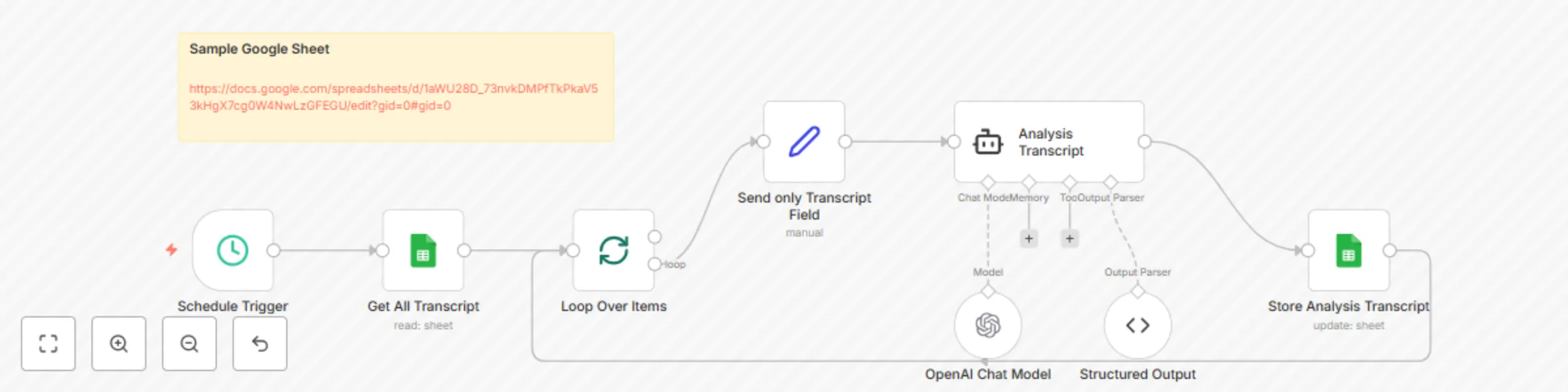
  1. Sheet Scan – The workflow reads rows from the provided Google Sheet.
  2. Loop Through Calls – For each transcript, it:
    • Sends prompts to OpenAI to analyze:
      • Greeting tone (friendly/neutral/rude)
      • Problem-solving quality (clear/confusing/helpful)
      • Closing sentiment
      • Agent attitude
      • Customer satisfaction
      • Whether the issue was resolved
    • Calculates a composite rating from all factors.
  3. Update Sheet – All analyzed data is written back into the Google Sheet.

πŸ“Š Example Output

https://docs.google.com/spreadsheets/d/1aWU28D_73nvkDMPfTkPkaV53kHgX7cg0W4NwLzGFEGU/edit?gid=0#gid=0


πŸ‘€ Who can use this?

This workflow is ideal for:

  • ☎️ Call Centers
  • 🎧 Customer Support Teams
  • 🧠 Training & QA Departments
  • 🏒 BPOs or Support Vendors

If you want deeper insight into every customer interaction, this workflow delivers quantified, actionable sentiment metrics automatically.


πŸ›  Customization Ideas

  • πŸ“… Add scheduled runs (daily/weekly) to auto-analyze new calls.
  • πŸ“ Export flagged or low-rated calls into a review dashboard.
  • 🧩 Integrate with Slack or email to send alerts for low-score calls.
  • πŸ—‚ Filter by agent, category, or score to track performance trends.

πŸš€ Ready to Use?

Just connect:

  • βœ… Google Sheets (with transcript data)
  • βœ… OpenAI API

…and this workflow will automatically turn your raw call transcripts into actionable sentiment insights.

1.2 Logical Blocks

This catalog entry is organized from the workflow JSON. The node-level section below shows the executable blocks available for review before importing the template.

2. Block-by-Block Analysis

Block 1 - OpenAI Chat Model

Type / Role
@n8n/n8n-nodes-langchain.lmChatOpenAi - lmChatOpenAi
Config choices
Version 1.2

Block 2 - Loop Over Items

Type / Role
n8n-nodes-base.splitInBatches - splitInBatches
Config choices
Version 3

Block 3 - Schedule Trigger

Type / Role
n8n-nodes-base.scheduleTrigger - scheduleTrigger
Config choices
Version 1.2

Block 4 - Get All Transcript

Type / Role
n8n-nodes-base.googleSheets - googleSheets
Config choices
Version 4.6

Block 5 - Send only Transcript Field

Type / Role
n8n-nodes-base.set - set
Config choices
Version 3.4

Block 6 - Analysis Transcript

Type / Role
@n8n/n8n-nodes-langchain.agent - agent
Config choices
Version 2

Block 7 - Structured Output

Type / Role
@n8n/n8n-nodes-langchain.outputParserStructured - outputParserStructured
Config choices
Version 1.3

Block 8 - Store Analysis Transcript

Type / Role
n8n-nodes-base.googleSheets - googleSheets
Config choices
Version 4.6

Block 9 - Sticky Note

Type / Role
n8n-nodes-base.stickyNote - stickyNote
Config choices
Version 1

3. Summary Table

Workflow Automate call center sentiment analysis with GPT-4o-mini and Google Sheets
Complexity intermediate
Nodes 9
Categories AI Summarization, Multimodal AI
Author InfyOm Technologies
Published 20 Aug 2025

4. Reproducing the Workflow from Scratch

  1. 1. Download the workflow JSON

    Use the JSON export at /data/workflows/7624/7624.json as the source template for this automation.

  2. 2. Import the template into n8n

    Open n8n, import the downloaded JSON, and review each node before activating the workflow.

  3. 3. Configure credentials and variables

    Replace placeholder credentials, API keys, webhook URLs, account IDs, and environment-specific values with your own settings.

  4. 4. Test with sample data

    Run the workflow manually or in a staging workspace, inspect node output, and confirm downstream systems receive the expected data.

  5. 5. Activate and monitor

    Enable the workflow only after testing, then monitor executions, errors, and rate limits during the first production runs.

5. General Notes & Resources

Review imported nodes carefully before activation. This catalog entry is intended to help you inspect the workflow structure, understand required services, and find related templates faster.

Node names, credentials, schedules, webhook paths, and external service limits may need adjustment for your workspace.

Frequently asked questions

What does Automate call center sentiment analysis with GPT-4o-mini and Google Sheets do?

What problem does this workflow solve? Call centers often record conversations for quality control and training, but reviewing every transcript manually is tedious and inefficient. This workflow ...

What do I need before importing this workflow?

Review the workflow JSON, configure any required credentials in n8n, and test the automation in a safe workspace before using it in production.

Can I customize this workflow?

Yes. Use the block-by-block analysis and the downloadable JSON to inspect each node, then adjust credentials, prompts, schedules, filters, or destinations for your AI Summarization, Multimodal AI use case.