Automate B2B SaaS renewal risk management with CRM, support & usage data

Workflow preview

Workflow preview
100%
Automate B2B SaaS renewal risk management with CRM, support & usage data preview
Open on n8n.io

Important notice

This workflow is provided as-is. Please review and test before using in production.

1. Workflow Overview

Description This workflow is designed for B2B/SaaS teams who want to secure renewals before it’s too late . It runs every day, identifies all accounts whose licenses are up for renewal in J–30 , en...

Best for

  • CRM automation workflows
  • AI Summarization automation workflows
  • advanced n8n builders looking for reusable templates

Tools used

n8n-nodes-base.httprequest, n8n-nodes-base.zendesk, n8n-nodes-base.scheduletrigger, n8n-nodes-base.set, n8n-nodes-base.postgres, n8n-nodes-base.splitinbatches, n8n-nodes-base.hubspot, n8n-nodes-base.salesforce

Source and attribution

This workflow is cataloged by N8N Workflows and links back to its original n8n.io source page by Yassin Zehar.

Original n8n.io source

1.1 Workflow description

Title
Automate B2B SaaS renewal risk management with CRM, support & usage data
Workflow name
Automate B2B SaaS renewal risk management with CRM, support & usage data

Description

This workflow is designed for B2B/SaaS teams who want to secure renewals before it’s too late.

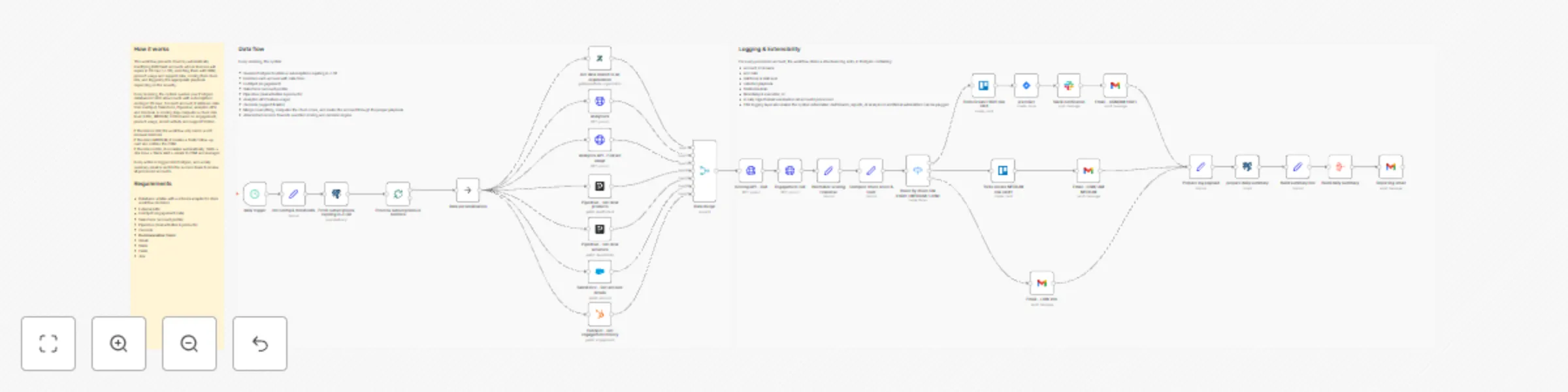
It runs every day, identifies all accounts whose licenses are up for renewal in J–30, enriches them with CRM, product usage and support data, computes an internal churn risk level, and then triggers the appropriate playbook:

  • HIGH risk → full escalation (tasks, alerts, emails)
  • MEDIUM risk → proactive follow-up by Customer Success
  • LOW risk → light renewal touchpoint / monitoring

Everything is logged into a database table so that you can build dashboards, run analysis, or plug additional automations on top.


How it works

  1. Daily detection (J–30 renewals)
    A scheduled trigger runs every morning and queries your database (Postgres / Supabase) to fetch all active subscriptions expiring in 30 days. Each row includes the account identifier, name, renewal date and basic commercial data.

  2. Data enrichment across tools
    For each account, the workflow calls several business systems to collect context:

    • HubSpot → engagement history
    • Salesforce → account profile and segment
    • Pipedrive → deal activities and associated products
    • Analytics API → product feature usage and activity trends
    • Zendesk → recent support tickets and potential friction signals

    All of this is merged into a single, unified item.

  3. Churn scoring & routing
    An internal scoring step evaluates the risk for each account based on multiple signals (engagement, usage, support, timing).
    The workflow then categorizes each account into one of three risk levels:

    • HIGH – strong churn signals → needs immediate attention
    • MEDIUM – some warning signs → needs proactive follow-up
    • LOW – looks healthy → light renewal reminder

    A Switch node routes each account to the relevant playbook.

  4. Automated playbooks

    • 🔴 HIGH risk

      • Create a Trello card on a dedicated “High-Risk Renewals” board/list
      • Create a Jira ticket for the CS / AM team
      • Send a Slack alert in a designated channel
      • Send a detailed email to the CSM and/or account manager
    • 🟠 MEDIUM risk

      • Create a Trello card in a “Renewals – Follow-up” list
      • Send a contextual email to the CSM to recommend a proactive check-in
    • 🟢 LOW risk

      • Send a soft renewal email / internal note to keep the account on the radar
  5. Logging & daily reporting For every processed account, the workflow prepares a structured log record (account, renewal date, risk level, basic context).
    A Postgres node is used to insert the data into a churn_logs table.

    At the end of each run, all processed accounts are aggregated and a daily summary email is sent (for example to the Customer Success leadership team), listing the renewals and their risk levels.


Requirements

  1. Database

    • A table named churn_logs (or equivalent) to store workflow decisions and history.
      Example fields: account_id, account_name, end_date, riskScore, riskLevel, playbook, trello_link, jira_link, timestamp.
  2. External APIs

    • HubSpot (engagement data)
    • Salesforce (account profile)
    • Pipedrive (deals & products)
    • Zendesk (support tickets)
    • Optional: product analytics API for usage metrics
  3. Communication & task tools

    • Gmail (emails to CSM / AM / summary recipients)
    • Slack (alert channel for high-risk cases)
    • Trello (task creation for CS follow-up)
    • Jira (escalation tickets for high-risk renewals)
  4. Configuration variables

    • Thresholds are configured in the Init config & thresholds node:
      • days_before_renewal
      • churn_threshold_high
      • churn_threshold_medium
    • These parameters let you adapt the detection window and risk sensitivity to your own business rules.

Typical use cases

  • Customer Success teams who want a daily churn watchlist without exporting spreadsheets.
  • RevOps teams looking to standardize renewal playbooks across tools.
  • SaaS companies who need to prioritize renewals based on real risk signals rather than gut feeling.
  • Product-led organizations that want to combine usage data + CRM + support into one automated process.

Tutorial video

Watch the Youtube Tutorial video

About me :

I’m Yassin a Project & Product Manager Scaling tech products with data-driven project management. 📬 Feel free to connect with me on Linkedin

1.2 Logical Blocks

This catalog entry is organized from the workflow JSON. The node-level section below shows the executable blocks available for review before importing the template.

2. Block-by-Block Analysis

Block 1 - analytivcs

Type / Role
n8n-nodes-base.httpRequest - httpRequest
Config choices
Version 4.3

Block 2 - Get data related to an organization

Type / Role
n8n-nodes-base.zendesk - zendesk
Config choices
Version 1

Block 3 - daily trigger

Type / Role
n8n-nodes-base.scheduleTrigger - scheduleTrigger
Config choices
Version 1.2

Block 4 - Init config & thresholds

Type / Role
n8n-nodes-base.set - set
Config choices
Version 3.4

Block 5 - Fetch subscriptions expiring in J+30

Type / Role
n8n-nodes-base.postgres - postgres
Config choices
Version 2.6

Block 6 - Process subscriptions in batches

Type / Role
n8n-nodes-base.splitInBatches - splitInBatches
Config choices
Version 3

Block 7 - HubSpot – Get engagement history

Type / Role
n8n-nodes-base.hubspot - hubspot
Config choices
Version 2.2

Block 8 - Salesforce – Get account details

Type / Role
n8n-nodes-base.salesforce - salesforce
Config choices
Version 1

Block 9 - Pipedrive – Get deal activities

Type / Role
n8n-nodes-base.pipedrive - pipedrive
Config choices
Version 1

Block 10 - Pipedrive – Get deal products

Type / Role
n8n-nodes-base.pipedrive - pipedrive
Config choices
Version 1

Block 11 - Analytics API – Feature usage

Type / Role
n8n-nodes-base.httpRequest - httpRequest
Config choices
Version 4.3

Block 12 - Scoring API – Call

Type / Role
n8n-nodes-base.httpRequest - httpRequest
Config choices
Version 4.3

Block 13 - Normalize scoring response

Type / Role
n8n-nodes-base.set - set
Config choices
Version 3.4

Block 14 - Compute churn score & level

Type / Role
n8n-nodes-base.set - set
Config choices
Version 3.4

Block 15 - Route by churn risk (HIGH / MEDIUM / LOW)

Type / Role
n8n-nodes-base.switch - switch
Config choices
Version 3.3

Block 16 - Build daily summary

Type / Role
n8n-nodes-base.aggregate - aggregate
Config choices
Version 1

Block 17 - Email – LOW info

Type / Role
n8n-nodes-base.gmail - gmail
Config choices
Version 2.1

Block 18 - Email – CSM/AM HIGH

Type / Role
n8n-nodes-base.gmail - gmail
Config choices
Version 2.1

Block 19 - Email – CSM/ AM MEDIUM

Type / Role
n8n-nodes-base.gmail - gmail
Config choices
Version 2.1

Block 20 - jira ticket

Type / Role
n8n-nodes-base.jira - jira
Config choices
Version 1

Block 21 - Slack notification

Type / Role
n8n-nodes-base.slack - slack
Config choices
Version 2.3

Block 22 - Data personalisation

Type / Role
n8n-nodes-base.noOp - noOp
Config choices
Version 1

Block 23 - Sticky Note4

Type / Role
n8n-nodes-base.stickyNote - stickyNote
Config choices
Version 1

Block 24 - Sticky Note1

Type / Role
n8n-nodes-base.stickyNote - stickyNote
Config choices
Version 1

Showing the first 24 of 33 workflow blocks. Download the JSON for the full node graph.

3. Summary Table

Workflow Automate B2B SaaS renewal risk management with CRM, support & usage data
Complexity advanced
Nodes 33
Categories CRM, AI Summarization
Author Yassin Zehar
Published 03 Dec 2025

4. Reproducing the Workflow from Scratch

  1. 1. Download the workflow JSON

    Use the JSON export at /data/workflows/11469/11469.json as the source template for this automation.

  2. 2. Import the template into n8n

    Open n8n, import the downloaded JSON, and review each node before activating the workflow.

  3. 3. Configure credentials and variables

    Replace placeholder credentials, API keys, webhook URLs, account IDs, and environment-specific values with your own settings.

  4. 4. Test with sample data

    Run the workflow manually or in a staging workspace, inspect node output, and confirm downstream systems receive the expected data.

  5. 5. Activate and monitor

    Enable the workflow only after testing, then monitor executions, errors, and rate limits during the first production runs.

5. General Notes & Resources

Review imported nodes carefully before activation. This catalog entry is intended to help you inspect the workflow structure, understand required services, and find related templates faster.

Node names, credentials, schedules, webhook paths, and external service limits may need adjustment for your workspace.

Frequently asked questions

What does Automate B2B SaaS renewal risk management with CRM, support & usage data do?

Description This workflow is designed for B2B/SaaS teams who want to secure renewals before it’s too late . It runs every day, identifies all accounts whose licenses are up for renewal in J–30 , en...

What do I need before importing this workflow?

Review the workflow JSON, configure any required credentials in n8n, and test the automation in a safe workspace before using it in production.

Can I customize this workflow?

Yes. Use the block-by-block analysis and the downloadable JSON to inspect each node, then adjust credentials, prompts, schedules, filters, or destinations for your CRM, AI Summarization use case.