Block 1 - When clicking ‘Test workflow’
- Type / Role
- n8n-nodes-base.manualTrigger - manualTrigger
- Config choices
- Version 1


 Early Deal
This workflow is provided as-is. Please review and test before using in production.
How it works ️ I set up this workflow to convert any audio or video file into structured text using the new ElevenLabs Scribe model, one of the best Speech to Text AIs , available in 99+ l...
n8n-nodes-base.manualtrigger, n8n-nodes-base.httprequest, n8n-nodes-base.readwritefile
This workflow is cataloged by N8N Workflows and links back to its original n8n.io source page by phil.
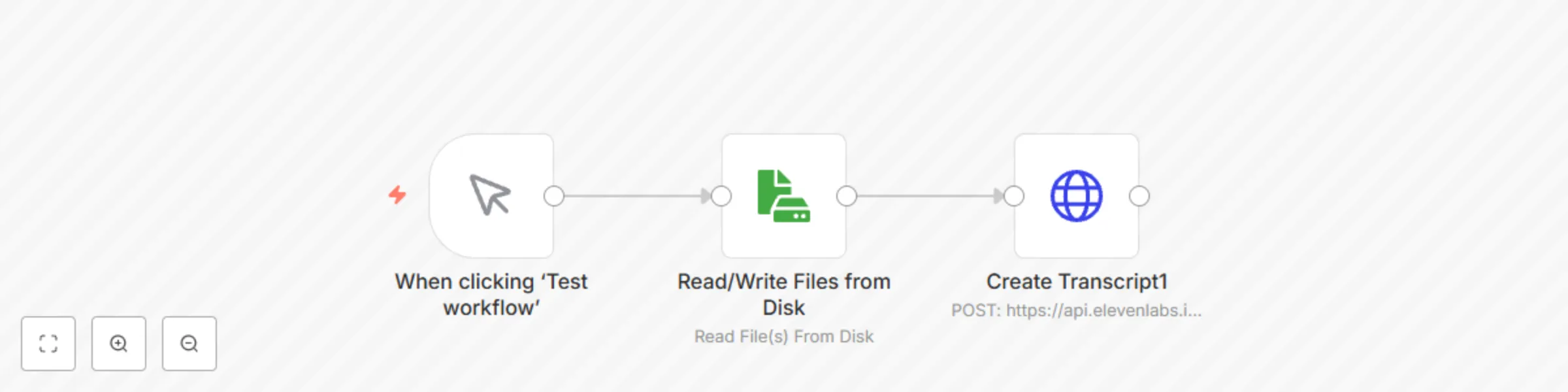
Original n8n.io sourceI set up this workflow to convert any audio or video file into structured text using the new ElevenLabs Scribe model, one of the best Speech-to-Text AIs, available in 99+ languages. This workflow integrates seamlessly with n8n and leverages the ElevenLabs Scribe API to:
This workflow seamlessly integrates with n8n to: ✅ Upload audio/video files automatically ✅ Transcribe them with industry-leading accuracy in any language ✅ Export the text for further processing (summaries, subtitles, SEO content, etc.)
👉 Try the new ElevenLabs Scribe model now: Convert speech to text instantly
🔹 Podcast Transcriptions – Convert podcast episodes into blog posts for SEO and accessibility 🔹 YouTube Subtitles – Generate captions automatically for increased engagement 🔹 Legal & Compliance – Accurately transcribe meetings, interviews, or customer calls 🔹 E-learning – Turn lectures and webinars into structured course notes 🔹 SEO & Content Marketing – Repurpose videos into articles, quotes, and social media content
💡 Boost your productivity with the new Scribe model → Start with ElevenLabs Scribe
🚀 Quick & simple setup in n8n – Upload your file, select the model (scribe_v1), and let the AI handle the rest via the ElevenLabs API.
⸻
I wanted the most accurate and reliable transcription tool for my workflow. After testing different options, Scribe outperformed Google Gemini & OpenAI Whisper in independent benchmarks. It delivers high-quality transcriptions, even in underserved languages like Serbian, Mongolian, and many more.
✅ Transcribes in 99+ languages ✅ Fast, accurate, and easy to integrate ✅ Suitable for content creators, businesses, and professionals
🔗 Get started now and revolutionize your workflow with the new Scribe model → Try Scribe AI today 🚀
🇫🇷 Contactez nous pour automatiser vos processus
This catalog entry is organized from the workflow JSON. The node-level section below shows the executable blocks available for review before importing the template.
| Workflow | Automate audio/video transcription in any language with the new ElevenLabs model |
|---|---|
| Complexity | beginner |
| Nodes | 3 |
| Categories | Document Extraction, Multimodal AI |
| Author | phil |
| Published | 07 Mar 2025 |
Use the JSON export at /data/workflows/3105/3105.json as the source template for this automation.
Open n8n, import the downloaded JSON, and review each node before activating the workflow.
Replace placeholder credentials, API keys, webhook URLs, account IDs, and environment-specific values with your own settings.
Run the workflow manually or in a staging workspace, inspect node output, and confirm downstream systems receive the expected data.
Enable the workflow only after testing, then monitor executions, errors, and rate limits during the first production runs.
Review imported nodes carefully before activation. This catalog entry is intended to help you inspect the workflow structure, understand required services, and find related templates faster.
Node names, credentials, schedules, webhook paths, and external service limits may need adjustment for your workspace.
How it works ️ I set up this workflow to convert any audio or video file into structured text using the new ElevenLabs Scribe model, one of the best Speech to Text AIs , available in 99+ l...
Review the workflow JSON, configure any required credentials in n8n, and test the automation in a safe workspace before using it in production.
Yes. Use the block-by-block analysis and the downloadable JSON to inspect each node, then adjust credentials, prompts, schedules, filters, or destinations for your Document Extraction, Multimodal AI use case.