Block 1 - When clicking ‘Execute workflow’
- Type / Role
- n8n-nodes-base.manualTrigger - manualTrigger
- Config choices
- Version 1


 Early Deal
This workflow is provided as-is. Please review and test before using in production.
Description: Keep your API documentation accurate and reliable with this n8n automation template. The workflow automatically tests your FAQ content related to authentication and rate limits, evalua...
n8n-nodes-base.manualtrigger, n8n-nodes-base.stickynote, n8n-nodes-base.set, n8n-nodes-base.googlesheets, n8n-nodes-base.code, @n8n/n8n-nodes-langchain.agent, @n8n/n8n-nodes-langchain.lmchatazureopenai, n8n-nodes-base.if
This workflow is cataloged by N8N Workflows and links back to its original n8n.io source page by Rahul Joshi.
Original n8n.io sourceKeep your API documentation accurate and reliable with this n8n automation template. The workflow automatically tests your FAQ content related to authentication and rate limits, evaluating each answer using Azure OpenAI GPT-4o-mini for completeness, edge-case coverage, and technical clarity. It logs all results to Google Sheets, scores FAQs from 0–10, and sends Slack alerts when low-quality answers are detected. Ideal for API teams, developer relations managers, and technical writers who want to maintain high-quality documentation with zero manual review effort.
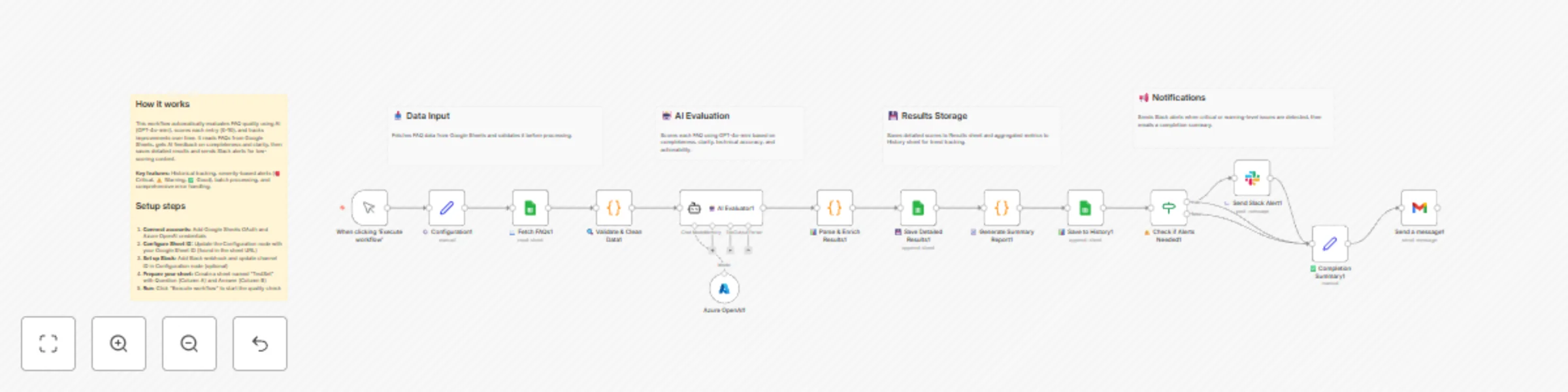
▶️ Manual Trigger or On-Demand Run Start the evaluation anytime you update your FAQs — perfect for regression testing before documentation releases.
📖 Fetch FAQ Q&A from Google Sheets Reads FAQ questions and answers from your designated test sheet (columns A:B). Each Q&A pair becomes a test case for AI evaluation.
🤖 AI Evaluation via GPT-4o-mini Uses Azure OpenAI GPT-4o-mini to evaluate how well each FAQ covers critical aspects of API authentication and rate limiting. The AI provides a numeric score (0–10) and a short explanation.
🔍 Parse & Format AI Results Extracts structured JSON data (Question, Score, Explanation, Timestamp) and prepares it for reporting and filtering.
💾 Save Evaluation to Google Sheets Appends all results to a Results Sheet (A:D) — creating a running history of FAQ quality audits.
⚠️ Filter for Low-Scoring FAQs Identifies any FAQ with a score below 7, flagging them as needing review or rewrite.
🔔 Send Slack Alerts for Weak Entries Posts an alert message in your chosen Slack channel, including: The question text Score received AI’s explanation Link to the full results sheet This ensures your documentation team can quickly address weak or incomplete FAQ answers.
🤖 AI-powered FAQ quality scoring (0–10) 📊 Automated tracking of doc health over time 📥 Seamless Google Sheets integration for results storage ⚙️ Slack notifications for underperforming FAQs 🧩 Ideal for continuous documentation improvement
📘 Validate FAQ accuracy before API documentation updates ⚡ Auto-test new FAQ sets during content refresh cycles 🧠 Ensure API rate limit and auth topics cover all edge cases 📢 Alert documentation owners about weak answers instantly
✅ Ensures API FAQ accuracy and completeness automatically ✅ Replaces tedious manual content reviews with AI scoring ✅ Builds an ongoing record of documentation improvements ✅ Keeps technical FAQs consistent, relevant, and developer-friendly
This catalog entry is organized from the workflow JSON. The node-level section below shows the executable blocks available for review before importing the template.
| Workflow | Automate API FAQ quality testing with GPT-4o-mini, Google Sheets & Slack alerts |
|---|---|
| Complexity | advanced |
| Nodes | 19 |
| Categories | Document Extraction, AI Summarization |
| Author | Rahul Joshi |
| Published | 30 Oct 2025 |
Use the JSON export at /data/workflows/10330/10330.json as the source template for this automation.
Open n8n, import the downloaded JSON, and review each node before activating the workflow.
Replace placeholder credentials, API keys, webhook URLs, account IDs, and environment-specific values with your own settings.
Run the workflow manually or in a staging workspace, inspect node output, and confirm downstream systems receive the expected data.
Enable the workflow only after testing, then monitor executions, errors, and rate limits during the first production runs.
Review imported nodes carefully before activation. This catalog entry is intended to help you inspect the workflow structure, understand required services, and find related templates faster.
Node names, credentials, schedules, webhook paths, and external service limits may need adjustment for your workspace.
Description: Keep your API documentation accurate and reliable with this n8n automation template. The workflow automatically tests your FAQ content related to authentication and rate limits, evalua...
Review the workflow JSON, configure any required credentials in n8n, and test the automation in a safe workspace before using it in production.
Yes. Use the block-by-block analysis and the downloadable JSON to inspect each node, then adjust credentials, prompts, schedules, filters, or destinations for your Document Extraction, AI Summarization use case.