Automate AI-powered quiz generation from PDFs with Google Forms

Workflow preview

Workflow preview
100%
Automate AI-powered quiz generation from PDFs with Google Forms preview
Open on n8n.io

Important notice

This workflow is provided as-is. Please review and test before using in production.

1. Workflow Overview

What problem does this workflow solve? Teachers, coaches, and educators spend hours manually creating quizzes from study notes and PDFs. This workflow eliminates that effort by using AI to conver...

Best for

  • Content Creation automation workflows
  • AI Summarization automation workflows
  • advanced n8n builders looking for reusable templates

Tools used

@n8n/n8n-nodes-langchain.lmchatopenai, n8n-nodes-base.httprequest, n8n-nodes-base.extractfromfile, @n8n/n8n-nodes-langchain.outputparserstructured, n8n-nodes-base.formtrigger, @n8n/n8n-nodes-langchain.chainllm, n8n-nodes-base.code, n8n-nodes-base.googlesheets

Source and attribution

This workflow is cataloged by N8N Workflows and links back to its original n8n.io source page by InfyOm Technologies.

Original n8n.io source

1.1 Workflow description

Title
Automate AI-powered quiz generation from PDFs with Google Forms
Workflow name
Automate AI-powered quiz generation from PDFs with Google Forms

βœ… What problem does this workflow solve?

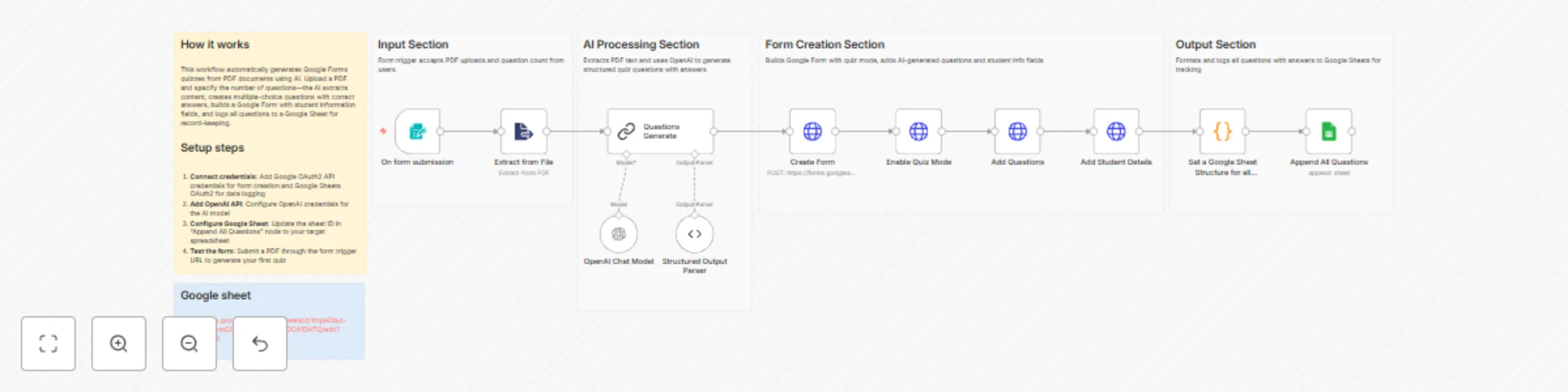
Teachers, coaches, and educators spend hours manually creating quizzes from study notes and PDFs. This workflow eliminates that effort by using AI to convert PDF study material into fully functional quizzes, complete with scoring, student tracking, and Google Form integration β€” all automatically.


βš™οΈ What does this workflow do?

  • Accepts study material as a PDF upload
  • Extracts educational content from the document
  • Uses AI to generate high-quality MCQ questions
  • Automatically creates a Google Quiz Form
  • Saves all questions and correct answers for teacher reference
  • Enables instant scoring and response tracking for students

🧠 How It Works – Step-by-Step

1. πŸ“„ Upload Study Material (PDF)

  • Teachers upload a PDF via an n8n Form Trigger
  • They specify how many quiz questions they want

2. πŸ“š PDF Parsing & AI Question Generation

  • The workflow extracts text from the PDF
  • An AI Teacher Agent powered by :contentReference[oaicite:1]{index=1}:
    • Identifies key learning concepts
    • Generates multiple-choice questions
    • Ensures:
      • 4 options per question
      • One correct answer
      • Clear and student-friendly language

3. πŸ“ Quiz Creation (Google Forms)

  • A new Google Form is created automatically
  • Quiz mode is enabled with:
    • Point values
    • Correct/incorrect feedback
    • Option shuffling
  • Student detail fields (Name, Email, ID, Class) are added

4. πŸ“Š Teacher Reference & Record Keeping

  • All generated questions are logged in Google Sheets
  • Stored data includes:
    • Question text
    • All options
    • Correct answers
    • Quiz URL

5. πŸŽ“ Student Submission & Scoring

  • Students take the quiz via Google Forms
  • Scores are calculated automatically
  • Teachers receive all responses in the connected Google Sheet

πŸ›  Tools & Integrations Used

  • n8n Form Trigger – File upload & inputs
  • PDF Parser – Extracts text from documents
  • OpenAI Chat Model – AI question generation
  • Google Forms API – Quiz creation & scoring
  • Google Sheets – Question storage & response tracking

πŸ’‘ Key Benefits

  • ⏱ Saves hours of manual quiz creation
  • πŸ“š Ensures pedagogically sound questions
  • πŸ“Š Automatic grading & analytics
  • 🧠 Consistent difficulty & coverage
  • πŸ” Easily reusable for different subjects

πŸ‘€ Who can use this?

Perfect for:

  • πŸ§‘β€πŸ« Teachers & Professors
  • 🏫 Coaching centers
  • πŸŽ“ EdTech & LMS platforms
  • πŸš€ SaaS founders building quiz tools

If you want to transform static PDFs into interactive, AI-generated assessments, this workflow is built for you.

1.2 Logical Blocks

This catalog entry is organized from the workflow JSON. The node-level section below shows the executable blocks available for review before importing the template.

2. Block-by-Block Analysis

Block 1 - OpenAI Chat Model

Type / Role
@n8n/n8n-nodes-langchain.lmChatOpenAi - lmChatOpenAi
Config choices
Version 1.3

Block 2 - Create Form

Type / Role
n8n-nodes-base.httpRequest - httpRequest
Config choices
Version 4.3

Block 3 - Enable Quiz Mode

Type / Role
n8n-nodes-base.httpRequest - httpRequest
Config choices
Version 4.3

Block 4 - Add Questions

Type / Role
n8n-nodes-base.httpRequest - httpRequest
Config choices
Version 4.3

Block 5 - Add Student Details

Type / Role
n8n-nodes-base.httpRequest - httpRequest
Config choices
Version 4.3

Block 6 - Extract from File

Type / Role
n8n-nodes-base.extractFromFile - extractFromFile
Config choices
Version 1.1

Block 7 - Structured Output Parser

Type / Role
@n8n/n8n-nodes-langchain.outputParserStructured - outputParserStructured
Config choices
Version 1.3

Block 8 - On form submission

Type / Role
n8n-nodes-base.formTrigger - formTrigger
Config choices
Version 2.3

Block 9 - Questions Generate

Type / Role
@n8n/n8n-nodes-langchain.chainLlm - chainLlm
Config choices
Version 1.7

Block 10 - Set a Google Sheet Structure for all Questions

Type / Role
n8n-nodes-base.code - code
Config choices
Version 2

Block 11 - Append All Questions

Type / Role
n8n-nodes-base.googleSheets - googleSheets
Config choices
Version 4.7

Block 12 - Sticky Note

Type / Role
n8n-nodes-base.stickyNote - stickyNote
Config choices
Version 1

Block 13 - Workflow Overview

Type / Role
n8n-nodes-base.stickyNote - stickyNote
Config choices
Version 1

Block 14 - Input Section

Type / Role
n8n-nodes-base.stickyNote - stickyNote
Config choices
Version 1

Block 15 - AI Processing Section

Type / Role
n8n-nodes-base.stickyNote - stickyNote
Config choices
Version 1

Block 16 - Form Creation Section

Type / Role
n8n-nodes-base.stickyNote - stickyNote
Config choices
Version 1

Block 17 - Output Section

Type / Role
n8n-nodes-base.stickyNote - stickyNote
Config choices
Version 1

3. Summary Table

Workflow Automate AI-powered quiz generation from PDFs with Google Forms
Complexity advanced
Nodes 17
Categories Content Creation, AI Summarization
Author InfyOm Technologies
Published 22 Dec 2025

4. Reproducing the Workflow from Scratch

  1. 1. Download the workflow JSON

    Use the JSON export at /data/workflows/12012/12012.json as the source template for this automation.

  2. 2. Import the template into n8n

    Open n8n, import the downloaded JSON, and review each node before activating the workflow.

  3. 3. Configure credentials and variables

    Replace placeholder credentials, API keys, webhook URLs, account IDs, and environment-specific values with your own settings.

  4. 4. Test with sample data

    Run the workflow manually or in a staging workspace, inspect node output, and confirm downstream systems receive the expected data.

  5. 5. Activate and monitor

    Enable the workflow only after testing, then monitor executions, errors, and rate limits during the first production runs.

5. General Notes & Resources

Review imported nodes carefully before activation. This catalog entry is intended to help you inspect the workflow structure, understand required services, and find related templates faster.

Node names, credentials, schedules, webhook paths, and external service limits may need adjustment for your workspace.

Frequently asked questions

What does Automate AI-powered quiz generation from PDFs with Google Forms do?

What problem does this workflow solve? Teachers, coaches, and educators spend hours manually creating quizzes from study notes and PDFs. This workflow eliminates that effort by using AI to conver...

What do I need before importing this workflow?

Review the workflow JSON, configure any required credentials in n8n, and test the automation in a safe workspace before using it in production.

Can I customize this workflow?

Yes. Use the block-by-block analysis and the downloadable JSON to inspect each node, then adjust credentials, prompts, schedules, filters, or destinations for your Content Creation, AI Summarization use case.