Block 1 - IF High Value Order
- Type / Role
- n8n-nodes-base.if - if
- Config choices
- Version 1


 Early Deal
This workflow is provided as-is. Please review and test before using in production.
Description: Automatically detect and flag high value sales orders as VIP in Zoho CRM using this intelligent n8n workflow. Ideal for eCommerce platforms, sales automation tools, or ERP systems, thi...
n8n-nodes-base.if, n8n-nodes-base.zohocrm, n8n-nodes-base.webhook, n8n-nodes-base.stickynote
This workflow is cataloged by N8N Workflows and links back to its original n8n.io source page by Rahul Joshi.
Original n8n.io sourceDescription:
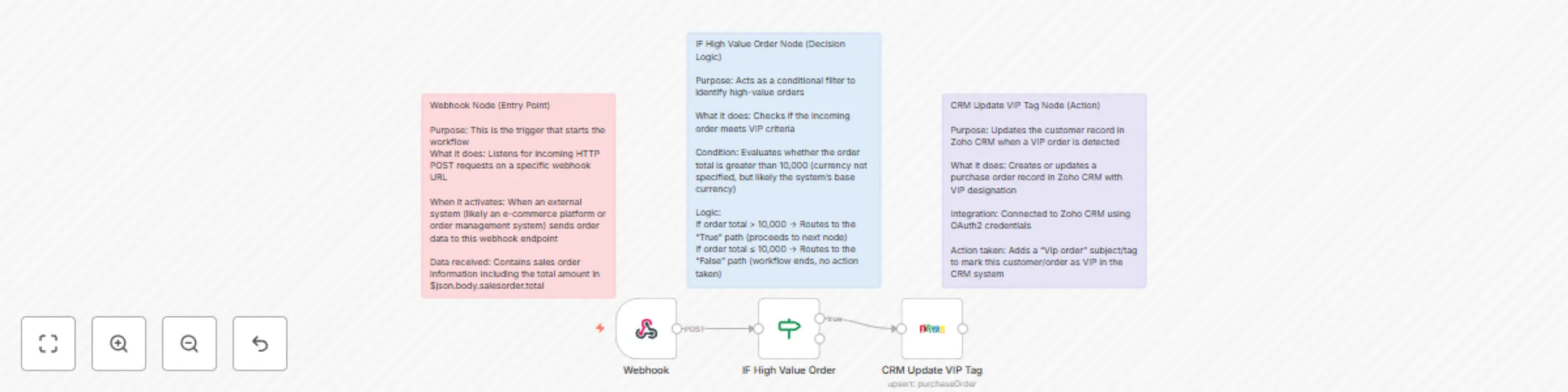
Automatically detect and flag high-value sales orders as VIP in Zoho CRM using this intelligent n8n workflow. Ideal for eCommerce platforms, sales automation tools, or ERP systems, this automation template listens to incoming order data via webhook, checks if the sales order amount exceeds a set threshold (₹10,000 or $10,000), and updates the CRM with a VIP tag in real time.
Whether you're scaling your operations or building a smart sales pipeline, this template ensures no important order goes unnoticed—real-time tagging of premium clients made easy.
What This Template Does (Step-by-Step)
🔔 Webhook Trigger (Sales Order Intake)
⚖️ High-Value Condition Check
🏷️ Zoho CRM VIP Tagging
Required Integrations:
✅ Zoho CRM (OAuth2 credentials) ✅ Any external sales/order system with webhook support
Use Cases:
💰 B2B sales teams tracking large enterprise orders 🛍️ D2C brands prioritizing premium customers for fulfillment or loyalty 🔁 CRM automation agencies building smart workflows for clients 🧑💼 Sales managers setting up internal escalations or alerts for VIP deals
Key Features:
⚙️ No-code CRM automation using n8n 🔒 Secure Zoho CRM integration via OAuth2 ⏱️ Instant tagging for faster follow-up 🧠 Configurable logic (change the threshold easily!) 📈 Scalable for thousands of incoming orders
This catalog entry is organized from the workflow JSON. The node-level section below shows the executable blocks available for review before importing the template.
| Workflow | Auto-tag high-value sales orders in Zoho CRM with VIP alert |
|---|---|
| Complexity | intermediate |
| Nodes | 6 |
| Categories | CRM |
| Author | Rahul Joshi |
| Published | 30 Jul 2025 |
Use the JSON export at /data/workflows/6681/6681.json as the source template for this automation.
Open n8n, import the downloaded JSON, and review each node before activating the workflow.
Replace placeholder credentials, API keys, webhook URLs, account IDs, and environment-specific values with your own settings.
Run the workflow manually or in a staging workspace, inspect node output, and confirm downstream systems receive the expected data.
Enable the workflow only after testing, then monitor executions, errors, and rate limits during the first production runs.
Review imported nodes carefully before activation. This catalog entry is intended to help you inspect the workflow structure, understand required services, and find related templates faster.
Node names, credentials, schedules, webhook paths, and external service limits may need adjustment for your workspace.
Description: Automatically detect and flag high value sales orders as VIP in Zoho CRM using this intelligent n8n workflow. Ideal for eCommerce platforms, sales automation tools, or ERP systems, thi...
Review the workflow JSON, configure any required credentials in n8n, and test the automation in a safe workspace before using it in production.
Yes. Use the block-by-block analysis and the downloadable JSON to inspect each node, then adjust credentials, prompts, schedules, filters, or destinations for your CRM use case.