Block 1 - Schedule Trigger
- Type / Role
- n8n-nodes-base.scheduleTrigger - scheduleTrigger
- Config choices
- Version 1.2


 Early Deal
This workflow is provided as-is. Please review and test before using in production.
Who’s it for Marketers, creators, and social managers who want hands off reposting of a specific X (Twitter) user’s videos — with on brand AI captions and clean, deduplicated logs. What it does / H...
n8n-nodes-base.scheduletrigger, n8n-nodes-base.httprequest, n8n-nodes-base.code, n8n-nodes-base.googlesheets, n8n-nodes-base.set, n8n-nodes-base.if, @n8n/n8n-nodes-langchain.agent, n8n-nodes-base.twitter
This workflow is cataloged by N8N Workflows and links back to its original n8n.io source page by masaya kawabe.
Original n8n.io sourceWho’s it for
Marketers, creators, and social managers who want hands-off reposting of a specific X (Twitter) user’s videos — with on-brand AI captions and clean, deduplicated logs.
What it does / How it works
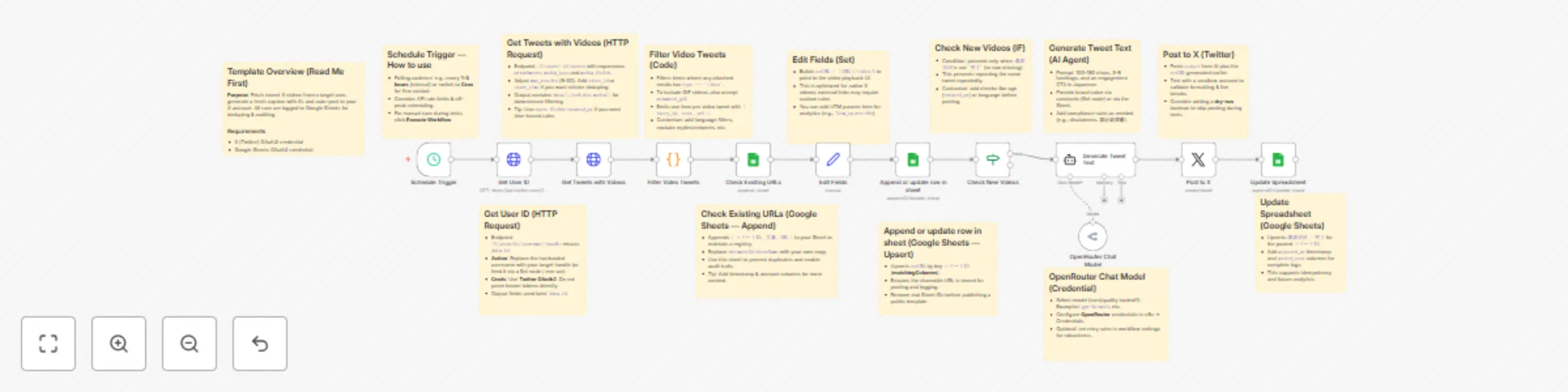
On a schedule, the workflow resolves a target user, fetches recent tweets with media, filters to video posts, and writes them to Google Sheets for tracking and dedupe. It then builds a shareable video URL, generates a short caption via an AI model (OpenRouter), posts to your X account, and updates the sheet with completion status. Sticky notes inside the workflow explain each step, setup tasks, and best practices.
How to set up
Add credentials: Twitter (X) OAuth2, Google Sheets OAuth2, OpenRouter.
Replace the demo Google Sheet with your own (document ID & sheet name).
Set the target X username (or parameterize it).
Adjust the schedule (interval/cron) and run a test execution.
Verify logs and posting format, then enable.
Requirements
Twitter (X) OAuth2 credential
Google Sheets OAuth2 credential
OpenRouter credential (choose an affordable model)
How to customize
Edit the caption prompt (tone, hashtags count, CTAs, compliance lines).
Add filters (language, min/max tweet age, exclude replies/retweets, since_id).
Extend logging (timestamps, posted text, account, errors).
Introduce a dry-run boolean to skip posting while testing.
Swap the caption model or add retry rules for robustness.
Security: Don’t hardcode tokens in HTTP nodes. Use n8n Credentials only and remove personal IDs before publishing.
This catalog entry is organized from the workflow JSON. The node-level section below shows the executable blocks available for review before importing the template.
Showing the first 24 of 25 workflow blocks. Download the JSON for the full node graph.
| Workflow | Auto-post X videos with OpenRouter AI captions & Google Sheets deduplication |
|---|---|
| Complexity | advanced |
| Nodes | 25 |
| Categories | Social Media, AI Chatbot |
| Author | masaya kawabe |
| Published | 16 Oct 2025 |
Use the JSON export at /data/workflows/9748/9748.json as the source template for this automation.
Open n8n, import the downloaded JSON, and review each node before activating the workflow.
Replace placeholder credentials, API keys, webhook URLs, account IDs, and environment-specific values with your own settings.
Run the workflow manually or in a staging workspace, inspect node output, and confirm downstream systems receive the expected data.
Enable the workflow only after testing, then monitor executions, errors, and rate limits during the first production runs.
Review imported nodes carefully before activation. This catalog entry is intended to help you inspect the workflow structure, understand required services, and find related templates faster.
Node names, credentials, schedules, webhook paths, and external service limits may need adjustment for your workspace.
Who’s it for Marketers, creators, and social managers who want hands off reposting of a specific X (Twitter) user’s videos — with on brand AI captions and clean, deduplicated logs. What it does / H...
Review the workflow JSON, configure any required credentials in n8n, and test the automation in a safe workspace before using it in production.
Yes. Use the block-by-block analysis and the downloadable JSON to inspect each node, then adjust credentials, prompts, schedules, filters, or destinations for your Social Media, AI Chatbot use case.