Auto-moderate Instagram comments with Perspective API & Slack alerts

Workflow preview

Workflow preview
100%
Auto-moderate Instagram comments with Perspective API & Slack alerts preview
Open on n8n.io

Important notice

This workflow is provided as-is. Please review and test before using in production.

1. Workflow Overview

Automatically detects and hides hate speech/toxic comments, alerts your team, and logs flagged content for review. Workflow Overview Trigger : A Schedule node runs every 15 minutes to poll for new ...

Best for

  • Social Media automation workflows
  • AI Summarization automation workflows
  • advanced n8n builders looking for reusable templates

Tools used

n8n-nodes-base.cron, n8n-nodes-base.httprequest, n8n-nodes-base.if, n8n-nodes-base.slack, n8n-nodes-base.googlesheets, n8n-nodes-base.set, n8n-nodes-base.splitinbatches, n8n-nodes-base.webhook

Source and attribution

This workflow is cataloged by N8N Workflows and links back to its original n8n.io source page by Oneclick AI Squad.

Original n8n.io source

1.1 Workflow description

Title
Auto-moderate Instagram comments with Perspective API & Slack alerts
Workflow name
Auto-moderate Instagram comments with Perspective API & Slack alerts

Automatically detects and hides hate speech/toxic comments, alerts your team, and logs flagged content for review.

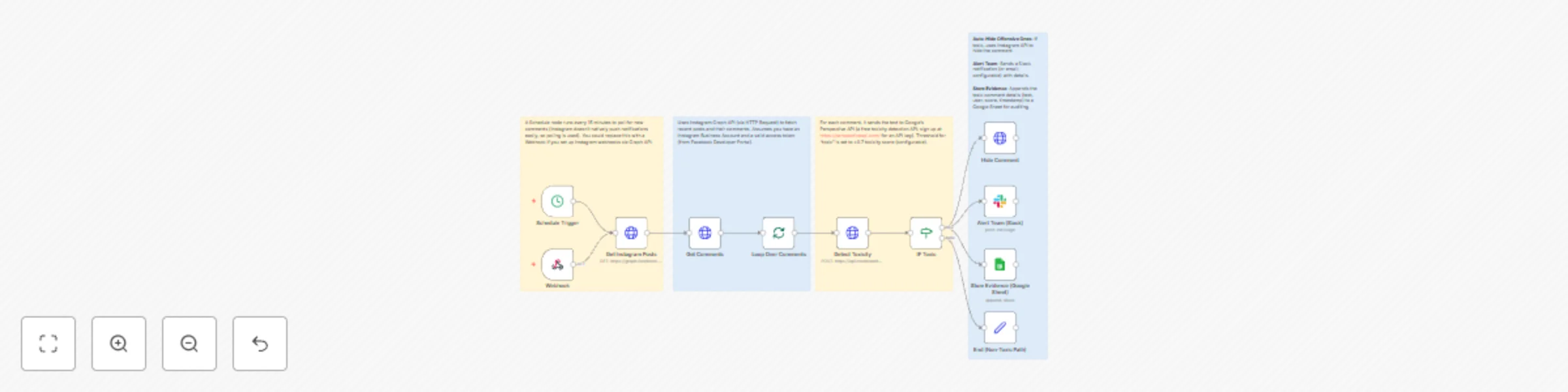
Workflow Overview

  • Trigger: A Schedule node runs every 15 minutes to poll for new comments (Instagram doesn't natively push notifications easily, so polling is used). You could replace this with a Webhook if you set up Instagram webhooks via Graph API.
  • Scan Comments: Uses Instagram Graph API (via HTTP Request) to fetch recent posts and their comments. Assumes you have an Instagram Business Account and a valid access token (from Facebook Developer Portal).
  • Detect Toxicity: For each comment, it sends the text to Google's Perspective API (a free toxicity detection API; sign up at https://perspectiveapi.com/ for an API key). Threshold for "toxic" is set to >0.7 toxicity score (configurable).
  • Auto-Hide Offensive Ones: If toxic, uses Instagram API to hide the comment.
  • Alert Team: Sends a Slack notification (or email; configurable) with details.
  • Store Evidence: Appends the toxic comment details (text, user, score, timestamp) to a Google Sheet for auditing.
  • Error Handling: Basic error node to notify if API calls fail.
  • Business Value Alignment: This automates protection, reducing manual moderation and building trust.

Prerequisites:

  • n8n installed (self-hosted or cloud).
  • Instagram Graph API access token (set in n8n credentials or as environment variable).
  • Perspective API key (free tier available).
  • Slack webhook or email credentials.
  • Google Sheets API credentials (for storage).

How to Import

  1. In n8n, go to the workflows list.
  2. Click "Import from JSON" (or paste into a new workflow).
  3. Update placeholders:
    • Replace YOUR_INSTAGRAM_ACCESS_TOKEN with your token.
    • Replace YOUR_PERSPECTIVE_API_KEY with your key.
    • Set up credentials for HTTP Request (Instagram), Slack, and Google Sheets.
    • Adjust YOUR_INSTAGRAM_BUSINESS_ACCOUNT_ID and YOUR_MEDIA_ID (or make it dynamic).
  4. Test and activate.

If you encounter issues (e.g., API rate limits), adjust the schedule or add waits.

Notes on Customization

  • Looping: The "Loop Over Comments" uses SplitInBatches to process comments one by one, avoiding API rate limits.
  • Toxicity API: I used Perspective API as it's reliable and free for low volume. If you prefer another (e.g., Hugging Face), swap the HTTP Request body.
  • Instagram API: This fetches comments for the first recent post (simplified). To handle multiple posts, add another loop.
  • Alerts: Slack is used; change to Email node if preferred.
  • Storage: Google Sheets for simplicity; could be swapped for MongoDB or Airtable.
  • Sticky Notes: Three notes explain phases – they won't affect execution but help in the UI.
  • Testing: Start with test data. Instagram API requires app review for production.

1.2 Logical Blocks

This catalog entry is organized from the workflow JSON. The node-level section below shows the executable blocks available for review before importing the template.

2. Block-by-Block Analysis

Block 1 - Schedule Trigger

Type / Role
n8n-nodes-base.cron - cron
Config choices
Version 1

Block 2 - Get Comments

Type / Role
n8n-nodes-base.httpRequest - httpRequest
Config choices
Version 1

Block 3 - Detect Toxicity

Type / Role
n8n-nodes-base.httpRequest - httpRequest
Config choices
Version 1

Block 4 - IF Toxic

Type / Role
n8n-nodes-base.if - if
Config choices
Version 1

Block 5 - Hide Comment

Type / Role
n8n-nodes-base.httpRequest - httpRequest
Config choices
Version 1

Block 6 - Alert Team (Slack)

Type / Role
n8n-nodes-base.slack - slack
Config choices
Version 1

Block 7 - Store Evidence (Google Sheet)

Type / Role
n8n-nodes-base.googleSheets - googleSheets
Config choices
Version 1

Block 8 - End (Non-Toxic Path)

Type / Role
n8n-nodes-base.set - set
Config choices
Version 1

Block 9 - Get Instagram Posts

Type / Role
n8n-nodes-base.httpRequest - httpRequest
Config choices
Version 1

Block 10 - Loop Over Comments

Type / Role
n8n-nodes-base.splitInBatches - splitInBatches
Config choices
Version 1

Block 11 - Webhook

Type / Role
n8n-nodes-base.webhook - webhook
Config choices
Version 2.1

Block 12 - Sticky Note

Type / Role
n8n-nodes-base.stickyNote - stickyNote
Config choices
Version 1

Block 13 - Sticky Note1

Type / Role
n8n-nodes-base.stickyNote - stickyNote
Config choices
Version 1

Block 14 - Sticky Note2

Type / Role
n8n-nodes-base.stickyNote - stickyNote
Config choices
Version 1

Block 15 - Sticky Note3

Type / Role
n8n-nodes-base.stickyNote - stickyNote
Config choices
Version 1

3. Summary Table

Workflow Auto-moderate Instagram comments with Perspective API & Slack alerts
Complexity advanced
Nodes 15
Categories Social Media, AI Summarization
Author Oneclick AI Squad
Published 30 Oct 2025

4. Reproducing the Workflow from Scratch

  1. 1. Download the workflow JSON

    Use the JSON export at /data/workflows/10319/10319.json as the source template for this automation.

  2. 2. Import the template into n8n

    Open n8n, import the downloaded JSON, and review each node before activating the workflow.

  3. 3. Configure credentials and variables

    Replace placeholder credentials, API keys, webhook URLs, account IDs, and environment-specific values with your own settings.

  4. 4. Test with sample data

    Run the workflow manually or in a staging workspace, inspect node output, and confirm downstream systems receive the expected data.

  5. 5. Activate and monitor

    Enable the workflow only after testing, then monitor executions, errors, and rate limits during the first production runs.

5. General Notes & Resources

Review imported nodes carefully before activation. This catalog entry is intended to help you inspect the workflow structure, understand required services, and find related templates faster.

Node names, credentials, schedules, webhook paths, and external service limits may need adjustment for your workspace.

Frequently asked questions

What does Auto-moderate Instagram comments with Perspective API & Slack alerts do?

Automatically detects and hides hate speech/toxic comments, alerts your team, and logs flagged content for review. Workflow Overview Trigger : A Schedule node runs every 15 minutes to poll for new ...

What do I need before importing this workflow?

Review the workflow JSON, configure any required credentials in n8n, and test the automation in a safe workspace before using it in production.

Can I customize this workflow?

Yes. Use the block-by-block analysis and the downloadable JSON to inspect each node, then adjust credentials, prompts, schedules, filters, or destinations for your Social Media, AI Summarization use case.