Auto generate & post LinkedIn content for Amazon sellers with GPT-4o & Apify

Workflow preview

Workflow preview
100%
Auto generate & post LinkedIn content for Amazon sellers with GPT-4o & Apify preview
Open on n8n.io

Important notice

This workflow is provided as-is. Please review and test before using in production.

1. Workflow Overview

How it works This powerful automation turns LinkedIn influencer activity into high performing Amazon seller content, fully hands off. It runs in two phases: 1. AI Content Generator Retrieves influe...

Best for

  • Content Creation automation workflows
  • Multimodal AI automation workflows
  • advanced n8n builders looking for reusable templates

Tools used

@n8n/n8n-nodes-langchain.agent, @n8n/n8n-nodes-langchain.lmchatopenai, @n8n/n8n-nodes-langchain.outputparserstructured, @n8n/n8n-nodes-langchain.openai, n8n-nodes-base.scheduletrigger, n8n-nodes-base.airtable, n8n-nodes-base.splitinbatches, n8n-nodes-base.httprequest

Source and attribution

This workflow is cataloged by N8N Workflows and links back to its original n8n.io source page by Usman Liaqat.

Original n8n.io source

1.1 Workflow description

Title
Auto generate & post LinkedIn content for Amazon sellers with GPT-4o & Apify
Workflow name
Auto generate & post LinkedIn content for Amazon sellers with GPT-4o & Apify

How it works

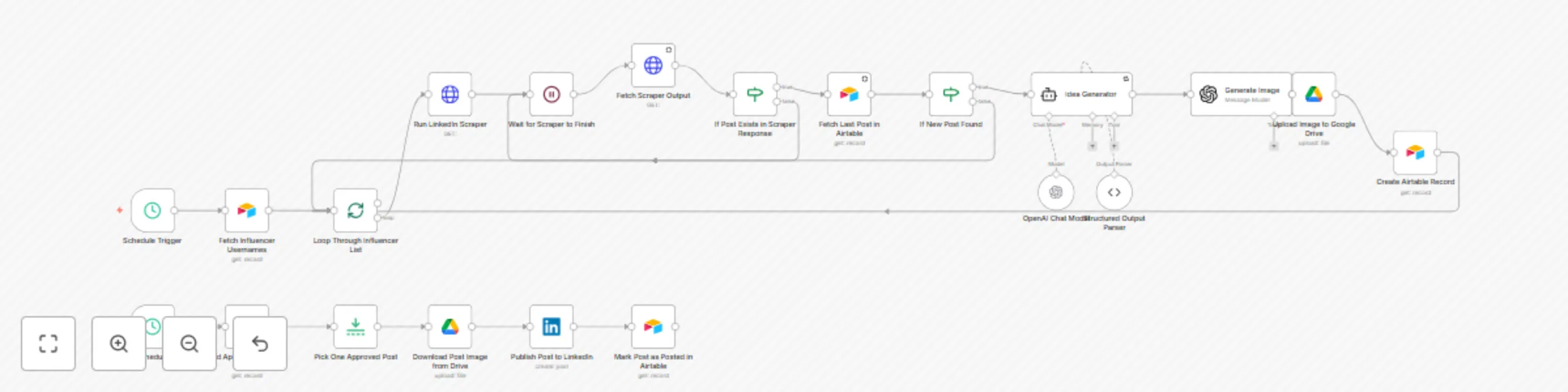
This powerful automation turns LinkedIn influencer activity into high performing Amazon seller content, fully hands-off. It runs in two phases:

  1. AI Content Generator

    • Retrieves influencer usernames from Airtable
    • Scrapes their most recent LinkedIn post via Apify
    • Uses OpenAI (GPT-4o) to generate original Amazon focused post content
    • Generates a branded LinkedIn image using AI (WeSpark visual identity)
    • Saves content & image link to Google Drive
    • Creates a record in Airtable with Status = In review
  2. Scheduled Publisher

    • Every day at 4 PM, one post from Airtable with Status = Approved is:

      • Downloaded from Drive
      • Published on LinkedIn
      • Marked as Posted in Airtable

⚙️ Set Up Steps

  • Time to set up: 15–20 minutes

  • Create two Airtable tables:

    • influencers with UserName (LinkedIn usernames only)

    • posts with fields:

      • Description (text)
      • Image (Drive link)
      • InfluencerUsername
      • InfluencerPost
      • InfluencerPostCreatedAt
      • Status (In review, Approved, Posted, Rejected)
  • Add Google Drive OAuth2 credentials for saving & downloading images

  • Configure OpenAI GPT-4o key (for text + image generation)

  • Set up Apify LinkedIn scraper and add header credentials

  • Link your LinkedIn account (company or personal profile)


Workflow Phases

1. AI Generator (Triggered manually)
  • Loops over influencer usernames

  • Scrapes latest LinkedIn post

  • Skips if already stored

  • Uses GPT-4o to:

    • Rewrite the post uniquely for Amazon sellers
    • Generate JSON with text + image prompt
  • Saves AI-generated image to Google Drive

  • Logs post to Airtable with In review status

2. Daily Publisher (Scheduled)
  • Runs every day at 4 PM
  • Filters Airtable for Status = Approved
  • Picks 1 record, downloads image from Drive
  • Publishes to LinkedIn
  • Updates Airtable status to Posted

Airtable Setup Example

influencers Table:

UserName
jon-derkits

posts Table:

Description Image InfluencerUsername InfluencerPost InfluencerPostCreatedAt Status
Amazon Listing Optimization... [Drive Link] jon-derkits [LinkedIn URL] 2025-06-18 19:30:01 In review

Status field options:

  • In review
  • Approved
  • Posted
  • Rejected

Example LinkedIn Visuals

Caption Image
Boost Your Amazon ROI!
Data-driven strategies are your secret weapon...
View Image
Boost Sales with 5–10% Higher Conversions!
Utilize Enhanced Brand Content and Smart PPC...
View Image
Grow Your Amazon Business
WeSpark – Amazon Consulting Agency...
View Image
Amazon Growth Strategies
Embrace the power of smart optimization...
View Image

✅ Best For:

  • Amazon agencies and FBA consultants
  • B2B SaaS tools targeting eCommerce
  • LinkedIn ghostwriters and creators
  • Content marketing teams for Amazon sellers

1.2 Logical Blocks

This catalog entry is organized from the workflow JSON. The node-level section below shows the executable blocks available for review before importing the template.

2. Block-by-Block Analysis

Block 1 - Idea Generator

Type / Role
@n8n/n8n-nodes-langchain.agent - agent
Config choices
Version 1.7

Block 2 - OpenAI Chat Model

Type / Role
@n8n/n8n-nodes-langchain.lmChatOpenAi - lmChatOpenAi
Config choices
Version 1.2

Block 3 - Structured Output Parser

Type / Role
@n8n/n8n-nodes-langchain.outputParserStructured - outputParserStructured
Config choices
Version 1.2

Block 4 - Generate Image

Type / Role
@n8n/n8n-nodes-langchain.openAi - openAi
Config choices
Version 1.8

Block 5 - Schedule

Type / Role
n8n-nodes-base.scheduleTrigger - scheduleTrigger
Config choices
Version 1.2

Block 6 - Fetch Influencer Usernames

Type / Role
n8n-nodes-base.airtable - airtable
Config choices
Version 2.1

Block 7 - Loop Through Influencer List

Type / Role
n8n-nodes-base.splitInBatches - splitInBatches
Config choices
Version 3

Block 8 - Run LinkedIn Scraper

Type / Role
n8n-nodes-base.httpRequest - httpRequest
Config choices
Version 4.2

Block 9 - Wait for Scraper to Finish

Type / Role
n8n-nodes-base.wait - wait
Config choices
Version 1.1

Block 10 - Fetch Scraper Output

Type / Role
n8n-nodes-base.httpRequest - httpRequest
Config choices
Version 4.2

Block 11 - If Post Exists in Scraper Response

Type / Role
n8n-nodes-base.if - if
Config choices
Version 2.2

Block 12 - Fetch Last Post in Airtable

Type / Role
n8n-nodes-base.airtable - airtable
Config choices
Version 2.1

Block 13 - If New Post Found

Type / Role
n8n-nodes-base.if - if
Config choices
Version 2.2

Block 14 - Upload Image to Google Drive

Type / Role
n8n-nodes-base.googleDrive - googleDrive
Config choices
Version 3

Block 15 - Create Airtable Record

Type / Role
n8n-nodes-base.airtable - airtable
Config choices
Version 2.1

Block 16 - Find Approved LinkedIn Posts

Type / Role
n8n-nodes-base.airtable - airtable
Config choices
Version 2.1

Block 17 - Pick One Approved Post

Type / Role
n8n-nodes-base.limit - limit
Config choices
Version 1

Block 18 - Download Post Image from Drive

Type / Role
n8n-nodes-base.googleDrive - googleDrive
Config choices
Version 3

Block 19 - Publish Post to LinkedIn

Type / Role
n8n-nodes-base.linkedIn - linkedIn
Config choices
Version 1

Block 20 - Mark Post as Posted in Airtable

Type / Role
n8n-nodes-base.airtable - airtable
Config choices
Version 2.1

Block 21 - Schedule Trigger

Type / Role
n8n-nodes-base.scheduleTrigger - scheduleTrigger
Config choices
Version 1.2

3. Summary Table

Workflow Auto generate & post LinkedIn content for Amazon sellers with GPT-4o & Apify
Complexity advanced
Nodes 21
Categories Content Creation, Multimodal AI
Author Usman Liaqat
Published 01 Jul 2025

4. Reproducing the Workflow from Scratch

  1. 1. Download the workflow JSON

    Use the JSON export at /data/workflows/5531/5531.json as the source template for this automation.

  2. 2. Import the template into n8n

    Open n8n, import the downloaded JSON, and review each node before activating the workflow.

  3. 3. Configure credentials and variables

    Replace placeholder credentials, API keys, webhook URLs, account IDs, and environment-specific values with your own settings.

  4. 4. Test with sample data

    Run the workflow manually or in a staging workspace, inspect node output, and confirm downstream systems receive the expected data.

  5. 5. Activate and monitor

    Enable the workflow only after testing, then monitor executions, errors, and rate limits during the first production runs.

5. General Notes & Resources

Review imported nodes carefully before activation. This catalog entry is intended to help you inspect the workflow structure, understand required services, and find related templates faster.

Node names, credentials, schedules, webhook paths, and external service limits may need adjustment for your workspace.

Frequently asked questions

What does Auto generate & post LinkedIn content for Amazon sellers with GPT-4o & Apify do?

How it works This powerful automation turns LinkedIn influencer activity into high performing Amazon seller content, fully hands off. It runs in two phases: 1. AI Content Generator Retrieves influe...

What do I need before importing this workflow?

Review the workflow JSON, configure any required credentials in n8n, and test the automation in a safe workspace before using it in production.

Can I customize this workflow?

Yes. Use the block-by-block analysis and the downloadable JSON to inspect each node, then adjust credentials, prompts, schedules, filters, or destinations for your Content Creation, Multimodal AI use case.