Block 1 - Start Workflow
- Type / Role
- n8n-nodes-base.manualTrigger - manualTrigger
- Config choices
- Version 1


 Early Deal
This workflow is provided as-is. Please review and test before using in production.
Who is this for? This workflow is ideal for social media managers, personal brand strategists, ghostwriters, and founders who want to post regularly on LinkedIn without spending hours writing fr...
n8n-nodes-base.manualtrigger, n8n-nodes-base.googlesheets, n8n-nodes-base.httprequest, @n8n/n8n-nodes-langchain.lmchatopenai, @n8n/n8n-nodes-langchain.agent, n8n-nodes-base.set, n8n-nodes-base.stickynote
This workflow is cataloged by N8N Workflows and links back to its original n8n.io source page by Yang.
Original n8n.io sourceThis workflow is ideal for social media managers, personal brand strategists, ghostwriters, and founders who want to post regularly on LinkedIn without spending hours writing from scratch. It’s also useful for marketing agencies and assistants looking to automate consistent post creation using curated articles as source material.
Manually reading multiple articles, extracting key insights, and writing a clean, professional LinkedIn post is a time-consuming process. This workflow automates everything: from pulling topics, finding related articles, summarizing them using AI, and even generating a matching image to accompany the post. It ensures faster content turnaround, more consistency, and less manual effort.
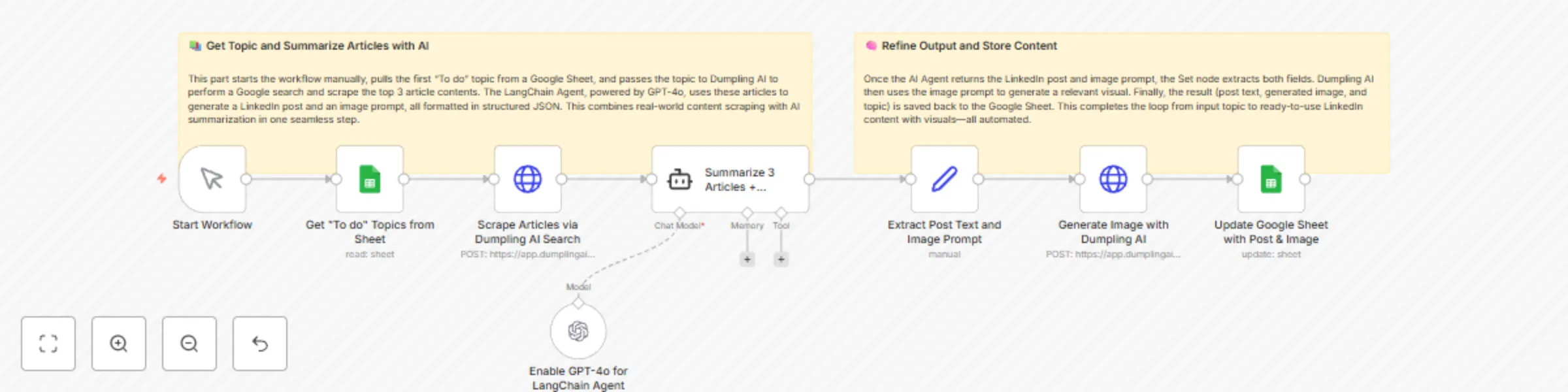
This workflow starts manually and retrieves one topic marked as “To do” from a Google Sheet. That topic is used as a search term for Dumpling AI’s search endpoint, which scrapes and returns the top three article contents related to the topic. These articles are sent to a LangChain agent powered by GPT-4o, which analyzes and summarizes the content into a LinkedIn post in a friendly, insightful tone. It also generates an image prompt for the post.
After generating the post and image prompt, the data is extracted using a Set node. The prompt is sent to Dumpling AI’s image generation endpoint, which returns an image URL. Finally, the post text, image prompt, image URL, and status update (“created”) are saved back to the original row in Google Sheets.
postText and imagePrompt from the LangChain agent output.imagePrompt to Dumpling AI’s image generation endpoint.Dumpling AI
/search endpoint to retrieve article content/generate-image endpoint to create the imageGoogle Sheets
topic, status, postText, imagePrompt, imageURLstatus to To doLangChain (GPT-4o)
Customize the Prompt (Optional)
This catalog entry is organized from the workflow JSON. The node-level section below shows the executable blocks available for review before importing the template.
| Workflow | Auto-generate LinkedIn posts from articles with Dumpling AI and GPT-4o |
|---|---|
| Complexity | intermediate |
| Nodes | 10 |
| Categories | Content Creation, Multimodal AI |
| Author | Yang |
| Published | 03 Jun 2025 |
Use the JSON export at /data/workflows/4631/4631.json as the source template for this automation.
Open n8n, import the downloaded JSON, and review each node before activating the workflow.
Replace placeholder credentials, API keys, webhook URLs, account IDs, and environment-specific values with your own settings.
Run the workflow manually or in a staging workspace, inspect node output, and confirm downstream systems receive the expected data.
Enable the workflow only after testing, then monitor executions, errors, and rate limits during the first production runs.
Review imported nodes carefully before activation. This catalog entry is intended to help you inspect the workflow structure, understand required services, and find related templates faster.
Node names, credentials, schedules, webhook paths, and external service limits may need adjustment for your workspace.
Who is this for? This workflow is ideal for social media managers, personal brand strategists, ghostwriters, and founders who want to post regularly on LinkedIn without spending hours writing fr...
Review the workflow JSON, configure any required credentials in n8n, and test the automation in a safe workspace before using it in production.
Yes. Use the block-by-block analysis and the downloadable JSON to inspect each node, then adjust credentials, prompts, schedules, filters, or destinations for your Content Creation, Multimodal AI use case.