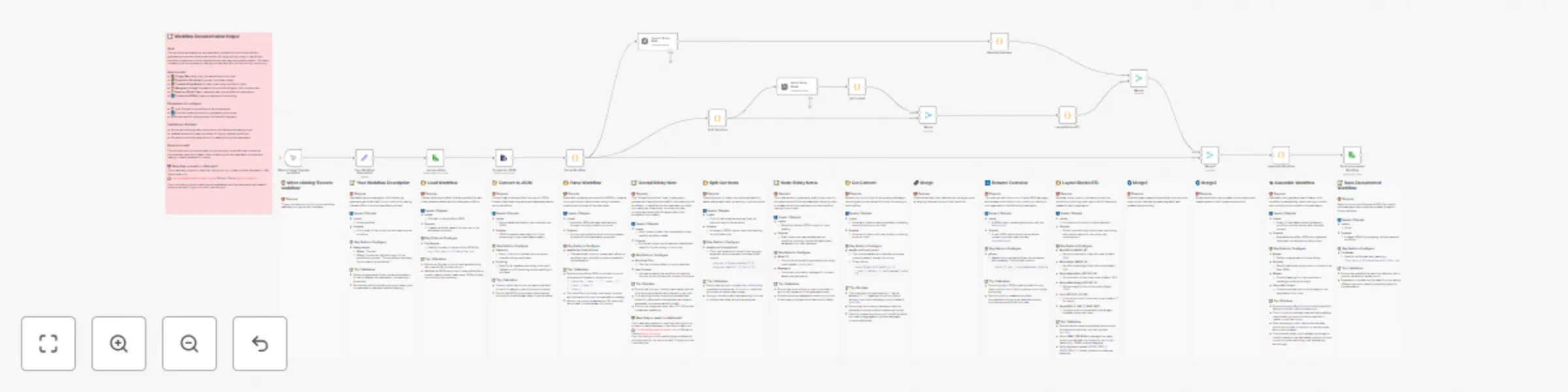
๐Ÿค–๐Ÿ“ Auto-document workflows with GPT-4o-mini sticky notes

Workflow preview

Workflow preview
100%
๐Ÿค–๐Ÿ“ Auto-document workflows with GPT-4o-mini sticky notes preview
Open on n8n.io

Important notice

This workflow is provided as-is. Please review and test before using in production.

1. Workflow Overview

Auto Document Workflows with GPT 4o mini Sticky Notes Skip the tedious part of writing documentation and turn your n8n workflows into clear, shareable blueprints โ€” fully automated. This workfl...

Best for

  • AI Summarization automation workflows
  • Multimodal AI automation workflows
  • advanced n8n builders looking for reusable templates

Tools used

n8n-nodes-base.manualtrigger, n8n-nodes-base.code, @n8n/n8n-nodes-langchain.openai, n8n-nodes-base.merge, n8n-nodes-base.readwritefile, n8n-nodes-base.extractfromfile, n8n-nodes-base.stickynote, n8n-nodes-base.set

Source and attribution

This workflow is cataloged by N8N Workflows and links back to its original n8n.io source page by Luis Acosta.

Original n8n.io source

1.1 Workflow description

Title
๐Ÿค–๐Ÿ“ Auto-document workflows with GPT-4o-mini sticky notes
Workflow name
๐Ÿค–๐Ÿ“ Auto-document workflows with GPT-4o-mini sticky notes

๐Ÿค–๐Ÿ“ Auto-Document Workflows with GPT-4o-mini Sticky Notes

Skip the tedious part of writing documentation and turn your n8n workflows into clear, shareable blueprints โ€” fully automated.

This workflow takes any workflow JSON, parses its nodes, generates structured sticky notes (both per-node and a general overview), and arranges them neatly on your canvas. No more messy layouts or missing documentation โ€” everything is handled in one click.

Itโ€™s perfect if you want to publish to the n8n marketplace, onboard teammates quickly, or just keep your own automations easy to understand months later.


๐Ÿ’ก What this workflow does

โœ… Loads your existing workflow from a JSON file
๐Ÿ” Parses and unwraps real nodes (ignoring old stickies)
๐Ÿค– Uses AI to create concise sticky notes for each node
๐Ÿ“ Adds a general overview sticky with goals, flow, parameters, and gotchas
๐Ÿ“ Arranges all nodes + stickies (node above, sticky below, right-to-left)
๐Ÿ’พ Saves a new documented workflow JSON, ready to reuse or share


โš™๏ธ Step-by-step setup

  1. Prepare your workflow file

    • Export your n8n workflow JSON or point to an existing file path.
  2. Configure the โ€œLoad Workflowโ€ node

    • Update the file selector to your JSON path, e.g. /workflows/myflow.json.
  3. Add your OpenAI credentials

    • In the OpenAI API nodes (Node Sticky Notes + Overall Sticky Note), insert your API key.
  4. Run the workflow

    • Trigger manually with the Execute Workflow node.
    • The script will parse your nodes, generate stickies, and align them on the canvas.
  5. Save the result

    • The โ€œSave Documented Workflowโ€ node writes a new file, e.g. /workflows/myflow-with-sticky.json.

๐Ÿ›  Customization

  • Sticky layout: Adjust spacing, colors, and alignment in the Layout Blocks RTL node (tweak GAP_X, GAP_Y, or STICKY_COLOR).
  • Word count & style: Edit prompts inside the OpenAI nodes to make notes shorter, longer, or more technical.
  • Overview focus: Customize the Your Workflow Description node to pass context (e.g., project goals, intended audience).
  • File outputs: Save to a new path/version for version control of your documentation.

โš ๏ธ Limitations / Gotchas

  • Maximum of ~50 nodes are summarized in the overview for brevity.
  • Old sticky notes are removed and replaced โ€” you canโ€™t preserve them unless you fork the workflow.
  • Complex nodes (large Code / AI prompts) may require manual edits for clarity.
  • Ensure n8n has read/write access to your workflow JSON paths.

๐ŸŽฏ Expected result

After execution, youโ€™ll get a fully documented workflow JSON where each node is paired with a clean sticky note, plus an overview note neatly placed on the canvas. You can open this new file in n8n, share it, or submit it directly to the marketplace.


๐Ÿ“ฌ Contact & Feedback

Need help customizing this? Have ideas for improvement?

๐Ÿ“ฉ [email protected]
๐Ÿฆ DM me on Twitter @guanchehacker

If youโ€™re working on advanced workflow documentation + AI, letโ€™s talk โ€” this template can be a foundation for more powerful tools.

1.2 Logical Blocks

This catalog entry is organized from the workflow JSON. The node-level section below shows the executable blocks available for review before importing the template.

2. Block-by-Block Analysis

Block 1 - When clicking โ€˜Execute workflowโ€™

Type / Role
n8n-nodes-base.manualTrigger - manualTrigger
Config choices
Version 1

Block 2 - Parse Workflow

Type / Role
n8n-nodes-base.code - code
Config choices
Version 2

Block 3 - Overall Sticky Note

Type / Role
@n8n/n8n-nodes-langchain.openAi - openAi
Config choices
Version 1.8

Block 4 - Split Out Items

Type / Role
n8n-nodes-base.code - code
Config choices
Version 2

Block 5 - Merge1

Type / Role
n8n-nodes-base.merge - merge
Config choices
Version 3.2

Block 6 - Rename Overview

Type / Role
n8n-nodes-base.code - code
Config choices
Version 2

Block 7 - Merge2

Type / Role
n8n-nodes-base.merge - merge
Config choices
Version 3.2

Block 8 - Assemble Workflow

Type / Role
n8n-nodes-base.code - code
Config choices
Version 2

Block 9 - get content

Type / Role
n8n-nodes-base.code - code
Config choices
Version 2

Block 10 - Layout Blocks RTL

Type / Role
n8n-nodes-base.code - code
Config choices
Version 2

Block 11 - Merge

Type / Role
n8n-nodes-base.merge - merge
Config choices
Version 3.2

Block 12 - load workflow

Type / Role
n8n-nodes-base.readWriteFile - readWriteFile
Config choices
Version 1

Block 13 - Convert to JSON

Type / Role
n8n-nodes-base.extractFromFile - extractFromFile
Config choices
Version 1

Block 14 - Node Sticky Notes

Type / Role
@n8n/n8n-nodes-langchain.openAi - openAi
Config choices
Version 1.8

Block 15 - Save documented Workflow

Type / Role
n8n-nodes-base.readWriteFile - readWriteFile
Config choices
Version 1

Block 16 - Sticky Note - Overview

Type / Role
n8n-nodes-base.stickyNote - stickyNote
Config choices
Version 1

Block 17 - Sticky Note - Save documented Workflow

Type / Role
n8n-nodes-base.stickyNote - stickyNote
Config choices
Version 1

Block 18 - Sticky Note - Assemble Workflow

Type / Role
n8n-nodes-base.stickyNote - stickyNote
Config choices
Version 1

Block 19 - Sticky Note - Merge2

Type / Role
n8n-nodes-base.stickyNote - stickyNote
Config choices
Version 1

Block 20 - Sticky Note - Layout Blocks RTL

Type / Role
n8n-nodes-base.stickyNote - stickyNote
Config choices
Version 1

Block 21 - Sticky Note - Rename Overview

Type / Role
n8n-nodes-base.stickyNote - stickyNote
Config choices
Version 1

Block 22 - Sticky Note - Merge

Type / Role
n8n-nodes-base.stickyNote - stickyNote
Config choices
Version 1

Block 23 - Sticky Note - get content

Type / Role
n8n-nodes-base.stickyNote - stickyNote
Config choices
Version 1

Block 24 - Sticky Note - Node Sticky Notes

Type / Role
n8n-nodes-base.stickyNote - stickyNote
Config choices
Version 1

Showing the first 24 of 33 workflow blocks. Download the JSON for the full node graph.

3. Summary Table

Workflow ๐Ÿค–๐Ÿ“ Auto-document workflows with GPT-4o-mini sticky notes
Complexity advanced
Nodes 33
Categories AI Summarization, Multimodal AI
Author Luis Acosta
Published 16 Aug 2025

4. Reproducing the Workflow from Scratch

  1. 1. Download the workflow JSON

    Use the JSON export at /data/workflows/7465/7465.json as the source template for this automation.

  2. 2. Import the template into n8n

    Open n8n, import the downloaded JSON, and review each node before activating the workflow.

  3. 3. Configure credentials and variables

    Replace placeholder credentials, API keys, webhook URLs, account IDs, and environment-specific values with your own settings.

  4. 4. Test with sample data

    Run the workflow manually or in a staging workspace, inspect node output, and confirm downstream systems receive the expected data.

  5. 5. Activate and monitor

    Enable the workflow only after testing, then monitor executions, errors, and rate limits during the first production runs.

5. General Notes & Resources

Review imported nodes carefully before activation. This catalog entry is intended to help you inspect the workflow structure, understand required services, and find related templates faster.

Node names, credentials, schedules, webhook paths, and external service limits may need adjustment for your workspace.

Frequently asked questions

What does ๐Ÿค–๐Ÿ“ Auto-document workflows with GPT-4o-mini sticky notes do?

Auto Document Workflows with GPT 4o mini Sticky Notes Skip the tedious part of writing documentation and turn your n8n workflows into clear, shareable blueprints โ€” fully automated. This workfl...

What do I need before importing this workflow?

Review the workflow JSON, configure any required credentials in n8n, and test the automation in a safe workspace before using it in production.

Can I customize this workflow?

Yes. Use the block-by-block analysis and the downloadable JSON to inspect each node, then adjust credentials, prompts, schedules, filters, or destinations for your AI Summarization, Multimodal AI use case.