Block 1 - When clicking ‘Test workflow’
- Type / Role
- n8n-nodes-base.manualTrigger - manualTrigger
- Config choices
- Version 1


 Early Deal
This workflow is provided as-is. Please review and test before using in production.
Who this is for The Async Structured Bulk Data Extract with Bright Data Web Scraper workflow is designed for data engineers, market researchers, competitive intelligence teams, and automation devel...
n8n-nodes-base.manualtrigger, n8n-nodes-base.if, n8n-nodes-base.set, n8n-nodes-base.httprequest, n8n-nodes-base.wait, n8n-nodes-base.aggregate, n8n-nodes-base.stickynote, n8n-nodes-base.function
This workflow is cataloged by N8N Workflows and links back to its original n8n.io source page by Ranjan Dailata.
Original n8n.io sourceThe Async Structured Bulk Data Extract with Bright Data Web Scraper workflow is designed for data engineers, market researchers, competitive intelligence teams, and automation developers who need to programmatically collect and structure high-volume data from the web using Bright Data's dataset and snapshot capabilities.
This workflow is built for:
Data Engineers - Building large-scale ETL pipelines from web sources
Market Researchers - Collecting bulk data for analysis across competitors or products
Growth Hackers & Analysts - Mining structured datasets for insights
Automation Developers - Needing reliable snapshot-triggered scrapers
Product Managers - Overseeing data-backed decision-making using live web information
Web scraping at scale often requires asynchronous operations, including waiting for data preparation and snapshots to complete. Manual handling of this process can lead to timeouts, errors, or inconsistencies in results.
This workflow automates the entire process of submitting a scraping request, waiting for the snapshot, retrieving the data, and notifying downstream systems all in a structured, repeatable fashion.
It solves:
Asynchronous snapshot completion handling
Reliable retrieval of large datasets using Bright Data
Automated delivery of scraped results via webhook
Disk persistence for traceability or historical analysis
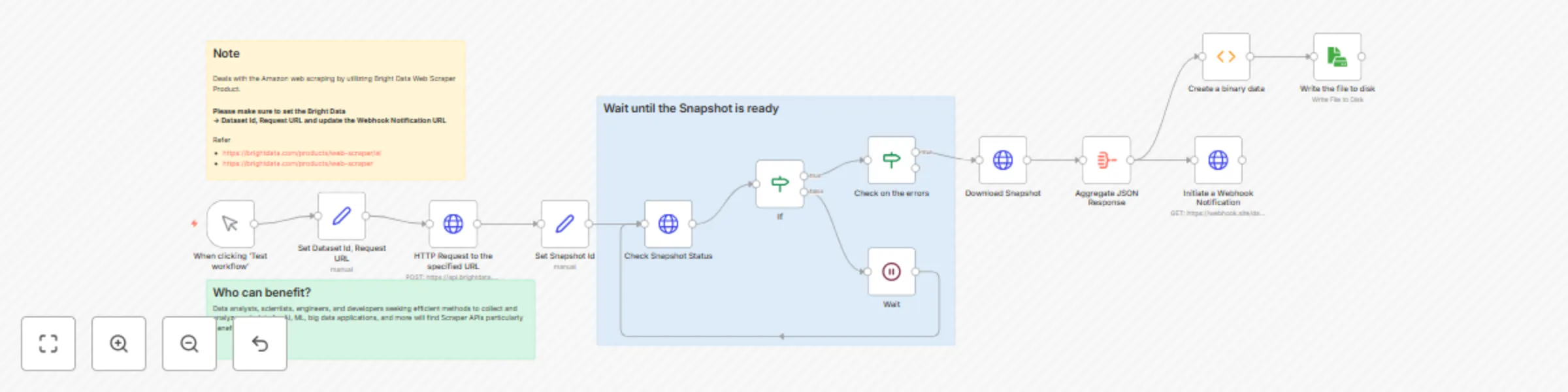
Set Bright Data Dataset ID & Request URL: Takes in the Dataset ID and Bright Data API endpoint used to trigger the scrape job
HTTP Request: Sends an authenticated request to the Bright Data API to start a scraping snapshot job
Wait Until Snapshot is Ready: Implements a loop or wait mechanism that checks snapshot status (e.g., polling every 30 seconds) until completion i.e ready state
Download Snapshot: Downloads the structured dataset snapshot once ready
Persist Response to Disk: Saves the dataset to disk for archival, review, or local processing
Webhook Notification: Sends the final result or a summary of it to an external webhook
Polling Strategy : Adjust polling interval (e.g., every 15–60 seconds) based on snapshot complexity
Input Flexibility : Accept datasetId and request URL dynamically from a webhook trigger or input form
Webhook Output : Send notifications to -
Internal APIs – for use in dashboards
Zapier/Make – for multi-step automation
Persistence
Save output to:
This catalog entry is organized from the workflow JSON. The node-level section below shows the executable blocks available for review before importing the template.
| Workflow | Asynchronous bulk web scraping with Bright Data & webhook notifications |
|---|---|
| Complexity | advanced |
| Nodes | 16 |
| Categories | Market Research |
| Author | Ranjan Dailata |
| Published | 04 May 2025 |
Use the JSON export at /data/workflows/3866/3866.json as the source template for this automation.
Open n8n, import the downloaded JSON, and review each node before activating the workflow.
Replace placeholder credentials, API keys, webhook URLs, account IDs, and environment-specific values with your own settings.
Run the workflow manually or in a staging workspace, inspect node output, and confirm downstream systems receive the expected data.
Enable the workflow only after testing, then monitor executions, errors, and rate limits during the first production runs.
Review imported nodes carefully before activation. This catalog entry is intended to help you inspect the workflow structure, understand required services, and find related templates faster.
Node names, credentials, schedules, webhook paths, and external service limits may need adjustment for your workspace.
Who this is for The Async Structured Bulk Data Extract with Bright Data Web Scraper workflow is designed for data engineers, market researchers, competitive intelligence teams, and automation devel...
Review the workflow JSON, configure any required credentials in n8n, and test the automation in a safe workspace before using it in production.
Yes. Use the block-by-block analysis and the downloadable JSON to inspect each node, then adjust credentials, prompts, schedules, filters, or destinations for your Market Research use case.