Arxiv paper summarization with ChatGPT

Workflow preview

Workflow preview
100%
Arxiv paper summarization with ChatGPT preview
Open on n8n.io

Important notice

This workflow is provided as-is. Please review and test before using in production.

1. Workflow Overview

Webhook Paper Summarization Who is this for? This workflow is designed for researchers, students, and professionals who frequently read academic papers and need concise summaries. It is useful fo...

Best for

  • Document Extraction automation workflows
  • AI Summarization automation workflows
  • intermediate n8n builders looking for reusable templates

Tools used

@n8n/n8n-nodes-langchain.chainsummarization, @n8n/n8n-nodes-langchain.lmchatopenai, n8n-nodes-base.httprequest, n8n-nodes-base.html, n8n-nodes-base.splitout, n8n-nodes-base.set, n8n-nodes-base.aggregate, @n8n/n8n-nodes-langchain.openai

Source and attribution

This workflow is cataloged by N8N Workflows and links back to its original n8n.io source page by Teddy.

Original n8n.io source

1.1 Workflow description

Title
Arxiv paper summarization with ChatGPT
Workflow name
Arxiv paper summarization with ChatGPT

Webhook | Paper Summarization

Who is this for?

This workflow is designed for researchers, students, and professionals who frequently read academic papers and need concise summaries. It is useful for anyone who wants to quickly extract key information from research papers hosted on arXiv.

What problem is this workflow solving?

Academic papers are often lengthy and complex, making it time-consuming to extract essential insights. This workflow automates the process of retrieving, processing, and summarizing research papers, allowing users to focus on key findings without manually reading the entire paper.

What this workflow does

This workflow extracts the content of an arXiv research paper, processes its abstract and main sections, and generates a structured summary. It provides a well-organized output containing the Abstract Overview, Introduction, Results, and Conclusion, ensuring that users receive critical information in a concise format.

Setup

  1. Ensure you have n8n installed and configured.
  2. Import this workflow into your n8n instance.
  3. Configure an external trigger using the Webhook node to accept paper IDs.
  4. Test the workflow by providing an arXiv paper ID.
  5. (Optional) Modify the summarization model or output format according to your preferences.

How to customize this workflow to your needs

  • Adjust the HTTPRequest node to fetch papers from other sources beyond arXiv.
  • Modify the Summarization Chain node to refine the summary output.
  • Enhance the Reorganize Paper Summary step by integrating additional language models.
  • Add an email or Slack notification step to receive summaries directly.

Workflow Steps

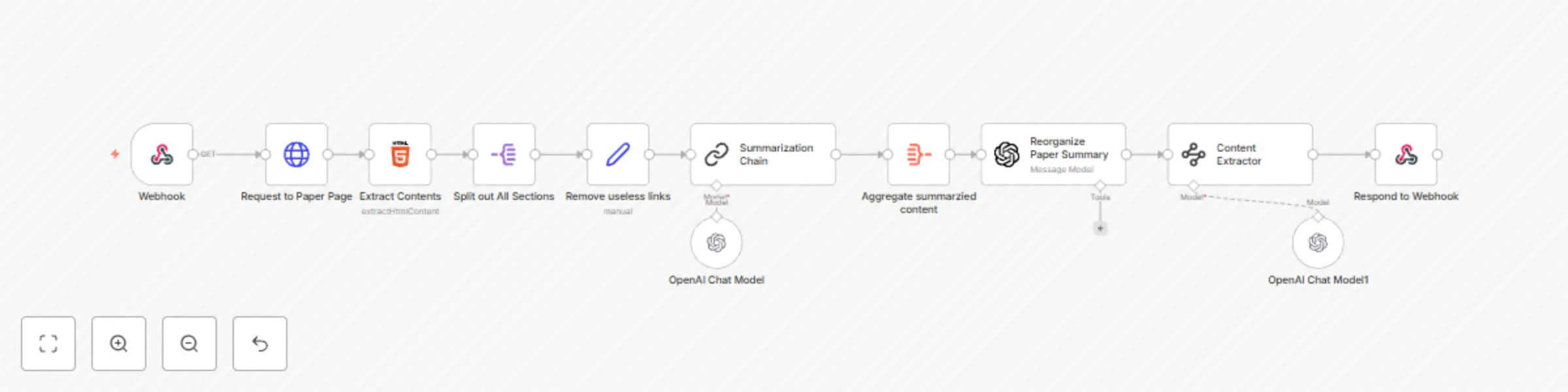
  1. Webhook receives a request with an arXiv paper ID.
  2. Send an HTTP request using "Request to Paper Page" to fetch the HTML content of the paper.
  3. Extract the abstract and sections using "Extract Contents".
  4. Split out all sections using "Split out All Sections" to process individual paragraphs.
  5. Clean up text using "Remove useless links" to remove unnecessary elements.
  6. Summarize extracted content using "Summarization Chain".
  7. Aggregate summarized content using "Aggregate summarized content".
  8. Reorganize the paper summary into structured sections using "Reorganize Paper Summary".
  9. Extract key information using "Content Extractor" to classify data into Abstract Overview, Introduction, Results, and Conclusion.
  10. Respond to the webhook with the structured summary.

Note: This workflow is designed for use with arXiv research papers but can be adapted to process papers from other sources.

1.2 Logical Blocks

This catalog entry is organized from the workflow JSON. The node-level section below shows the executable blocks available for review before importing the template.

2. Block-by-Block Analysis

Block 1 - Summarization Chain

Type / Role
@n8n/n8n-nodes-langchain.chainSummarization - chainSummarization
Config choices
Version 2

Block 2 - OpenAI Chat Model

Type / Role
@n8n/n8n-nodes-langchain.lmChatOpenAi - lmChatOpenAi
Config choices
Version 1

Block 3 - Request to Paper Page

Type / Role
n8n-nodes-base.httpRequest - httpRequest
Config choices
Version 4.2

Block 4 - Extract Contents

Type / Role
n8n-nodes-base.html - html
Config choices
Version 1.2

Block 5 - Split out All Sections

Type / Role
n8n-nodes-base.splitOut - splitOut
Config choices
Version 1

Block 6 - Remove useless links

Type / Role
n8n-nodes-base.set - set
Config choices
Version 3.4

Block 7 - Aggregate summarzied content

Type / Role
n8n-nodes-base.aggregate - aggregate
Config choices
Version 1

Block 8 - Reorganize Paper Summary

Type / Role
@n8n/n8n-nodes-langchain.openAi - openAi
Config choices
Version 1.7

Block 9 - Content Extractor

Type / Role
@n8n/n8n-nodes-langchain.informationExtractor - informationExtractor
Config choices
Version 1

Block 10 - OpenAI Chat Model1

Type / Role
@n8n/n8n-nodes-langchain.lmChatOpenAi - lmChatOpenAi
Config choices
Version 1

Block 11 - Webhook

Type / Role
n8n-nodes-base.webhook - webhook
Config choices
Version 2

Block 12 - Respond to Webhook

Type / Role
n8n-nodes-base.respondToWebhook - respondToWebhook
Config choices
Version 1.1

3. Summary Table

Workflow Arxiv paper summarization with ChatGPT
Complexity intermediate
Nodes 12
Categories Document Extraction, AI Summarization
Author Teddy
Published 14 Feb 2025

4. Reproducing the Workflow from Scratch

  1. 1. Download the workflow JSON

    Use the JSON export at /data/workflows/2904/2904.json as the source template for this automation.

  2. 2. Import the template into n8n

    Open n8n, import the downloaded JSON, and review each node before activating the workflow.

  3. 3. Configure credentials and variables

    Replace placeholder credentials, API keys, webhook URLs, account IDs, and environment-specific values with your own settings.

  4. 4. Test with sample data

    Run the workflow manually or in a staging workspace, inspect node output, and confirm downstream systems receive the expected data.

  5. 5. Activate and monitor

    Enable the workflow only after testing, then monitor executions, errors, and rate limits during the first production runs.

5. General Notes & Resources

Review imported nodes carefully before activation. This catalog entry is intended to help you inspect the workflow structure, understand required services, and find related templates faster.

Node names, credentials, schedules, webhook paths, and external service limits may need adjustment for your workspace.

Frequently asked questions

What does Arxiv paper summarization with ChatGPT do?

Webhook Paper Summarization Who is this for? This workflow is designed for researchers, students, and professionals who frequently read academic papers and need concise summaries. It is useful fo...

What do I need before importing this workflow?

Review the workflow JSON, configure any required credentials in n8n, and test the automation in a safe workspace before using it in production.

Can I customize this workflow?

Yes. Use the block-by-block analysis and the downloadable JSON to inspect each node, then adjust credentials, prompts, schedules, filters, or destinations for your Document Extraction, AI Summarization use case.