Teddy
Workflows by Teddy
Arxiv paper summarization with ChatGPT
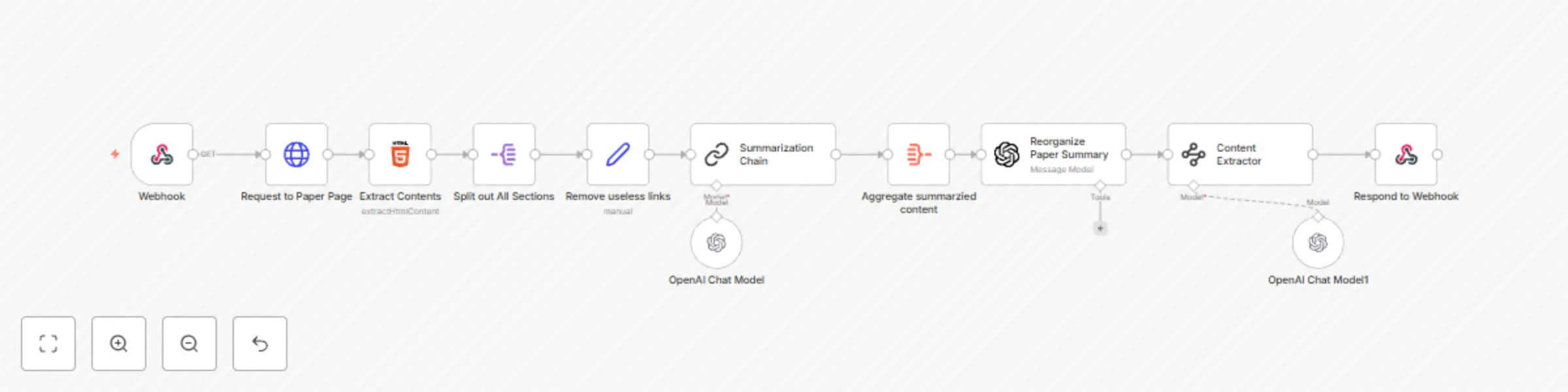
# Webhook | Paper Summarization ## Who is this for? This workflow is designed for researchers, students, and professionals who frequently read academic papers and need concise summaries. It is useful for anyone who wants to quickly extract key information from research papers hosted on arXiv. ## What problem is this workflow solving? Academic papers are often lengthy and complex, making it time-consuming to extract essential insights. This workflow automates the process of retrieving, processing, and summarizing research papers, allowing users to focus on key findings without manually reading the entire paper. ## What this workflow does This workflow extracts the content of an arXiv research paper, processes its abstract and main sections, and generates a structured summary. It provides a well-organized output containing the **Abstract Overview, Introduction, Results, and Conclusion**, ensuring that users receive critical information in a concise format. ## Setup 1. Ensure you have **n8n** installed and configured. 2. Import this workflow into your n8n instance. 3. Configure an external trigger using the **Webhook** node to accept paper IDs. 4. Test the workflow by providing an arXiv paper ID. 5. (Optional) Modify the summarization model or output format according to your preferences. ## How to customize this workflow to your needs - Adjust the **HTTPRequest** node to fetch papers from other sources beyond arXiv. - Modify the **Summarization Chain** node to refine the summary output. - Enhance the **Reorganize Paper Summary** step by integrating additional language models. - Add an **email or Slack notification** step to receive summaries directly. ## Workflow Steps 1. **Webhook** receives a request with an arXiv paper ID. 2. **Send an HTTP request** using **"Request to Paper Page"** to fetch the HTML content of the paper. 3. **Extract the abstract and sections** using **"Extract Contents"**. 4. **Split out all sections** using **"Split out All Sections"** to process individual paragraphs. 5. **Clean up text** using **"Remove useless links"** to remove unnecessary elements. 6. **Summarize extracted content** using **"Summarization Chain"**. 7. **Aggregate summarized content** using **"Aggregate summarized content"**. 8. **Reorganize the paper summary** into structured sections using **"Reorganize Paper Summary"**. 9. **Extract key information** using **"Content Extractor"** to classify data into **Abstract Overview, Introduction, Results, and Conclusion**. 10. **Respond to the webhook** with the structured summary. --- **Note:** This workflow is designed for use with **arXiv** research papers but can be adapted to process papers from other sources.
Scrape latest Github trending repositories
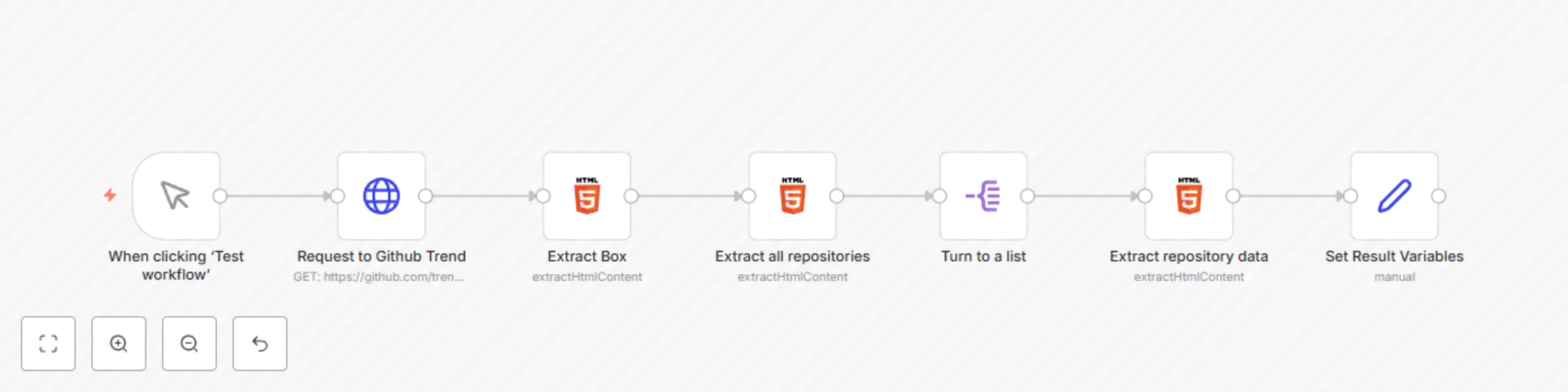
# Scrape Latest 20 TechCrunch Articles ## Who is this for? This workflow is designed for developers, researchers, and data analysts who need to track the latest trending repositories on GitHub. It is useful for anyone who wants to stay updated on popular open-source projects without manually browsing GitHub’s trending page. ## What problem is this workflow solving? Manually checking GitHub’s trending repositories daily can be time-consuming and inefficient. This workflow automates the extraction of trending repositories, providing structured data including repository name, author, description, programming language, and direct repository links. ## What this workflow does This workflow scrapes the trending repositories from GitHub’s trending page and extracts essential metadata such as repository names, languages, descriptions, and URLs. It processes the extracted data and structures it into an easy-to-use format. ## Setup 1. Ensure you have n8n installed and configured. 2. Import this workflow into your n8n instance. 3. Run the workflow manually or schedule it to execute at regular intervals. 4. (Optional) Customize the extracted data or integrate it with other systems. ## How to customize this workflow to your needs - Modify the HTTP request node to target different GitHub trending categories (e.g., specific programming languages). - Add further processing steps such as filtering repositories by stars, forks, or specific keywords. - Integrate this workflow with Slack, email, or a database to store or notify about trending repositories. ## Workflow Steps 1. **Trigger execution manually** using the **"When clicking ‘Test workflow’"** node. 2. **Send an HTTP request** to fetch GitHub’s trending page using **"Request to Github Trend"**. 3. **Extract the trending repositories box** from the HTML response using **"Extract Box"**. 4. **Extract all repository data** including names, authors, descriptions, and languages using **"Extract all repositories"**. 5. **Convert extracted data into a structured list** for easier processing using **"Turn to a list"**. 6. **Extract detailed repository information** using **"Extract repository data"**. 7. **Format and set variables** to ensure clean and structured data output using **"Set Result Variables"**. --- **Note:** Since GitHub’s trending page updates dynamically, ensure you run this workflow periodically to capture the latest trends.
Scrape latest 20 TechCrunch articles
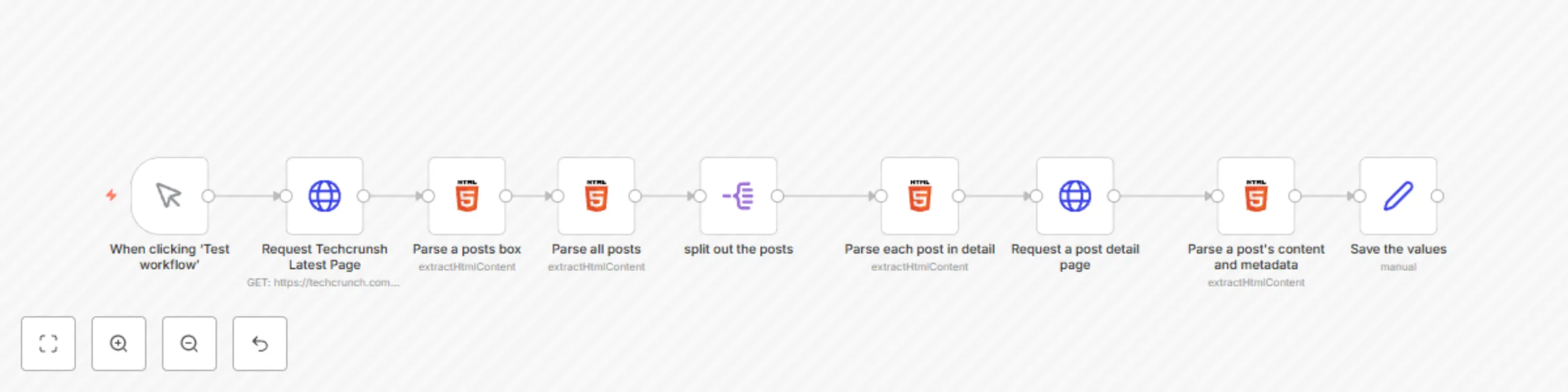
# Retrieve 20 Latest TechCrunch Articles ## Who is this for? This workflow is designed for developers, content creators, and data analysts who need to scrape recent articles from TechCrunch. It’s perfect for anyone looking to aggregate news articles or create custom feeds for analysis, reporting, or integration into other systems. ## What problem is this workflow solving? This workflow automates the process of scraping recent articles from TechCrunch. Manually collecting article data can be time-consuming and inefficient, but with this workflow, you can quickly gather up-to-date news articles with relevant metadata, saving time and effort. ## What this workflow does This workflow retrieves the latest 20 news articles from TechCrunch’s “Recent” page. It extracts the article URLs, metadata (such as titles and publication dates), and main content for each article, allowing you to access the information you need without any manual effort. ## Setup 1. Clone or download the workflow template. 2. Ensure you have a working n8n environment. 3. Configure the HTTP Request nodes with your desired parameters to connect to the TechCrunch API. 4. (Optional) Customize the workflow to target specific sections or topics of interest. 5. Run the workflow to retrieve the latest 20 articles. ## How to customize this workflow to your needs - Modify the HTTP request to pull articles from different pages or sections of TechCrunch. - Adjust the number of articles to retrieve by changing the selection criteria. - Add additional processing steps to further filter or analyze the article data. ## Workflow Steps 1. **Send an HTTP request** to the TechCrunch "Recent" page. 2. **Parse a posts box** that holds the list of articles. 3. **Parse all posts** to extract all articles. 4. **spilt out posts** for each article. 5. **Extract the URL and metadata** from each article. 6. **Send an HTTP request** for each article using its URL. 7. **Locate and parse** the main content of each article. --- **Note:** Be sure to update the HTTP Request nodes with any necessary headers or authentication to work with TechCrunch’s website.